25ENGLISH
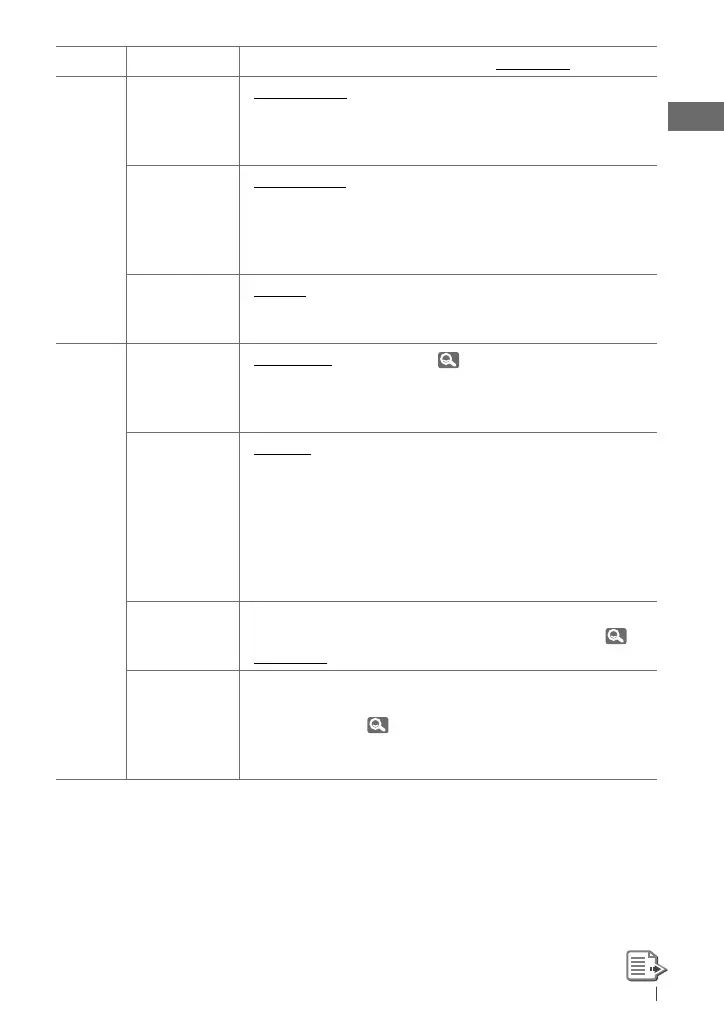
Category
Menu item Selectable setting, [Initial: Underlined]
DISPLAY
DIMMER •
DIMMER AUTO
• DIMMER ON
• DIMMER OFF
: Dims the display when you turn on the
headlights. *
3
: Dims the display and button illumination.
: Cancels.
SCROLL *
4
• SCROLL ONCE
• SCROLL AUTO
• SCROLL OFF
: Scrolls the displayed information once.
: Repeats scrolling (at 5-second intervals).
: Cancels.
Pressing
DISP
for more than one second can scroll the display
regardless of the setting.
TAG DISPLAY • TAG ON
• TAG OFF
: Shows the Tag information while playing MP3/
WMA tracks.
: Cancels.
TUNER
SSM*
5
Strong-station
Sequential
Memory
• SSM 01 – 06 *
6
• SSM 07 – 12
• SSM 13 – 18
: For settings,
7.
AREA
Tuner channel
interval
• AREA US
• AREA EU
• AREA SA
: When using in North/Central/South America.
AM/FM intervals are set to 10 kHz/200 kHz.
: When using in any other areas. AM/FM intervals
are set to 9 kHz/50 kHz (100 kHz during auto
search).
: When using in South American countries
where FM interval is 100 kHz. AM interval is set
to 10 kHz.
MONO *
5
Monaural mode
• MONO ON
• MONO OFF
: Activate monaural mode to improve FM
reception, but stereo effect will be lost. ( 7)
: Restore the stereo effect.
SID *
7
SIRIUS ID
— : Your SIRIUS identification number scrolls on the
display 5 seconds after “SID” is selected.
( 19)
If no operation is done for about 60 seconds,
the unit returns to playback mode.
*
3
The illumination control lead connection is required. (See “Installation/Connection Manual.”) This
setting may not work correctly on some vehicles (particularly on those having a control dial for
dimming). In this case, change the setting to any other than <DIMMER AUTO>.
*
4
Some characters or symbols will not be shown correctly (or will be blanked) on the display.
*
5
Displayed only when the source is “FM” or “HD Radio.”
*
6
If an HD Radio tuner box is connected, you can also search and store the AM stations to
<SSM 01 – 06>.
*
7
Displayed only when SIRIUS Satellite radio is connected.
EN24-33_KD-S37[J]_1.indd 25EN24-33_KD-S37[J]_1.indd 25 5/19/10 10:36:39 AM5/19/10 10:36:39 AM


 To Next Page