13
1
2
4
3
5
6
7
8
9
0
!
@
#
$
%
^
&
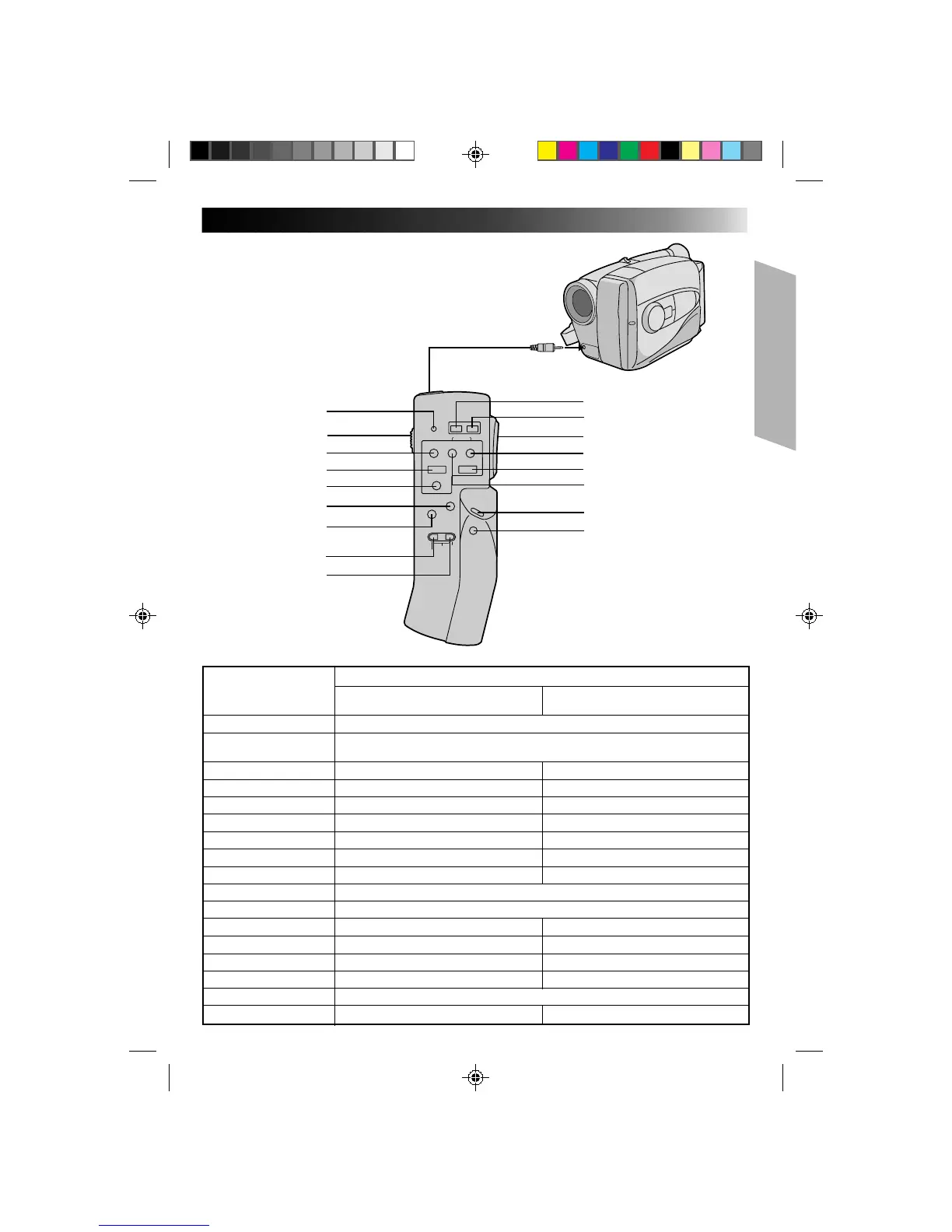
RM-V20U Remote Control Unit
The RM-V20U (optional) permits VCR functions to
be controlled from a distance. When using the
RM-V20U, connect its cable to the camcorder’s
REMOTE jack.
* Before use, refer to the RM-V20U instruction
booklet.
To REMOTE
Buttons
Functions
With the camcorder’s power switch With the camcorder’s power switch set
set to “CAMERA”. to “PLAY”.
1 LED indicator Lights when a signal is transmitted.
2 KEY-LOCK switch
Switching to “;” turns off the remote control unit’s power. Decreases battery power
consumption, and prevents accidental operation by young children, etc.
3 REC ——
4STOP — Stop (Z P. 30)
5 PAUSE/MONITOR — Pause (Z P. 31)
6 AUDIO DUB — Audio Dubbing (Z P. 37)
7 INSERT — Insert Editing (Z P. 36)
8 REC TIME Animation/Time-Lapse (Z P. 27) —
9 INTERVAL Self-Timer (Z P. 26)/Time-Lapse (Z P. 27) —
0 POWER OFF Power off
! POWER ON Power on
@ ZOOM (T/W) Slow-speed zoom (Z P. 15) —
# FF/RETAKE Retake (Forward) (Z P. 15) FF/FF Shuttle Search (Z P. 30)
$ PLAY — Playback start (Z P. 30)
% REW/RETAKE Retake (Rewind) (Z P. 15) Rew/Rew Shuttle Search (Z P. 30)
^ START/STOP Functions same as the Recording/Stop button of a camcorder.
& VISS Index Code Marking (Z P. 15) —


 To Next Page