36 EN
S ET
AT
VOLUNE
TAPE END
M 1
:
23
:
45
SP
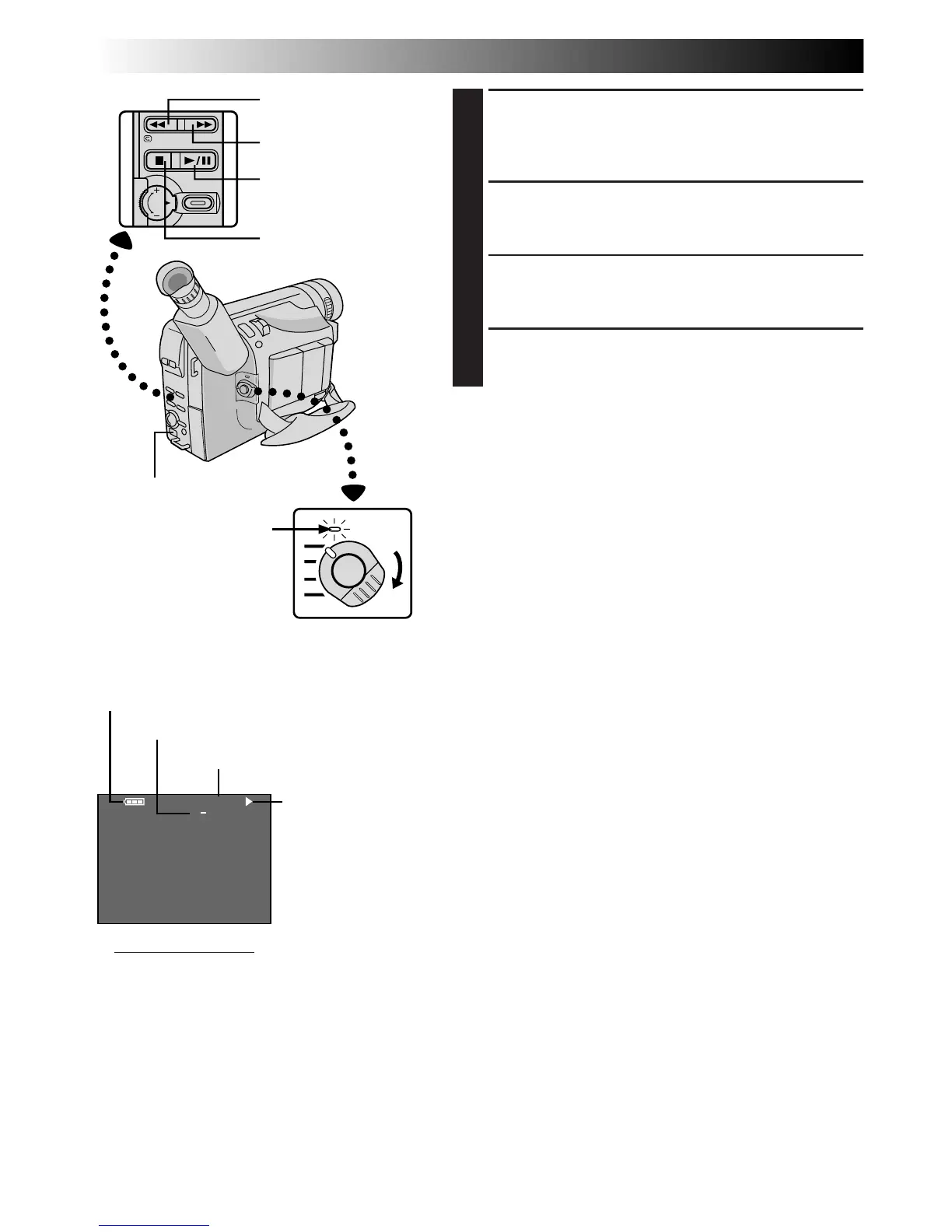
PLAYBACK
Basic Playback
1
LOAD A CASSETTE
Slide EJECT to open the cassette holder, then insert
the cassette with the label facing out. Press PUSH to
ensure the holder is closed and locked.
2
SELECT MODE
Set the Power Switch to “PLAY”. The power lamp
lights.
3
PLAY BACK
Press PLAY/PAUSE (
4
/6). The playback picture
appears.
4
STOP PLAYBACK
Press STOP (5).
Rewind or Fast-Forward the tape
Press REW (
2
) to rewind, or FF (
3
) to fast-forward the
tape during Stop mode.
NOTES:
●
The camcorder shuts off automatically after about 5
minutes in Stop mode. To turn on again, set the Power
Switch to “POWER OFF”, then to “PLAY”.
●
During Stop, Fast-Forward or Rewind mode, none of the
indications are displayed in the viewfinder.
●
If a blank portion on the tape is played back, the screen
may become black. This is not a malfunction.
Power Switch
Power lamp
REW (
2
) Button
FF (
3
) Button
PLAY/PAUSE (
4
/6)
Button
STOP (5) Button
Tape running
indicator
4
:Playback
3
:Fast-Forward/
Forward Search
2
:Rewind/Reverse
Search
6 :Still Playback
Recording mode indicator
Tape counter
Battery pack remaining power indicator
Viewfinder indications
EJECT Switch


 To Next Page