40
A
B
C
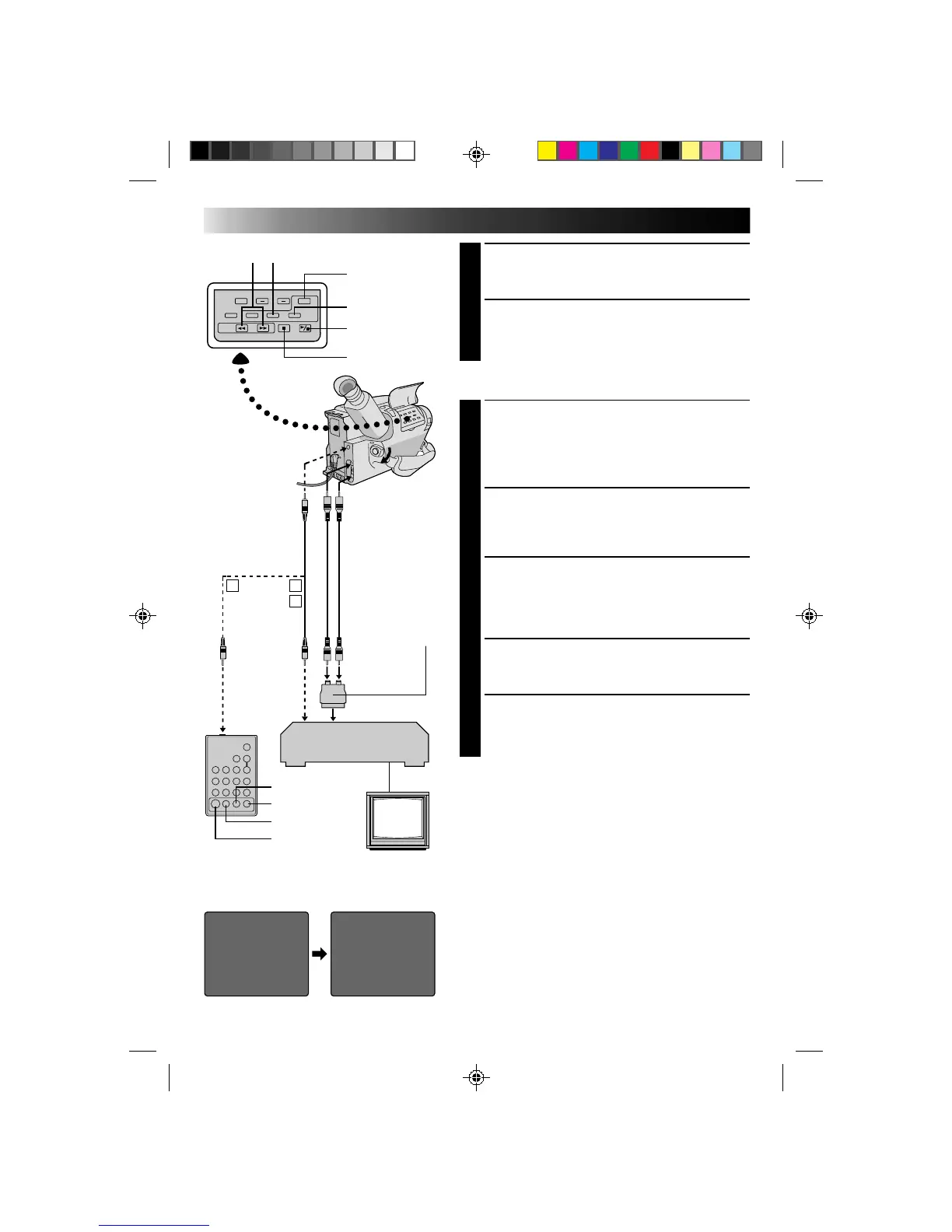
IN OUT
ç 1 0:00:25 --: -- : --
2
3
4
5
6
7
8
COUNTER 0:00:25
TOTAL 0:00:00
IN OUT
ç 1 0:00:25 0:01:05
2 0:03:18 0:03:31
3 0:02:33 0:02:53
4 0:04:11 --:-- : --
5
6
7
8
COUNTER 0:04:11
TOTAL 0:01:13
EDITING (cont.)
PREPARE CAMCORDER
2
Insert a recorded tape and set the Power switch to
“PLAY”.
PREPARE VCR
3
Turn the power on, insert a recordable tape and
engage the AUX mode (refer to VCR’s instructions).
SELECT SCENES
ACCESS R.A. EDIT COUNTER
DISPLAY
1
Press PLAY/PAUSE, then press R.A. EDIT and the
counter display appears in the viewfinder and the
screen of the connected TV.
REGISTER BEGINNING OF SCENE
2
Press REW or FF to locate the beginning of a scene
you want, then press IN/OUT to register that point.
The data appears under IN on the display.
REGISTER END OF SCENE
3
Press REW or FF to locate the end of the scene and
press IN/OUT to register it. The data appears under
OUT on the display. The total time of the registered
scene(s) is displayed at the bottom of the screen.
REGISTER ADDITIONAL SCENES
4
Repeat steps 2 and 3 for each additional scene
(as many as 8).
MAKE CORRECTIONS
5
Press CANCEL during steps 2 and 3 to erase the
most recently registered point.
NOTES:
●
The RM-V704U can be used to operate other camcorder
functions as well. Point the RM-V704U at the camcorder’s
remote sensor and press any of the following buttons
(function apears in parentheses):
— ON/OFF (camcorder R.A. EDIT)
— IN/OUT (camcorder IN/OUT)
— CANCEL (camcorder CANCEL)
●
There must be at least one second between an in-point and
its corresponding out-point.
●
To ensure correct operation, leave at least 15 seconds open
between scenes.
●
Blank portions of tape cannot be registered as in-points or
out-points.
●
If it takes more than 5 minutes to search for an in-point, the
VCR’s Record-Pause mode is cancelled and editing doesn’t
take place.
●
Pressing R.A.EDIT clears all in- and out-points from
memory.
●
Leave a small margin for error around each in-point to
ensure the scene is recorded in its entirety.
IN/OUT
PLAY/PAUSE
R.A. EDIT
CANCELREW/FF
To AUDIO and
VIDEO out
connectors
To JLIP
To Remote
PAUSE
To Pause-In
STOP
Editing cable
(provided)
If your TV/VCR
has the SCART
connector, use
the provided
cable adapter.
Audio and Video
cable (optional)
To AUDIO IN
To VIDEO IN
VCR (Recording deck)
ON/OFF
VCR REC STBY
CANCEL
IN/OUT
RM-V704U
(provided with GR-AX760,
optional for GR-AX660)



 To Next Page