GETTINGSTARTED
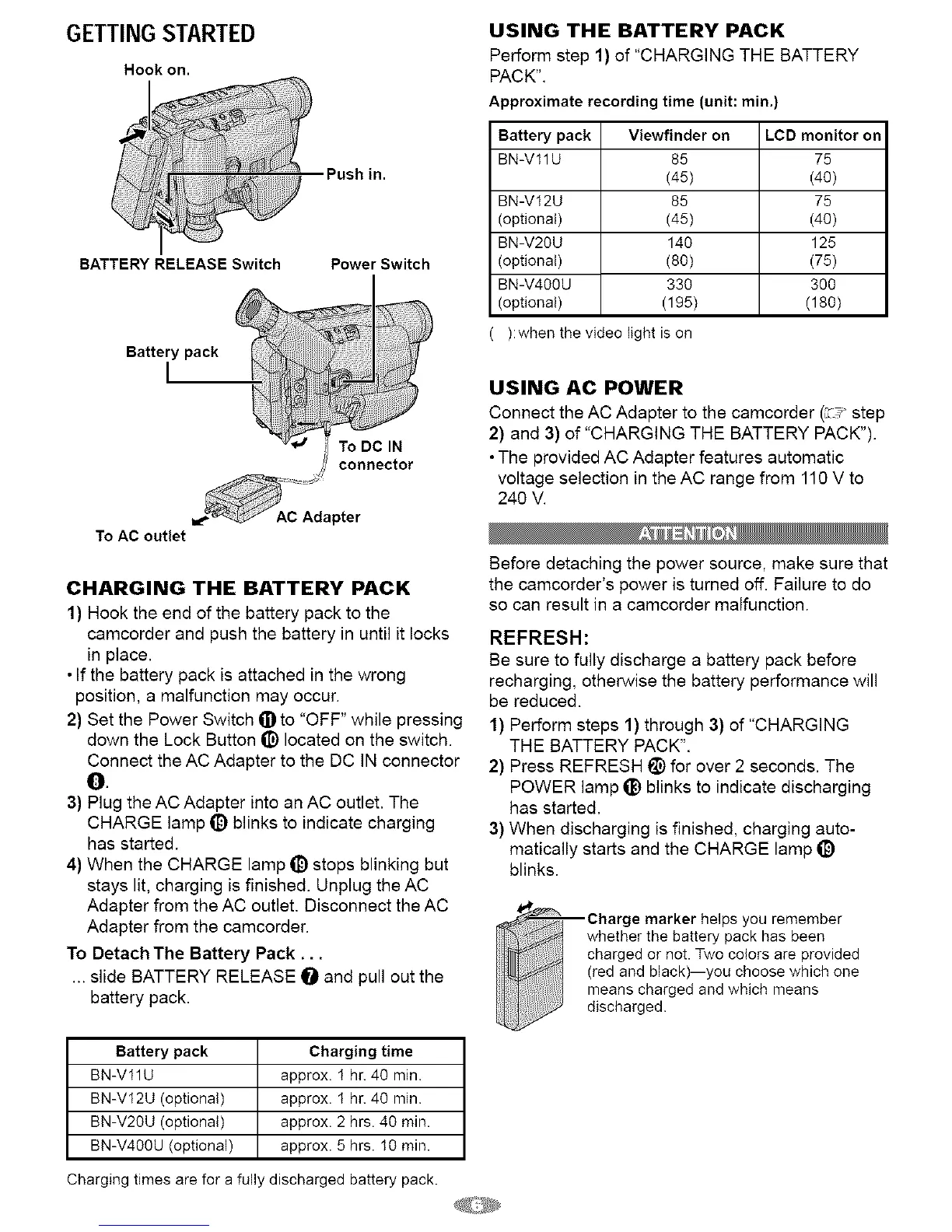
Hook on.
Push in.
BATTERY RELEASE Switch Power Switch
Battery pack
To DC IN
connector
To AC outlet
AC Adapter
CHARGING THE BATTERY PACK
1) Hook the end of the battery pack to the
camcorder and push the battery in until it locks
in place.
• If the battery pack is attached in the wrong
position, a malfunction may occur.
2) Set the Power Switch _])to "OFF" while pressing
down the Lock Button t_) located on the switch.
Connect the AC Adapter to the DC IN connector
O
3) Plug the AC Adapter into an AC outlet. The
CHARGE lamp _) blinks to indicate charging
has started.
4) When the CHARGE lamp _) stops blinking but
stays lit, charging is finished. Unplug the AC
Adapter from the AC outlet. Disconnect the AC
Adapter from the camcorder.
To Detach The Battery Pack ...
... slide BATTERY RELEASE O and pull out the
battery pack.
Battery pack Charging time
BN-V11U approx. I hr. 40 min.
BN-VI2U (optional) approx. I hr. 40 min.
BN-V20U (optional) approx. 2 hrs. 40 min.
BN-V40OU (optional) approx. 5 hrs. I0 min.
Charging times are for a fully discharged battery pack.
USING THE BATTERY PACK
Perform step 1) of "CHARGING THE BATTERY
PACK".
Approximate recording time (unit: rain.)
Battery pack Viewfinder on LCD monitor on
BN-V11U 85 75
(45) (40)
BN-V12U 85 75
(optional) (45) (40)
BN-V20U 140 125
(optional) (80) (75)
BN-V400U 330 300
(optional) (195) (180)
):when the video light is on
USING AC POWER
Connect the AC Adapter to the camcorder (_, step
2) and 3) of "CHARGING THE BATTERY PACK").
• The provided AC Adapter features automatic
voltage selection in the AC range from 110 V to
240 V.
Before detaching the power source, make sure that
the camcorder's power is turned off. Failure to do
so can result in a camcorder malfunction.
REFRESH:
Be sure to fully discharge a battery pack before
recharging, otherwise the battery performance will
be reduced.
1} Perform steps 1) through 3} of "CHARGING
THE BATTERY PACK".
2} Press REFRESH !_) for over 2 seconds. The
POWER lamp ti_ blinks to indicate discharging
has started.
3} When discharging is finished, charging auto-
matically starts and the CHARGE lamp _)
blinks.
Charge marker helps you remember
whether the battery pack has been
charged or not. Two colors are provided
(red and black)--you choose which one
means charged and which means
discharged.


 To Next Page