EN 35
MasterPage: Start_Right
ADVANCED FEATURES
EDITING
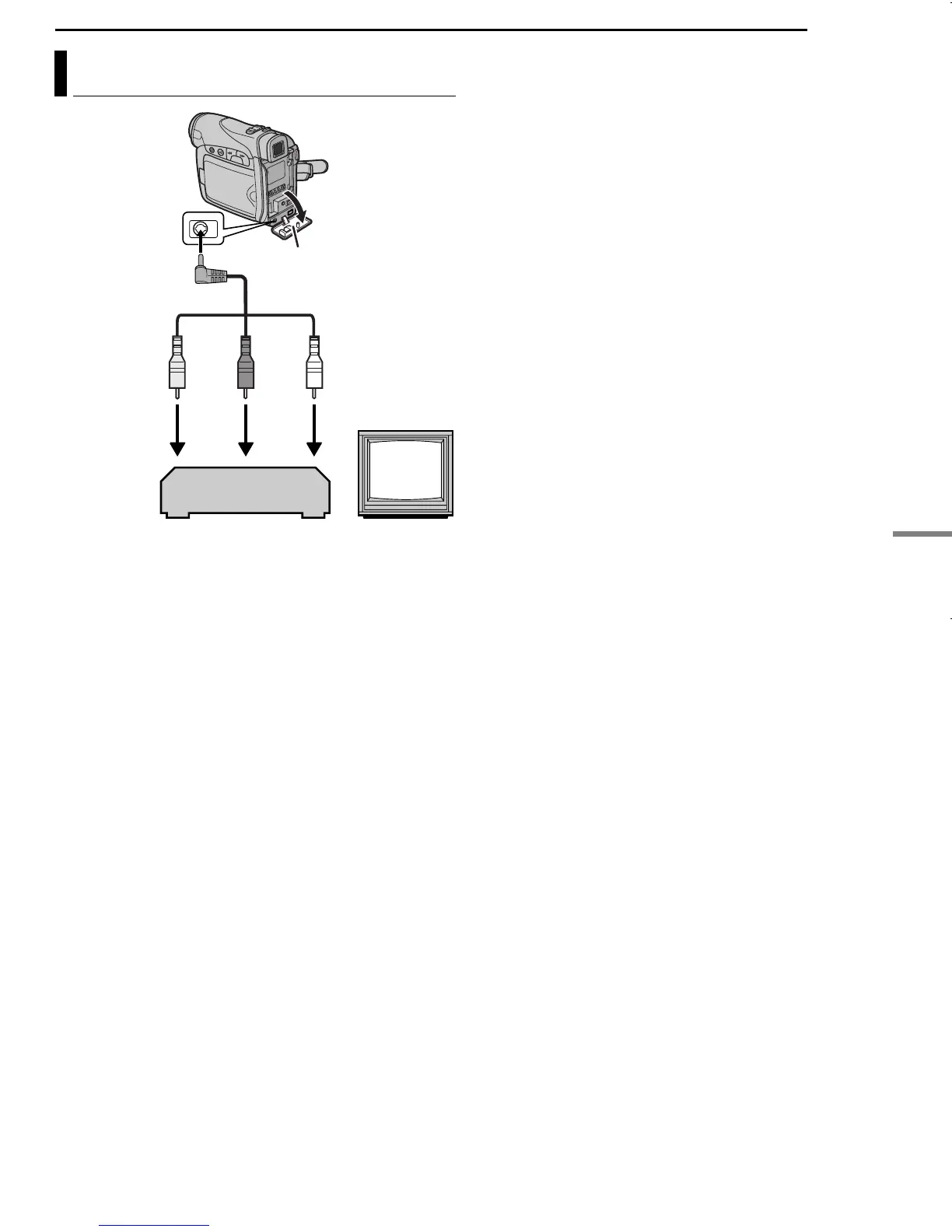
A Yellow to VIDEO IN
B Red to AUDIO R IN
C White to AUDIO L IN
1 Following the illustrations, connect the
camcorder and the VCR’s input connectors.
2 Start playback on the camcorder. (墌 pg. 20)
3 At the point you want to start dubbing, start
recording on the VCR. (Refer to the VCR’s
instruction manual.)
4 To stop dubbing, stop recording on the VCR,
then stop playback on the camcorder.
NOTES:
● It is recommended to use the AC Adapter as
the power supply instead of the battery pack.
(墌 pg. 13)
● To choose whether or not the following displays
appear on the connected TV
• Date/time
Set “DATE/TIME” to “AUTO”, “ON” or “OFF”.
(墌 pg. 22, 27)
• Time code
Set “TIME CODE” to “OFF” or “ON”.
(墌 pg. 22, 27)
• Indications other than date/time and time code
Set “ON SCREEN” to “OFF”, “LCD” or “LCD/
TV”. (墌 pg. 22, 27)
Dubbing To A VCR
213
TV
VCR
Open the cover.
Audio/Video
cable
(provided)
To AV connector
GR-D250US.book Page 35 Wednesday, November 24, 2004 6:13 PM


 To Next Page