MasterPage: Heading0_Left
32 EN
EDITING
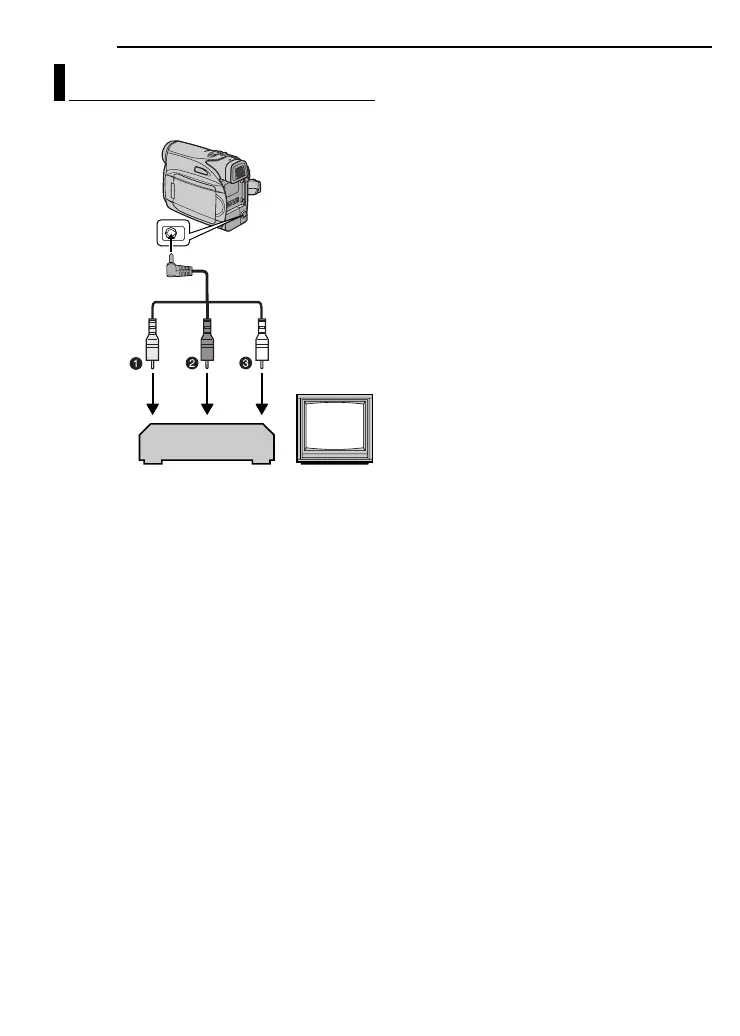
1Yellow to VIDEO IN
2Red to AUDIO R IN
3White to AUDIO L IN
1 Following the illustrations, connect the
camcorder and the VCR’s input connectors.
2 Start playback on the camcorder. ( pg. 20)
3 At the point you want to start dubbing, start
recording on the VCR. (Refer to the VCR’s
instruction manual.)
4 To stop dubbing, stop recording on the VCR,
then stop playback on the camcorder.
NOTES:
÷÷
÷÷
It is recommended to use the AC Adapter as
the power supply instead of the battery pack.
( pg. 13)
● To choose whether or not the following displays
appear on the connected TV
● Date/time
Set “DATE/TIME” to “ON” or “OFF”.
( pg. 22, 25)
● Time code
Set “TIME CODE” to “OFF” or “ON”.
( pg. 22, 25)
● Indications other than date/time and time code
Set “ON SCREEN” to “OFF”, “LCD” or “LCD/
TV”. ( pg. 22, 25)
Dubbing To A VCR
TV
VCR
Audio/Video
cable
(provided)
To AV connector
GR-D347US_EN.book Page 32 Wednesday, July 12, 2006 3:51 PM


 To Next Page