ADDITIONAL FEATURES FOR D.S.C.
30 EN
MasterPage: Left
To Print By Selecting Still Images And
Number Of Prints
1 Perform steps 1 – 3
in “To Print All Still
Images (One Print For
Each)” ( pg. 29).
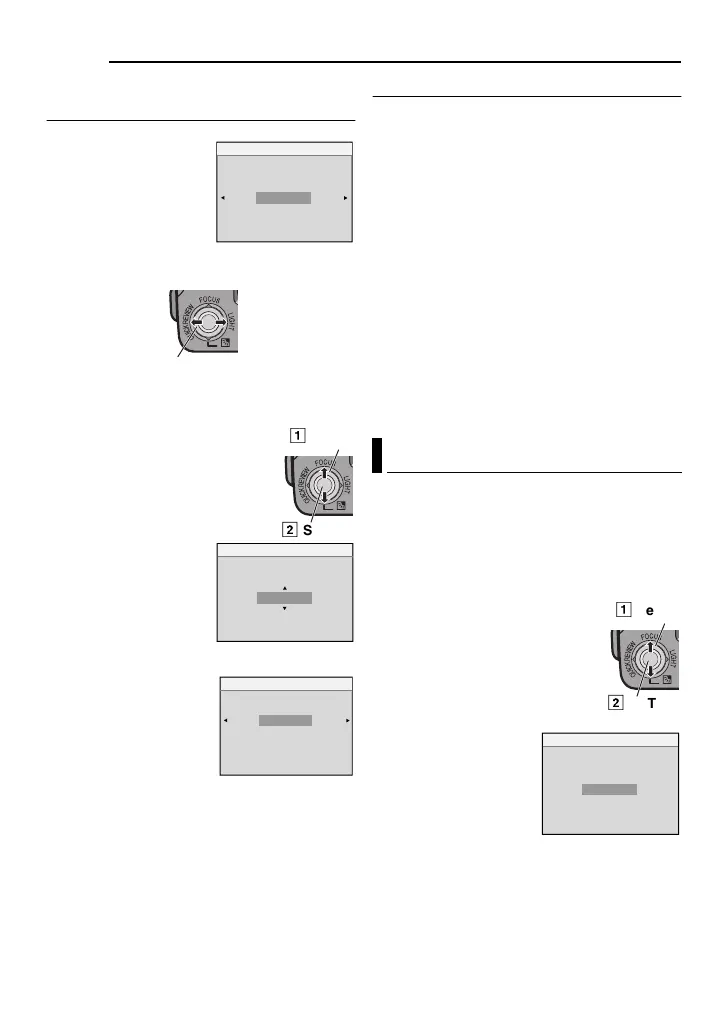
2 Select “CURRENT”,
press SET or
2. The
DPOF screen appears.
3 Press 1 or 2 to select the desired file.
4 Press 4 or 3 to select the number
indication (00), and press SET.
5 Select the number of prints
by pressing
3 to increase the
number, or
4 to decrease the
number, and press SET.
● Repeat steps 3 through
5 for the desired number
of prints.
● The number of prints can
be set up to 15.
● To correct the number of
prints, select the image
again and change the number.
6 Select “RETURN”,
press SET. The “SAVE?”
appears.
● If you did not change any
settings in step
3
through
5, the DPOF
Menu reappears.
7 Select “EXECUTE”, press SET.
● To cancel selection, select “CANCEL”.
To Reset The Number Of Prints
1 Perform steps 1 – 3 in “To Print All Still
Images (One Print For Each)” ( pg. 29).
2 Select “RESET”, press SET or 2. The
DPOF screen appears.
3 Select “EXECUTE”, press SET.
● To cancel selection, select “RETURN”.
● The number of prints is reset to 0 for all still
images.
CAUTION:
While performing the above, never disconnect
power, as this may cause the memory card to be
corrupted.
NOTE:
When the image is printed from the printer, a
black bar appears at the bottom of the screen.
This is not a malfunction. By recording with “DIS”
de-activated ( pg. 32) this can be avoided.
You can initialise a memory card any time.
After initialising, all files and data stored in the
memory card, including those which have
been protected, are cleared.
1 Perform steps 1 – 3 in “Normal Playback
Of Images” ( pg. 27).
2 Press MENU.
3 Select “FORMAT”, press SET
or
2. The FORMAT screen
appears.
● Press 1 whenever you want to
return to the previous menu
screen.
4 Select “EXECUTE”,
press SET. The memory
card is initialise.
● When initialisation is
finished, “NO IMAGES
STORED” appears.
● To cancel initialisation,
select “CANCEL”.
DPOF
SHEETS
RETURN
02
Select
Select
2
SET
DPOF
SHEETS
02
CANCEL
DPOF
SAVE?
EXECUTE
Initialising A Memory Card
CANCEL
FORMAT
ERASE ALL
EXISTING DATA?
EXECUTE
GR-D770AS_EN.book Page 30 Wednesday, January 17, 2007 10:08 AM



 To Next Page