MasterPage: Heading0_Left
34 EN
FEATURES FOR RECORDING
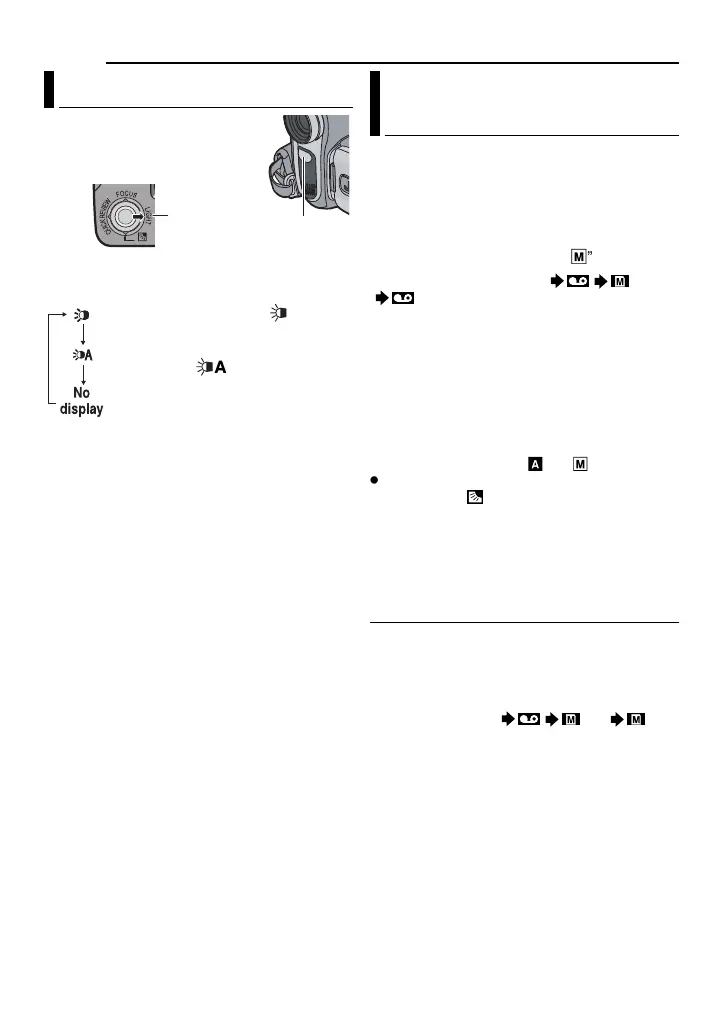
LED Light can be used to
brighten the subject in the dark
place during video recording or
D.S.C. shooting.
1 Press LIGHT repeatedly to change the
setting.
2 Press the Recording Start/Stop Button to
start video recording or SNAPSHOT to shoot a
still image.
NOTES:
●
Be careful not to point the LED Light directly to
eyes.
● If the light does not reach the subject when the
LED Light setting is “ON”, the Night-Alive
function will be activated, and makes it possible
to shoot the subject brighter.
● Since subjects are shot at a reduced shutter
speed when the LED Light setting is “ON”, they
will appear slightly blurred.
This feature lets you record still images that
look like photographs onto a tape.
1 Set the VIDEO/MEMORY Switch to
“VIDEO”.
2 Set the Power Switch to “REC”.
3 Set the recording mode to “
M
”. ( pg. 20)
4 Set “REC SELECT” to “ / ” or
““.
( pg. 31)
5 Press SNAPSHOT.
●
The
“PHOTO
” indication appears and a still image
will be recorded for approx. 5 seconds, then the
camcorder re-enters the Record-Standby mode.
● You can perform Snapshot also during
recording. A still image will be recorded for
approx. 5 seconds, then the normal recording
resumes.
● Snapshot is effective when the recording mode
selection is set to both
“
A
” or “
M
”.
●
If the image taken by snapshot is too dark or too
bright, select (
pg. 36) or “SPOTLIGHT”
(
pg. 38).
● The image size for snapshot in 16:9 mode is
640 x 360. However, the approximate number of
storable images is similar with snapshot in 4:3
mode. (
pg. 24)
Motor Drive Mode
Keeping SNAPSHOT pressed in step 5
provides an effect similar to serial
photography. (Interval between still
images: approx. 1 second)
●
The Motor Drive mode is disabled when “REC
SELECT” is set to “ / ” or ““.
( pg. 31)
LED Light
The light is on always. ( appears.)
The light turns on automatically
when dark. ( appears.)
Turns off the light.
LED Light
LIGHT
Snapshot (Record Still Image On
Tape)
GR-D770US_EN.book Page 34 Friday, December 15, 2006 2:11 PM


 To Next Page