Warning indications
Indications Fundlon
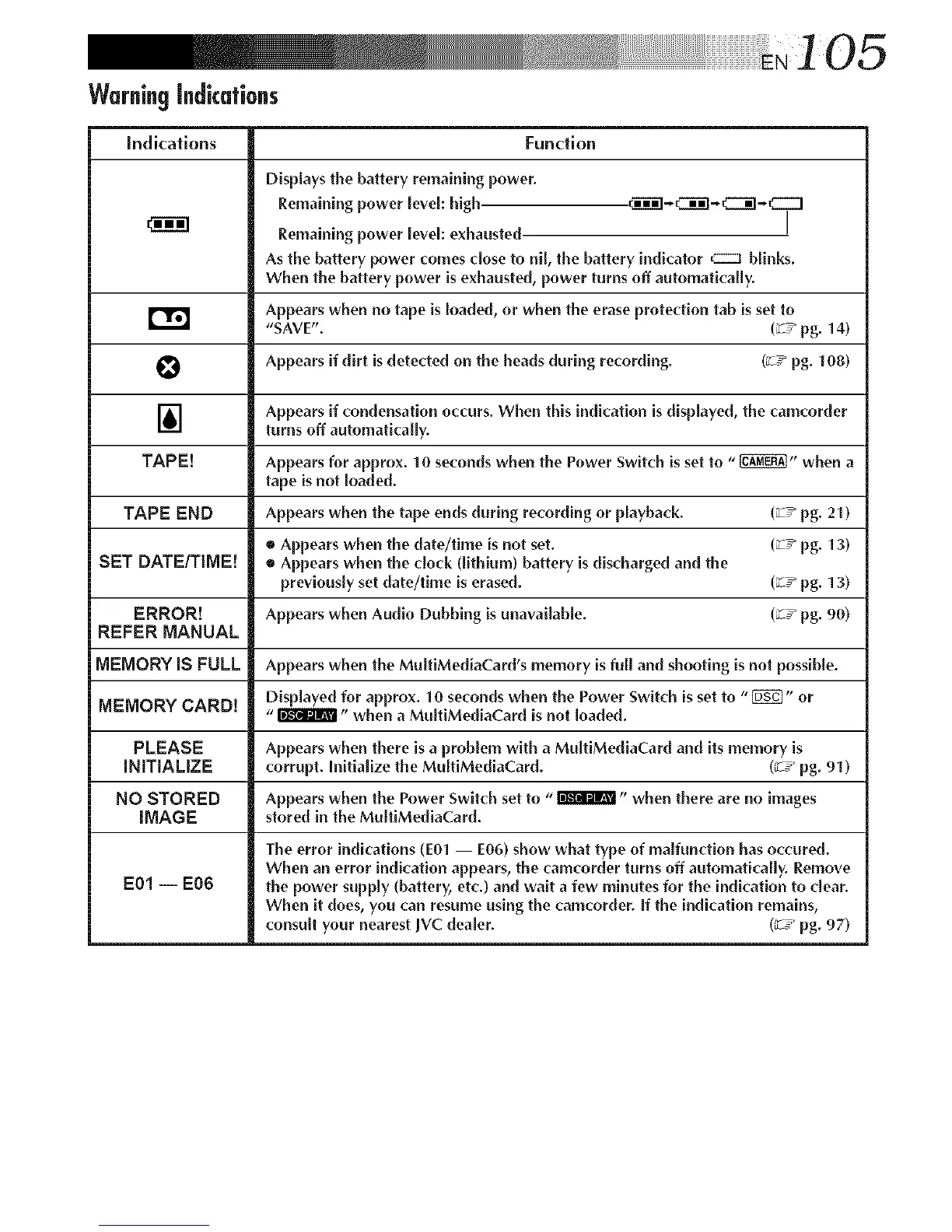
Displays the battery remaining power.
Remaining power level: high. ._I'_I-C_]-_-CZZ3
Remaining power level: exhausted J
As the battery power comes close to nil, the battery indicator cz3 blinks.
When the battery power is exhausted, power turns off automatically.
Appears when no tape is loaded, or when the erase protection tab isset to
r'_ "SAVE". (ZT_pg. 14)
O Appears if dirt is detected on the heads during recording. (_T_ pg. 108)
] Appears if {'ondensation occurs. When this indication is displayed, the camcorder
turns off automatically.
TAPE[ Appears for approx. 10 seconds when the Power Switch is set to "_" when a
tape is not loaded.
TAPE END Appears when the tape ends during recording or playback. (_-T_pg. 21)
• Appears when the date/time is not set. (_T_ pg. 13)
SET DATEITIME! • Appears when the clock (lithium) battery is discharged and the
previously set date/time is erased. (_-T_ pg. 13)
ERROR[ Appears when Audio Dubbing is unavailable. (_T_ pg. 90)
REFER MANUAL
MEMORY iS FULL Appears when the MuitiMed[aCard's memory is full and shooting isnot possible.
Displayed for approx. 10 se{'onds when the Power Switch is set to "1_" or
MEMORY CARD[ "_" when a MultiMediaCard is not loaded.
PLEASE Appears when there is a problem with a MultiMediaCard and its memory is
INITIALIZE corrupt. Initialize the MultiMediaCard. (_T_pg. 91)
NO STORED Appears when the Power Switch set to "_" when there are no images
IMAGE stored in the MultiMediaCard.
The error indications (E01 -- E06) show what type of malfunction has occured.
When an error indication appears, the {'amcorder turns off automath'ally. Remove
E01 -- E06 the power supply (battery, etc.) and wait a few minutes for the indi{'ation to dear.
When it does, you can resume using the camcorder. If the indication remains,
consult your nearest ]VC dealer. (_-T_ pg. 97)



 To Next Page