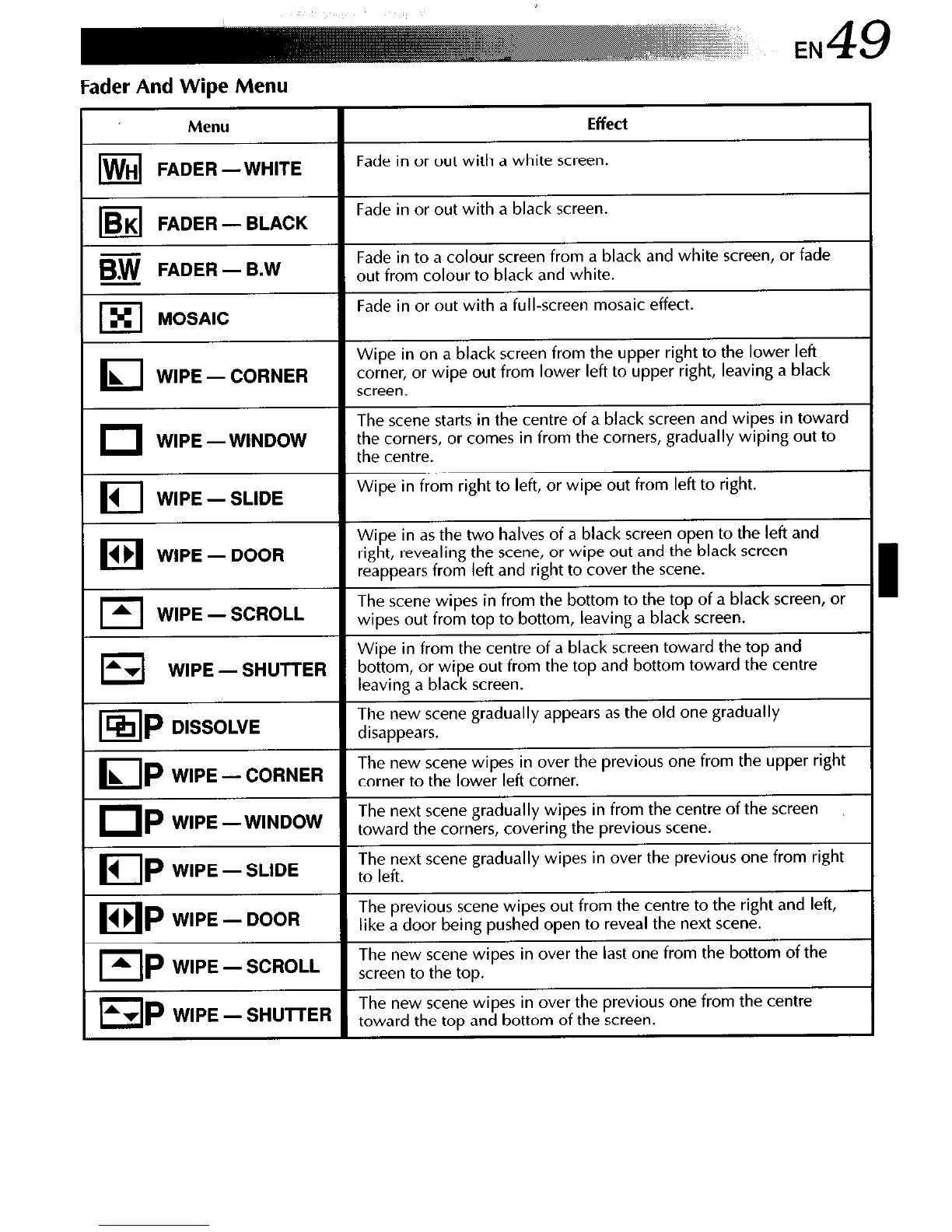
Fader And Wipe Menu
Menu
Iw
H FADER -WHITE
Effect
Fade in or out with a white screen.
le
K FADER - BLACK
Fade in or out with a black screen.
m FADER - B.W
Fade in to a colour screen from a black and white screen, or fade
out from colour to black and white.
lxl
MOSAIC
Fade in or out with a full-screen mosaic effect.
I
Wipe in on a black screen from the upper right to the lower left
L
WIPE - CORNER
corner, or wipe out from lower left to upper right, leaving a black
screen.
I
The scene starts in the centre of a black screen and wipes in toward
WIPE -WINDOW
the corners, or comes in from the corners, gradually wiping out to
the centre.
I
1 WIPE - SLIDE
Wipe in from right to left, or wipe out from left to right.
I
1)
Wipe in as the two halves of a black screen open to the left and
WIPE - DOOR
right, revealing the scene, or wipe out and the black screen
reappears from left and right to cover the scene.
I
A WIPE-SCROLL
The scene wipes in from the bottom to the top of a black screen, or
wipes out from top to bottom, leaving a black screen.
I
Wipe in from the centre of a black screen toward the top and
Av
WIPE-SHUTTER
bottom, or wipe out from the top and bottom toward the centre
leaving a black screen.
ISIP
DISSOLVE
The new scene gradually appears as the old one gradually
disappears.
LIP
L
WIPE-CORNER
The new scene wipes in over the previous one from the upper right
corner to the lower left corner.
UP
WIPE -WINDOW
The next scene gradually wipes in from the centre of the screen
toward the corners, covering the previous scene.
UP
4
WIPE-SLIDE
The next scene gradually wipes in over the previous one from right
to left.
IP
4 b WIPE - DOOR
The previous scene wipes out from the centre to the right and left,
like a door being pushed open to reveal the next scene.
EIP
WIPE-SCROLL
The new scene wipes in over the last one from the bottom of the
screen to the top.
WIPE -SHUTTER
The new scene wipes in over the previous one from the centre
toward the top and bottom of the screen.


 To Next Page
 Loading...









