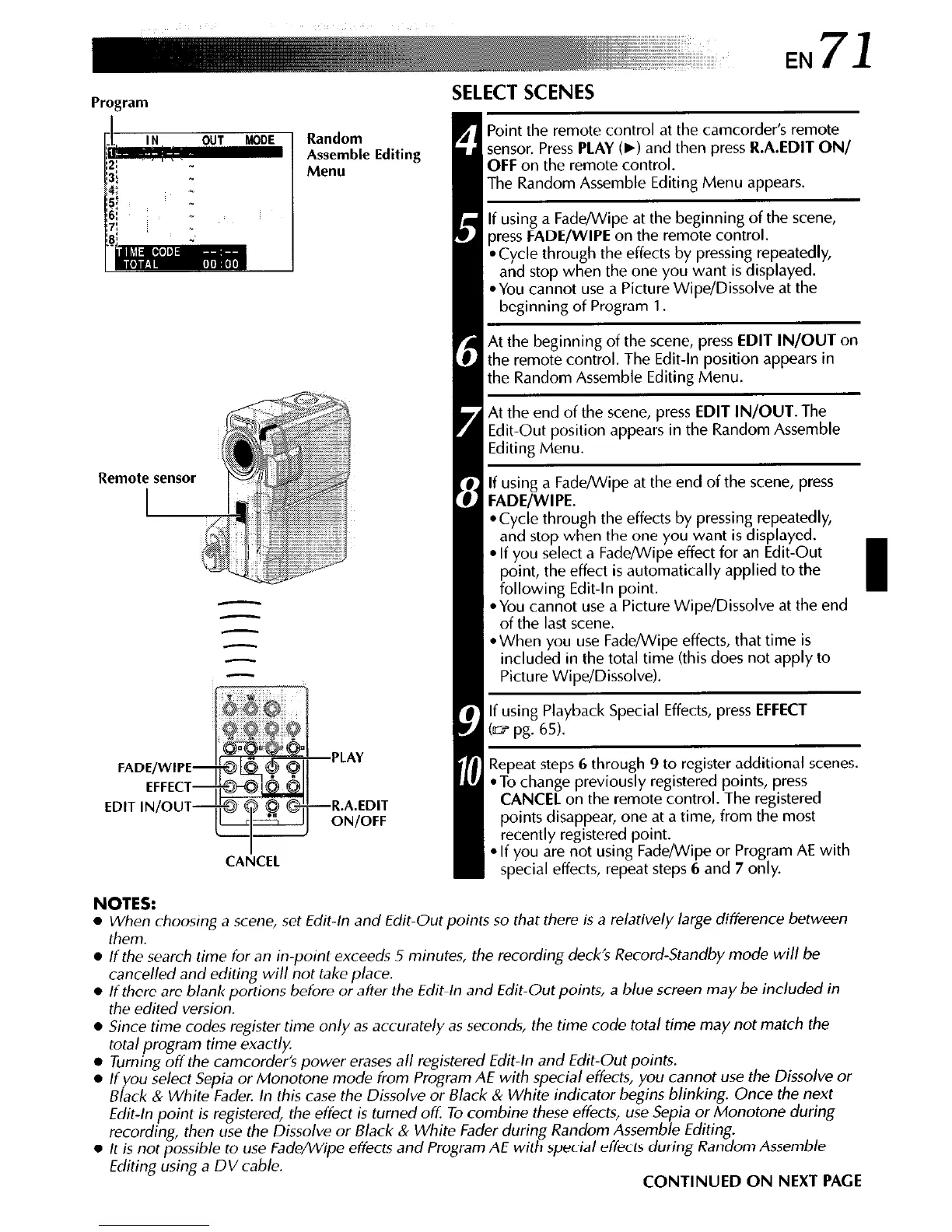
FADE/WIPE
EFFECT
EDIT IN/OUT
PLAY
R.A.EDIT
ON/OFF
CA&EL
SELECT SCENES
, Point the remote control at the camcorder’s remote
sensor. Press
PLAY
(b) and then press
R.A.EDIT ON/
OFF
on the remote control.
The Random Assemble Editing Menu appears.
If using a Fade/Wipe at the beginning of the scene,
press
FADE/WIPE
on the remote control.
*Cycle through the effects by pressing repeatedly,
and stop when the one you want is displayed.
*You cannot use a Picture Wipe/Dissolve at the
beginning of Program 1.
8
At the beginning of the scene, press
EDIT IN/OUT
on
the remote control. The Edit-In position appears in
the Random Assemble Editing Menu.
At the end of the scene, press
EDIT IN/OUT.
The
Edit-Out position appears in the Random Assemble
Editing Menu.
0 If using a Fade/Wipe at the end of the scene, press
8 FADE/WIPE.
*Cycle through the effects by pressing repeatedly,
and stop when the one you want is displayed.
l
If you select a Fade/Wipe effect for an Edit-Out
point, the effect is automatically applied to the
following Edit-In point.
*You cannot use a Picture Wipe/Dissolve at the end
of the last scene.
l
When you use Fade/Wipe effects, that time is
included in the total time (this does not apply to
Picture Wipe/Dissolve).
0 If using Playback Special Effects, press
EFFECT
(a? pg. 65).
I
Repeat steps 6 through 9 to register additional scenes.
*To change previously registered points, press
CANCEL
on the remote control. The registered
points disappear, one at a time, from the most
recently registered point.
l
If you are not using Fade/Wipe or Program AE with
special effects, repeat steps 6 and 7 only.
NOTES:
l
When choosing a scene, set Edit-/n and Edit-Out points so that there is a relatively large difference between
them.
l
/f the search time for an in-point exceeds 5 minutes, the recording deck’s Record-Standby mode will be
cancelled and editing will not take p/ace.
l
/f there are blank portions before or after the Edit-/n and Edit-Out points, a blue screen may be included in
the edited version.
l
Since time codes register time on/y as accurate/y as seconds, the time code total time may not match the
total program time exactly.
l
Turning off the camcorder’s power erases a// registered Edit-/n and Edit-Out points.
l
lf you select Sepia or Monotone mode from Program AE with special effects, you cannot use the Dissolve or
Black & White Fader. In this case the Dissolve or Black & White indicator begins blinking. Once the next
Edit-/n point is registered, the effect is turned off To combine these effects, use Sepia or Monotone during
recording, then use the Dissolve or Black & White Fader during Random Assemble Editing.
l
It is not possible to use Fade/Wipe effects and Program AE with special effects during Random Assemble
Editing using a DV cable.
CONTINUED ON NEXT PAGE


 To Next Page
 Loading...









