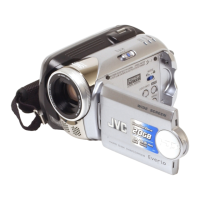
EasyManua.ls Logo

JVC GZ-MG275AG - User Manual

JVC GZ-MG275AG
120 pages
Print Icon
To Next Page IconTo Next Page
Loading...
ENGLISH
ᒦᆪ
EN CS
INSTRUCTIONS
ဧ፿ႁීၗ
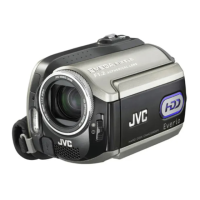
HARD DISK CAMCORDER
፮๤࿳ስ૦
Dear Customer
Thank you for purchasing
this hard disk camera. Before
use, please read the safety
information and precautions
contained in pages 2 and 3 to
ensure safe use of this product.
༫ڐࡼ৻ఱ
ঢቝิ৪൰ࠥ౒፮๤࿳ስ૦ăᏴ
ဧ፿ᒄ༄Lj༿ᔄᇼᏞࣗႁීၗ
࢒!3!጑࢒!4!጑࿟ࡼဧ፿ڔ
ཝᓖፀူሲLjጲۣᑺڔཝဧ፿۾
ޘອă
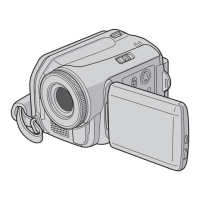
The camera illustrations appearing in this
instruction manual are of the GZ-MG130.
۾ဧ፿ႁීၗᒦ߲ሚࡼ࿳ስ૦ᅄာᆐ!H[.NH241ă
GZ-MG275AG/AH
GZ-MG255AH
GZ-MG175AH
GZ-MG155AG/AH
GZ-MG135AG
GZ-MG130AG/AH

Table of Contents

Questions and Answers

  • A
    Aaron PetersonAug 19, 2025
    Why won't my JVC GZ-MG275AG turn on, or why is the battery life so short?
    • A
      Andre ColeAug 19, 2025
      If your JVC Camcorder does not turn on, or the battery life is extremely short even after fully charging, ensure you are using the camera within appropriate operating temperatures. If the issue persists, the battery is likely worn out and needs replacement.
  • R
    Raymond KingAug 21, 2025
    Why can't I play videos on my JVC GZ-MG275AG?
    • M
      Marie HaasAug 21, 2025
      To resolve playback issues on your JVC Camcorder, ensure you have selected the correct recording medium. If watching on a TV, verify the TV’s input mode or channel is appropriate for video playback.
  • D
    David ClementsAug 23, 2025
    Why does my JVC GZ-MG275AG Camcorder power turn off accidentally?
    • W
      william66Aug 25, 2025
      If your JVC Camcorder's power turns off accidentally, move to a place free from vibration or excessive sound, as the drop detection function may be operating. To resume, set the power/mode switch to OFF, then ON again. To disable this function, set [DROP DETECTION] to [OFF].
  • B
    Bryan DiazAug 26, 2025
    How to fix JVC Camcorder when no power is supplied?
    • M
      Michelle JohnsonAug 26, 2025
      If your JVC Camcorder is not supplying power, ensure the AC adapter is securely connected. If using a battery pack, detach and re-attach it firmly. If the issue persists, replace the battery with a fully charged one.
  • K
    Kim WallerAug 28, 2025
    What to do if no display appears on JVC GZ-MG275AG Camcorder?
    • K
      Karen MuellerAug 28, 2025
      If no display appears on your JVC Camcorder, and the camera has been idle for 5 minutes, it may have turned off automatically to save power. If using a battery pack, set the power/mode switch to OFF, then ON. If using the AC adapter, perform any operation such as zooming. Also, adjust the brightness of the LCD monitor.
  • B
    bridget23Aug 30, 2025
    What to do if the 7REC indicator flashes on my JVC GZ-MG275AG during recording?
    • S
      Sarah MorganAug 30, 2025
      To prevent the JVC Camcorder from overheating during video recording, which causes the 7REC indicator to flash, power off the device and allow it to cool down before resuming.
  • K
    Kelly GreeneSep 1, 2025
    Why is my JVC Camcorder not recording?
    • H
      holmesashleySep 2, 2025
      If your JVC Camcorder isn't recording, ensure the recording medium isn't full by deleting unnecessary files or replacing the SD card. Also, verify that the correct recording medium is selected in the settings.
  • J
    Jennifer HortonSep 4, 2025
    Why do images on my JVC GZ-MG275AG LCD monitor appear dark or whitish?
    • W
      William GoldenSep 4, 2025
      If the images on the LCD monitor of your JVC Camcorder appear dark or whitish, try adjusting the brightness and angle of the LCD monitor. If the issue persists, the LED light may be reaching the end of its service life, and you should consult your nearest JVC dealer.
  • A
    Austin AndersonSep 6, 2025
    Why does the battery level on my JVC Camcorder seem inaccurate?
    • D
      dsimpsonSep 6, 2025
      If your JVC Camcorder displays an incorrect remaining battery power, fully charge the battery and then let it run down completely. If the problem continues, the battery is likely worn out and should be replaced.
  • B
    Brian TurnerSep 8, 2025
    How to display date and time during recording on JVC Camcorder?
    • C
      Catherine SharpSep 8, 2025
      To ensure the date and time appear during recording on your JVC Camcorder, set [DATE/TIME] to [ON] in the settings.

JVC GZ-MG275AG Specifications

General IconGeneral
BrandJVC
ModelGZ-MG275AG
CategoryCamcorder
LanguageEnglish

Related product manuals