EN 5
AV1 IN/OUT
(L-1)
AV2 IN/DECODER
(L-2)
DV IN
AV1 OUT
COMP. Y/C
S IN
(S-1)
S OUT
R.PAUSE
ANT. IN
ANT. OUT
R
L
AUDIO
OUT IN
(S-1)
SYNCHRO EDIT
JLIP
After you plug the mains power cord into a mains outlet, the Country Set display appears on the TV screen and/or on the recorder's
front display panel when the button on the recorder/remote control is pressed for the first time to power on the recorder; go to
page 6 to perform Auto Set Up.
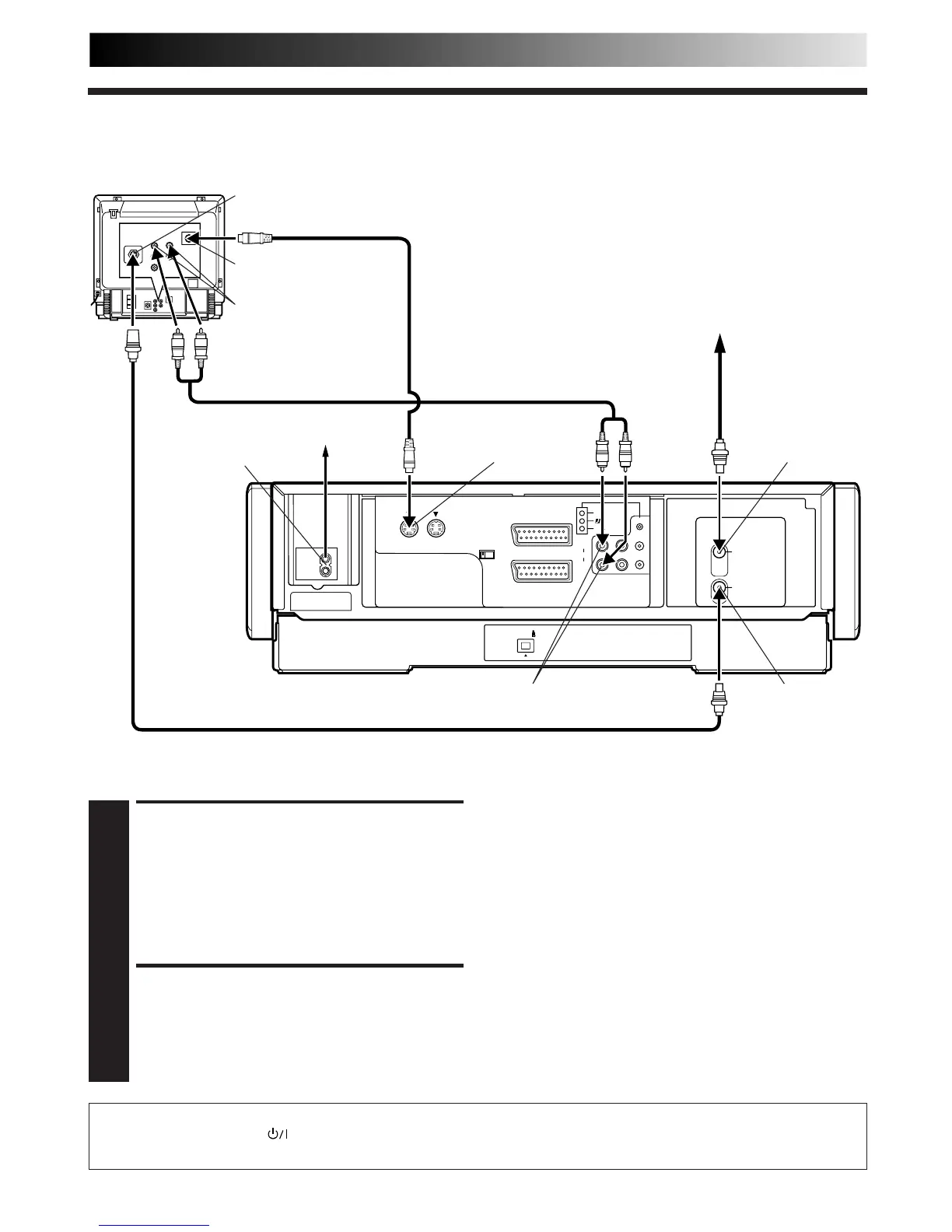
CONNECT RECORDER TO
TV
1
a– Connect the aerial, recorder and TV as per "Basic
Connection" (Z pg. 4).
b–Connect the recorder's S OUT connector to the TV's
S-VIDEO IN connector.
c– Connect the recorder's AUDIO OUT connectors to
the TV's AUDIO IN connectors.
CONNECT RECORDER TO
MAINS
2
Connect the provided mains power cord between the
mains power inlet on the rear panel of the recorder and
a mains outlet.
●
To Connect to A TV With S-VIDEO/AUDIO IN Connectors . . .
S-VIDEO Connection
Mains outlet
Mains power inlet
AUDIO OUT
ANT. IN
Back of Recorder
ANT. OUT
Aerial or Cable
RF Cable (provided)
Back of TV
S-Video cable
(provided)
Audio cable (not provided)
S OUT
NOTES:
●
You can obtain high-quality S-VHS pictures.
●
If your television is not stereo-capable, use the recorder's
AUDIO OUT connectors to connect to an audio amplifier for
Hi-Fi stereo sound reproduction. (
Z
pg. 61)
●
To operate the recorder with your TV using the S-VIDEO
connection, set your TV to the AV mode.
●
For switching the TV's mode, refer to the instruction manual
of your television.
AUDIO IN connectors
S-VIDEO IN connector
Aerial terminal



 To Next Page