44 EN
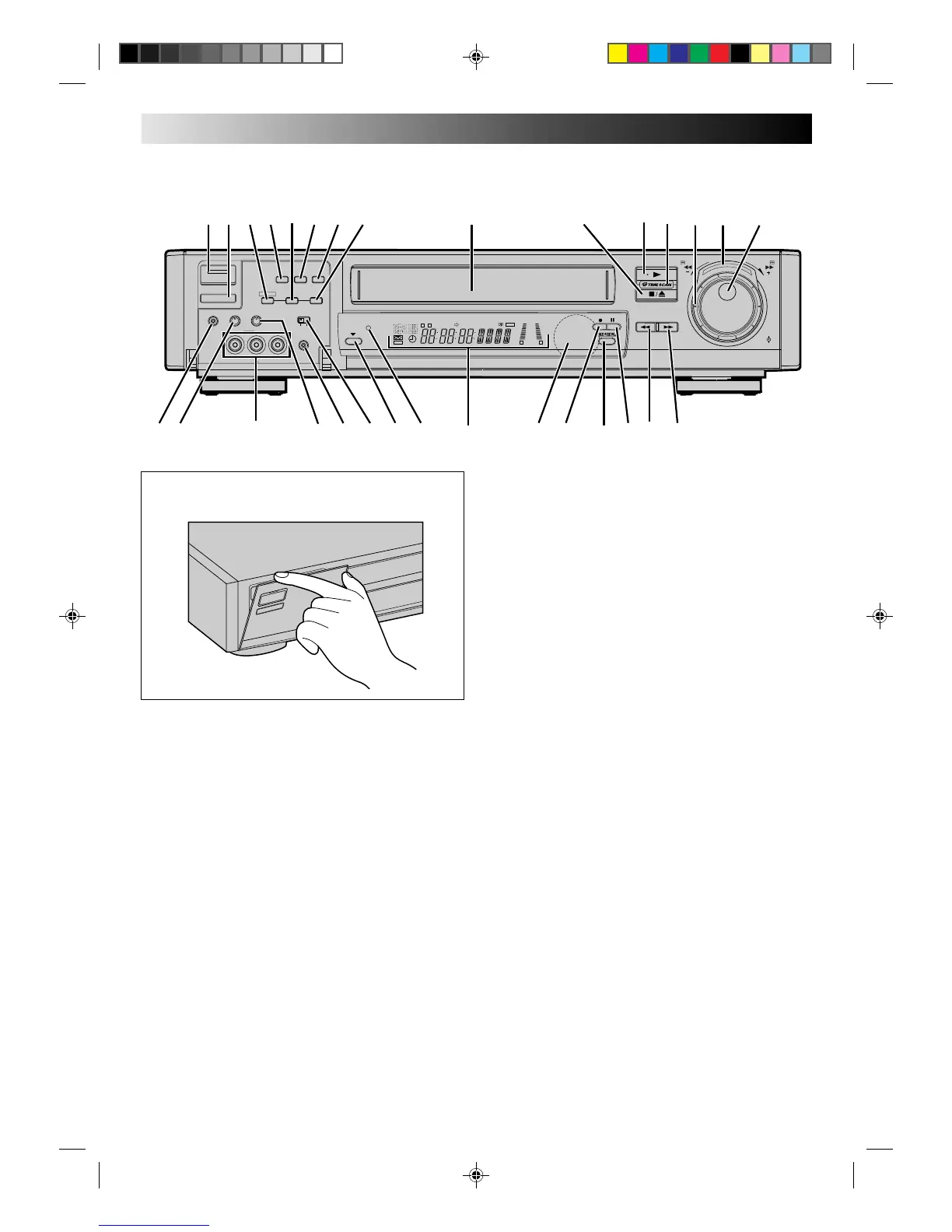
FRONT VIEW
INDEX
1 OPERATE Button (Z pg. 3)
2 TIMER Button (Z pg. 25)
3 R.A.EDIT Button (Z pg. 32)
4 SP/LP [Tape Speed] Button (Z pg. 16)
5 IN/OUT Button (Z pg. 32)
6 A. DUB [Audio Dubbing] Button (Z pg. 36)
7 INSERT Button (Z pg. 34)
8 START Button (Z pg. 33)
9 Cassette Loading Slot
0 STOP/EJECT Button (Z pg. 9)
! PLAY Button (Z pg. 9)
@ TIME SCAN Indicator (Z pg. 14)
# TIME SCAN SHUTTLE Ring (Z pg. 14)
$ TIME SCAN SHUTTLE Indicator (Z pg. 14)
% JOG Dial (Z pg. 10)
TV PROG. Dial (Z pg. 16)
Open the lid to access covered connectors and buttons.
^ Headphone Connector*
& Headphone Volume control*
* VIDEO and AUDIO Input Connectors (Z pg. 31)
( Hi-Fi Audio Recording Level Control (Z pg. 21)
) REMOTE PAUSE Connector (Z pg. 31)
q TIME SCAN AUDIO Switch (Z pg. 14)
w AUTO SP/LP TIMER Button (Z pg. 28)
e AUTO SP/LP TIMER Indicator (Z pg. 28)
r Display Panel (Z pg. 45)
t Infrared Beam Receiving Window
y RECORD Button (Z pg. 16)
u REVIEW Button (Z pg. 11)
i PAUSE Button (Z pg. 10)
o Rewind [REW] Button (Z pg. 9)
p Fast Foward Button [FF] Button (Z pg. 9)
* It is possible to listen to the audio using headphones.
Adjust the volume level using the Headphone Volume
Control.
A.DUB
STARTIN/OUT
REMOTE
PAUSE
SP/ LP INSERT
HEAD PHONE VOLUME
Hi-Fi REC
LEVEL
TIME SCAN
AUDIO
R.A.EDIT
ON OFF
VIDEO
010010
(MONO)
L–AUDIO–R
8
S
L
O
W
S
L
O
W
AUTO SP/LP
TIMER
••
•
•
••
••
•
•
•
REW
FF
TV PROG/
JOG
SHUTTLE
••
•
•
••
••
•
•
•
SP
LP
EP
M
D
VIDEO
D
I T R
W
+8
4
0
6
10
–20dB
NORM
L
R
REMAIN
OPERATE
TIMER
*
r
o
9
5
1
! $
#
u
iew
q
)
pyt
3
0
2
4
6 7 8
%
@
(
&^



 To Next Page