30
6
5/8
q
–
™
+
£
123
456
789
0
123
456
789
0
Edit From A
Camcorder
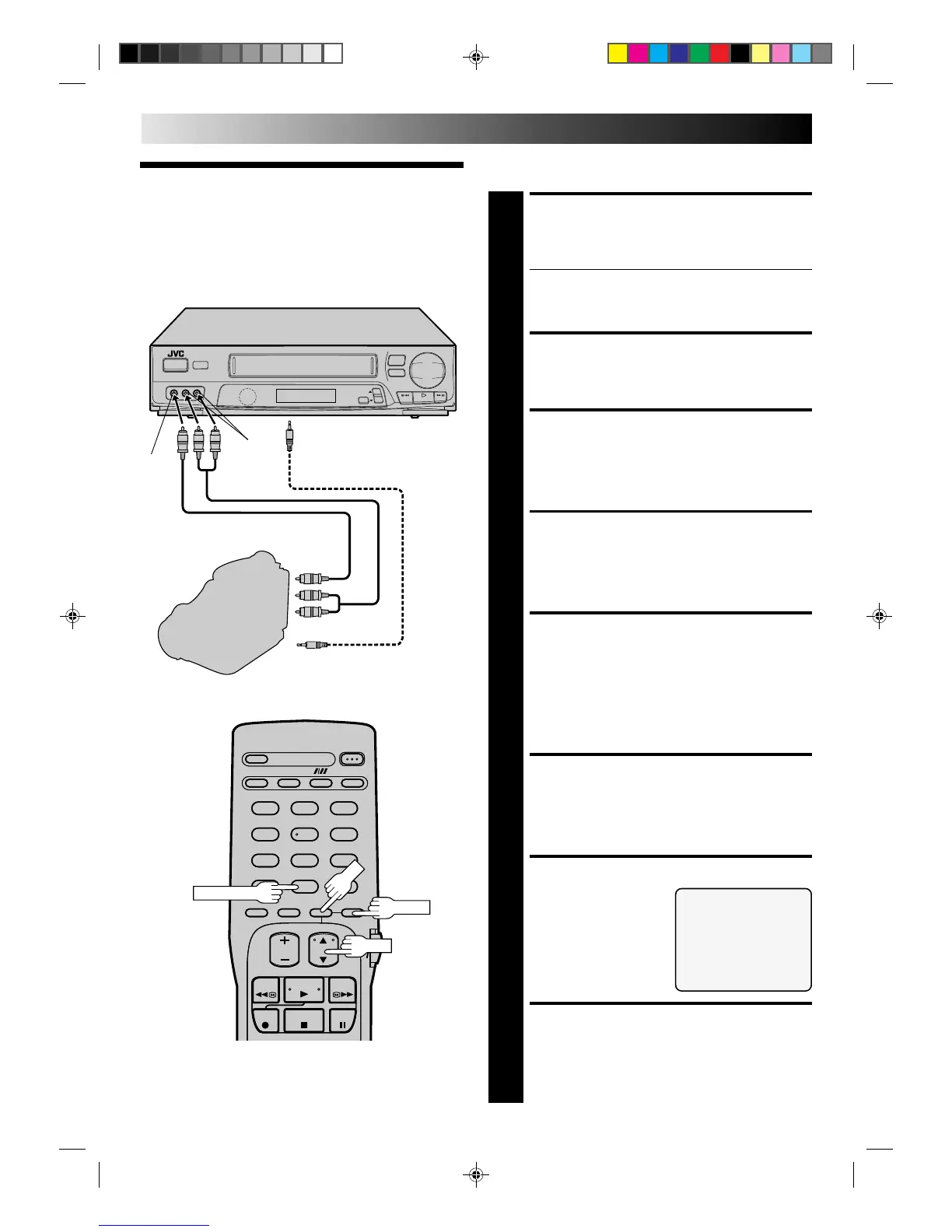
You can use a camcorder as the player and your VCR as the
recorder.
MAKE CONNECTIONS
1
Connect an AV cable (not supplied) between the
camcorder’s VIDEO OUT and AUDIO OUT connectors
and your VCR’s VIDEO IN and AUDIO IN connectors.
● When a Master Edit Control-equipped JVC camcorder is
used, the camcorder is capable of controlling your VCR.
The Mini-plug cable is a mono 3.5 mm mini-plug to
mono 3.5 mm mini-plug connector.
LOAD A CASSETTE
2
Insert the cassette to be recorded on into the recorder.
SET RECORDER’S INPUT
MODE
3
Press NUMBER key “0” to set to AUX.
ACCESS MAIN MENU
SCREEN
4
Press MENU.
ACCESS FUNCTION SET
SCREEN
5
Press CH
5
∞
to place the arrow next to “FUNCTION
SET”, then press OK.
If you’re using a JVC Master Edit Control-equipped
camcorder — step 6
If not — step 9
ACCESS SPECIAL
FUNCTION SCREEN
6
Press CH
5
∞
to place the arrow next to “SPECIAL
FUNCTION”, then press OK.
SELECT MODE
7
Press CH
5
∞
to place the
arrow next to “R.A. EDIT/
PAUSE”.
RETURN TO FUNCTION
SET SCREEN
8
Press MENU.
AUDIO
IN
EDITING
Recorder
SPECIAL FUNCTION
=R.A. EDIT/PAUSE
AV COMPU-LINK
PRESS (
5
,∞) TO SELECT
PRESS (MENU) TO END
To rear panel PAUSE/SPECIAL
FUNCTION connector
Mini-plug cable (not supplied)
(JVC camcorder only)
Camcorder
Player
VIDEO
OUT
AUDIO OUT
EDIT
VIDEO
IN
Your VCR
CH
MENU



 To Next Page
 Loading...