English - 15
WARNING: Information provided in this manual and
in the illustrations, and the components specified in
the package contents may change as per model.
J Usage
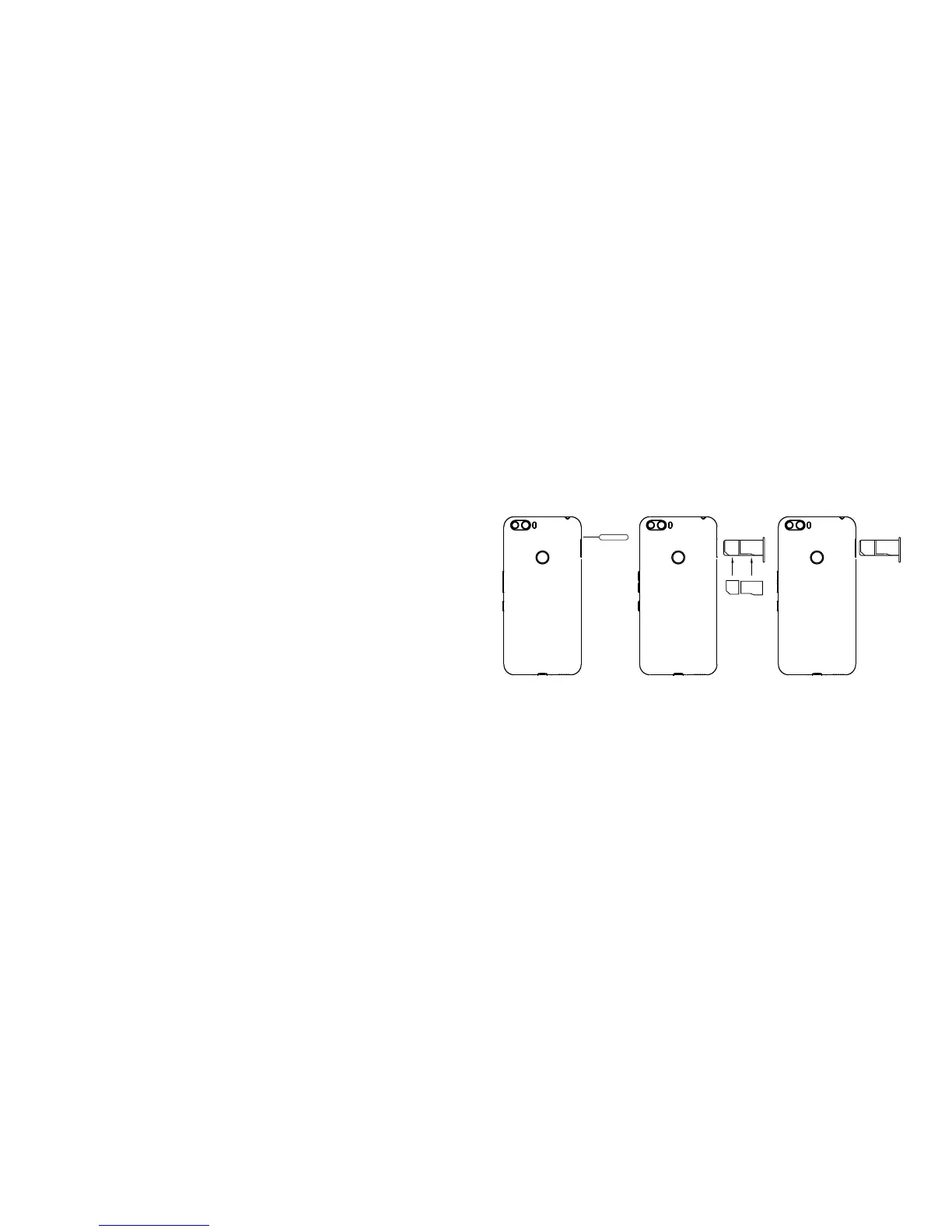
Installing and Removing a UIM/SIM and SD Card
Your phone has a single slot that consists of two
sections for a UIM / SIM card and an SD card. The
smaller section is suitable for nano SIM cards and
the larger section is suitable for micro SD cards. If a
section is empty, it will not affect the operation of the
card in the other section.
UIM / SIM card shall always be installed before
making a call. Turn off your phone before installing a
UIM/SIM or an SD card. Follow the instructions shown
in the figure while installing a UIM/SIM or an SD card.
To remove the cards, you only need to complete the
first 2 steps and take off the receptacle. You may
remove any card after taking the receptacle off.
WARNING : Smart phone shall be turned off and on to
receive the UIM/SIM and SD card installation/removal
notification and recognition information.
Nano
SIM
M�cro SD
Nano
SIM
M�cro SD
Instructions for Installing and Removing
a UIM/SIM and an SD Card
Design
JVC J20 is designed by a metal frame and glass rear
cover. The metal frame protects your phone against



 To Next Page