EasyManua.ls Logo

JVC KD-A315 - Bluetooth System Settings and Troubleshooting; Detailed Setting Menu Options; Bluetooth Error and Warning Messages

JVC KD-A315
49 pages
Print Icon
To Next Page IconTo Next Page
To Previous Page IconTo Previous Page
Loading...
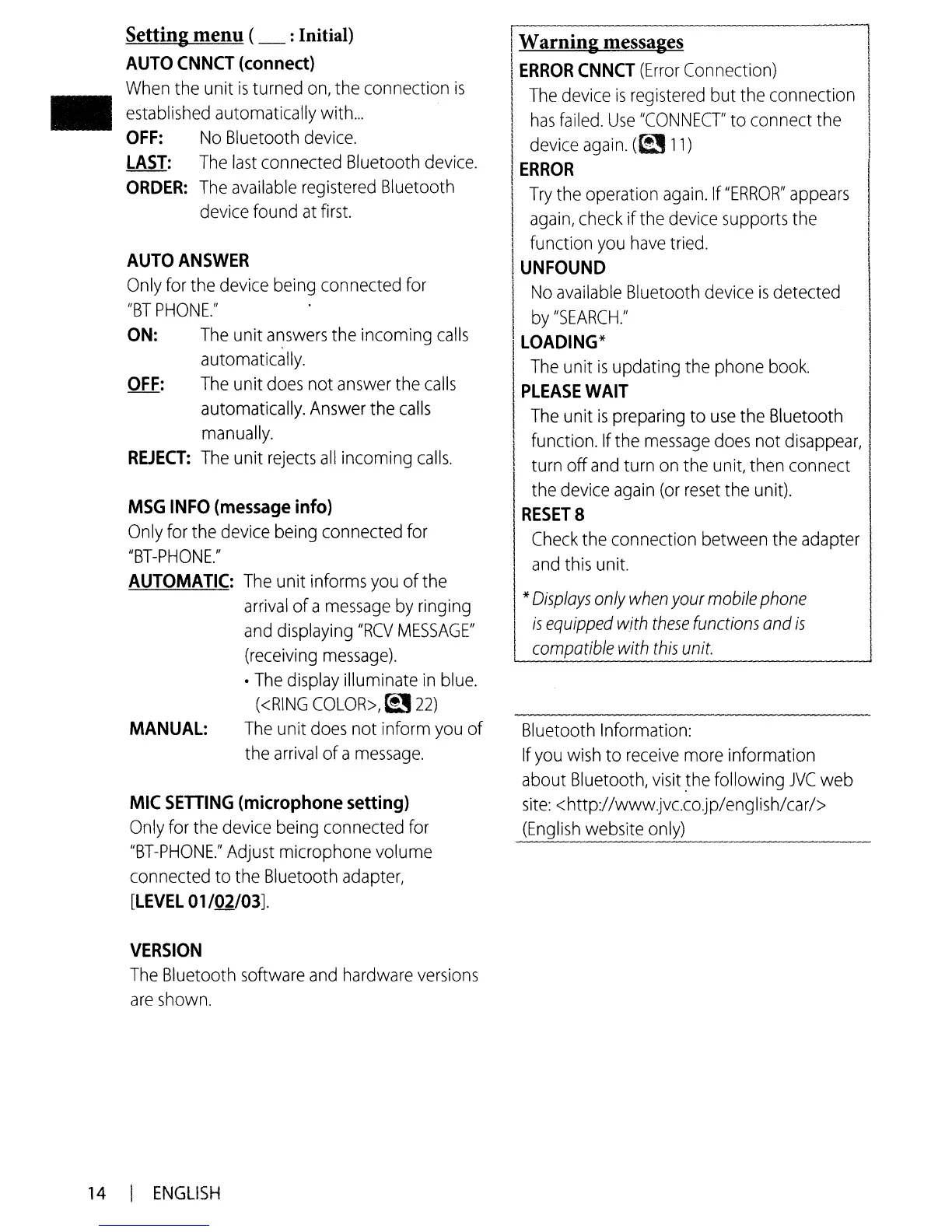
Setting menu (_ :Initial)
AUTO
CNNCT
(connect)
When
the unit
is
turned
on,
the connection
is
established
automatically with
...
OFF:
No
Bluetooth
device.
LAST:
The
last
connected Bluetooth
device.
ORDER:
The
available
registered
Bluetooth
device
found
at
first.
AUTO
ANSWER
Only
for
the
device
being
connected
for
"BT
PHONE."
ON:
The
unit
answers
the incoming
calls
automatically.
OFF:
The
unit
does
not
answer
the
calls
automatically.
Answer
the
calls
manually.
REJECT:
The
unit
rejects
all
incoming
calls.
MSG
INFO
(message
info)
Only
for the
device
being
connected for
"BT-PHONE."
AUTOMATIC:
The
unit informs
you
of the
arrival
ofa
message
by
ringing
and
displaying
"RCV
MESSAGE"
(receiving
message)
.
The
display
illuminate
in
blue.
«RING
COLOR>,
~
22)
MANUAL:
The
unit
does
not inform
you
of
the
arrival
of a
message.
MIC
SETTING
(microphone
setting)
Only
for
the
device
being
connected
for
"BT-PHONE."
Adjust
microphone volume
connected to the Bluetooth
adapter,
[LEVEL
01/02/03].
VERSION
The
Bluetooth
software
and
hardware
versions
are
shown.
I
W
.
I arnlng messages
I
ERROR
CNNCT
(Error
Connection) .
I
The
device
is
registered
but the connection
I
has
failed.
Use
"CONNECT"
to connect the
I
device
again.
(~
11)
I
ERROR
I
Try
the
operation
again.
If
"ERROR"
appears
I
II
again,
check
ifthe
device
supports
the
I function
you
have
tried.
I
UNFOUND
No
available
Bluetooth
device
is
detected
by
"SEARCH."
I
LOADING*
I
The
unit
is
updating the phone
book.
I
PLEASE
WAIT
I
The
unit
is
preparing to
use
the
Blu~tooth
function.
If
the
message
does
not
disappear,
II
turn off
and
turn
on
the
unit,
the.n
connect
the
device
again
(or
reset
the
unit).
I
RESET
8
Check
the connection between the
adapter
and
this
unit.
*
Displays
only
when
your
mobile
phone
I
is
equipped
with
these
functions
and
is
I
L...::c:..:o.:..:..m:r.p.::a:.:.:tib:..:.le:...:.-:...:..::with~th-:.:::is~u_n_it.
.-J
Bluetooth Information:
If
you
wish
to
receive
more
information
about
Bluetooth,
visit
.the
following
JVC
web
site:
<http://www.jvc.co.jp/englishl
ca
r
I>
(English
website
o_n.....:.ly.:.....)
_
14
I
ENGLISH

Other manuals for JVC KD-A315

Related product manuals