EasyManua.ls Logo

JVC KD-A315 - External Component Connectivity; Connecting External Sources; Adjusting External Source Volume

JVC KD-A315
49 pages
Print Icon
To Next Page IconTo Next Page
To Previous Page IconTo Previous Page
Loading...
•
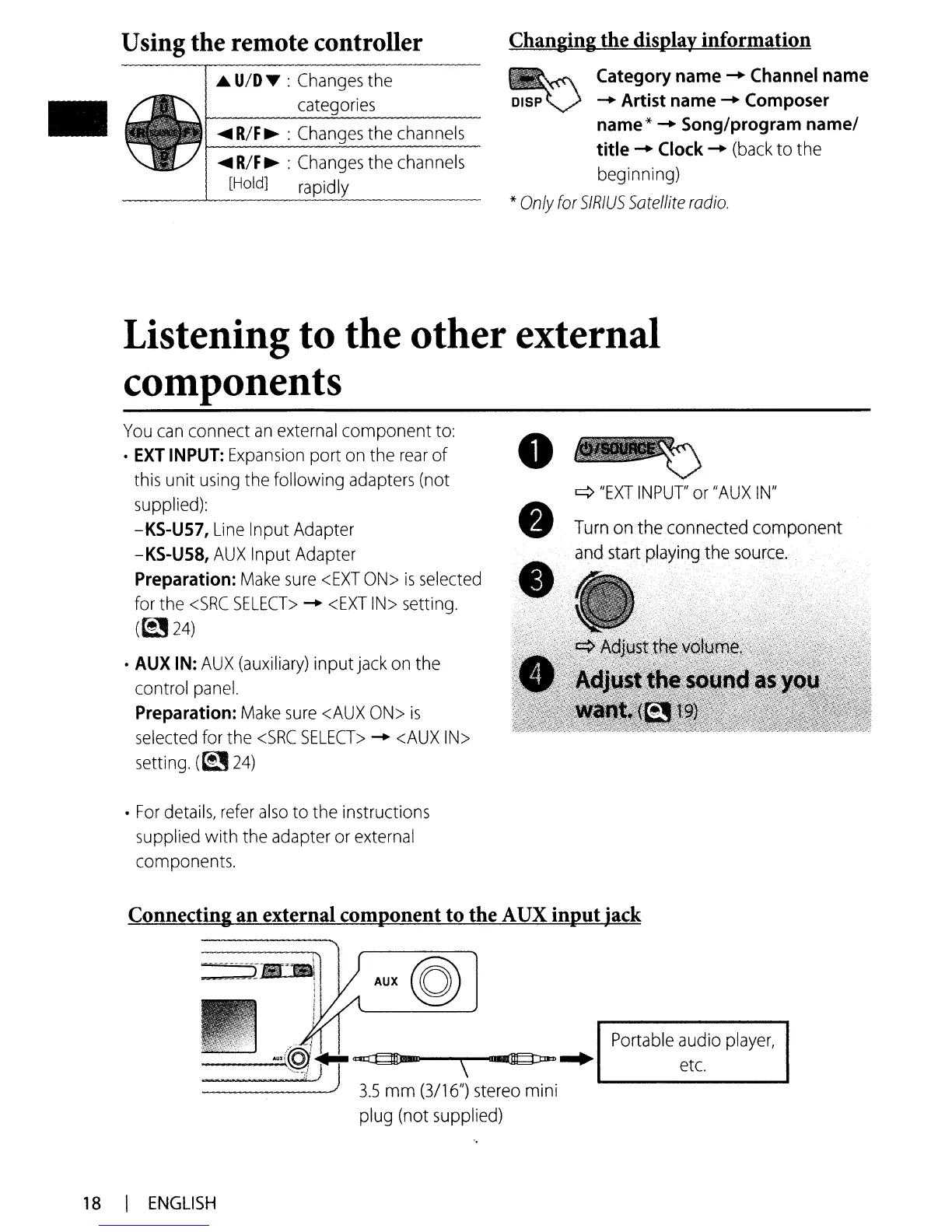
Using the remote controller
I
~
u/o
~
:
Changes
the
categories
......
R/F~
:
Changes
the
channels
......
R/F
~
:
Changes
the
channels
__
~[HOld]
rapidly
Changing the display information
~
Category name
-+
Channel name
DISP V
-+
Artist name
-+
Composer
name*
-+
Song/program
name/
title
-+
Clock
-+
(back
to the
beginning)
*
Only
for
SIRIUS
Sotellite
radio.
Listening to the other external
components
You
can
connect
an
external
component
to:
·
EXT
INPUT:
Expansion
port
on
the
rear
of
this
unit
using
the following
adapters
(not
supplied):
-KS-U57,
Line
Input Adapter
-KS-U58,
AUX
Input Adapter
Preparation:
Make
sure
<EXT
ON>
is
selected
for the
<SRC
SELECT>
-+
<EXT
IN>
setting.
(t!J
24)
·
AUX
IN:
AUX
(auxiliary)
input
jack
on
the
control
panel.
Preparation:
Make
sure
<AUX
ON>
is
selected
for
the
<SRC
SELECT>
-+
<AUX
IN>
setting.
(~24)
•
For
details,
refer
also
to the instructions
supplied with the adapter
or
external
components.
q
"EXT
INPUT'
or
"AUX
IN"
Connecting
an
external component to the A
UX
input
.jack
__
~AOX(@~.J.
...
:=.
-:===
.
....
J)
~
j
3.5
mm
(3/16//)
stereo
mini
plug (not supplied)
Portable
audio
player,
etc.
18
I
ENGLISH