To Next Page
R
ryanleeSep 23, 2025
Why does my JVC Car Receiver say “NOT SUPPORT” and skip tracks?
- KkbondSep 23, 2025
If the JVC Car Receiver displays “NOT SUPPORT” and the track skips, check whether the track is a playable format.

Why does my JVC Car Receiver say “NOT SUPPORT” and skip tracks?
If the JVC Car Receiver displays “NOT SUPPORT” and the track skips, check whether the track is a playable format.
How to unlock 'CH LOCKED' on JVC KD-A645?
If the JVC Car Receiver displays “CH LOCKED”, you need to enter the correct pass code to unlock it.
What to do if my JVC Car Receiver says “WRONG CODE”?
If your JVC Car Receiver displays “WRONG CODE”, ensure that you have entered the correct pass code.
Why does my JVC KD-A645 Car Receiver say “NO SIGNAL”?
If the JVC Car Receiver displays “NO SIGNAL”, make sure the antenna is mounted outside the vehicle.
Why are the correct characters not displayed on my JVC Car Receiver?
If the correct characters are not displayed on your JVC Car Receiver, note that this unit can only display uppercase letters, numbers, and a limited number of symbols.
Why can't I select a source on my JVC KD-A645?
If the source cannot be selected on your JVC Car Receiver, check the [SRC SELECT] setting.
What does “CHAN UNSUB” mean on my JVC KD-A645 Car Receiver and how to fix it?
If the JVC Car Receiver displays “CHAN UNSUB”, call 1-866-635-2349 to subscribe.
What to do when JVC Car Receiver displays “SUBSCRIPTN UPDATED – ENTER TO CONTINUE.”?
If the JVC Car Receiver displays “SUBSCRIPTN UPDATED – ENTER TO CONTINUE.”, press the volume knob to continue.
Why does my JVC KD-A645 Car Receiver say “NO SKIPS”?
If the JVC Car Receiver displays “NO SKIPS”, it means that the skip limit has been reached.
What does “STATION LIM” mean on my JVC Car Receiver?
If the JVC Car Receiver displays “STATION LIM”, the number of registered stations has reached its limit. Try again after deleting an unnecessary station on your device.
Includes general operating warnings and cautions for safe driving and unit usage.
Procedures for cleaning the unit, its connectors, and handling discs properly.
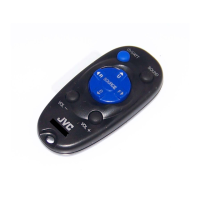
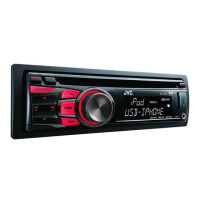
Description of the faceplate components and the remote control (RM-RK52).
Instructions for resetting the unit and replacing the battery in the remote control.
Steps to cancel demonstration, set the clock, and configure basic settings.
Options for customizing display information and enabling audio sources.
Methods for searching, storing, and recalling radio stations.
Utilizing PTY Search, Radio Timer, and other tuner settings.
Initiating playback, selecting tracks, folders, and navigating media.
Setting repeat and random playback options for audio content.
Guidance for connecting portable audio players and Bluetooth devices.
Adjusting button and display colors, day/night settings, and menu illumination.
Preparation steps and initiating Pandora streaming and playback.
Using playback controls, creating stations, and bookmarking content.
Connecting the tuner, activating service, and selecting SiriusXM as a source.
Manually selecting channels, storing favorites, and using the replay function.
Configuring channel lock, pass codes, mature channels, and signal level.
Selecting preset equalizers and storing custom sound settings.
Detailed controls for PRO EQ, Subwoofer, Fader, Balance, and other audio parameters.
Details on disc, USB, and iPod/iPhone compatibility and file format support.
Information on JVC software, display content for various sources.
Resolving problems related to sound, operation, source selection, and disc errors.
Troubleshooting for Pandora®, SiriusXM™, and general device connectivity.
Technical details for the audio amplifier and tuner sections.
Technical data for CD player, USB interface, and general unit parameters.
Important warnings, cautions, and basic steps for installing the unit.
Instructions for installing without a sleeve and how to remove the unit.
Visual guides for connecting the unit to the vehicle's wiring harness and amplifier.
Inventory of components included for unit installation.
Information on laser safety, FCC warnings, and interference guidelines.
Listing of trademarks and instructions for recycling electronic waste.
 General
| Brand | JVC |
|---|---|
| Model | KD-A645 |
| Category | Car Receiver |
| Language | English |