10
ENGLISH
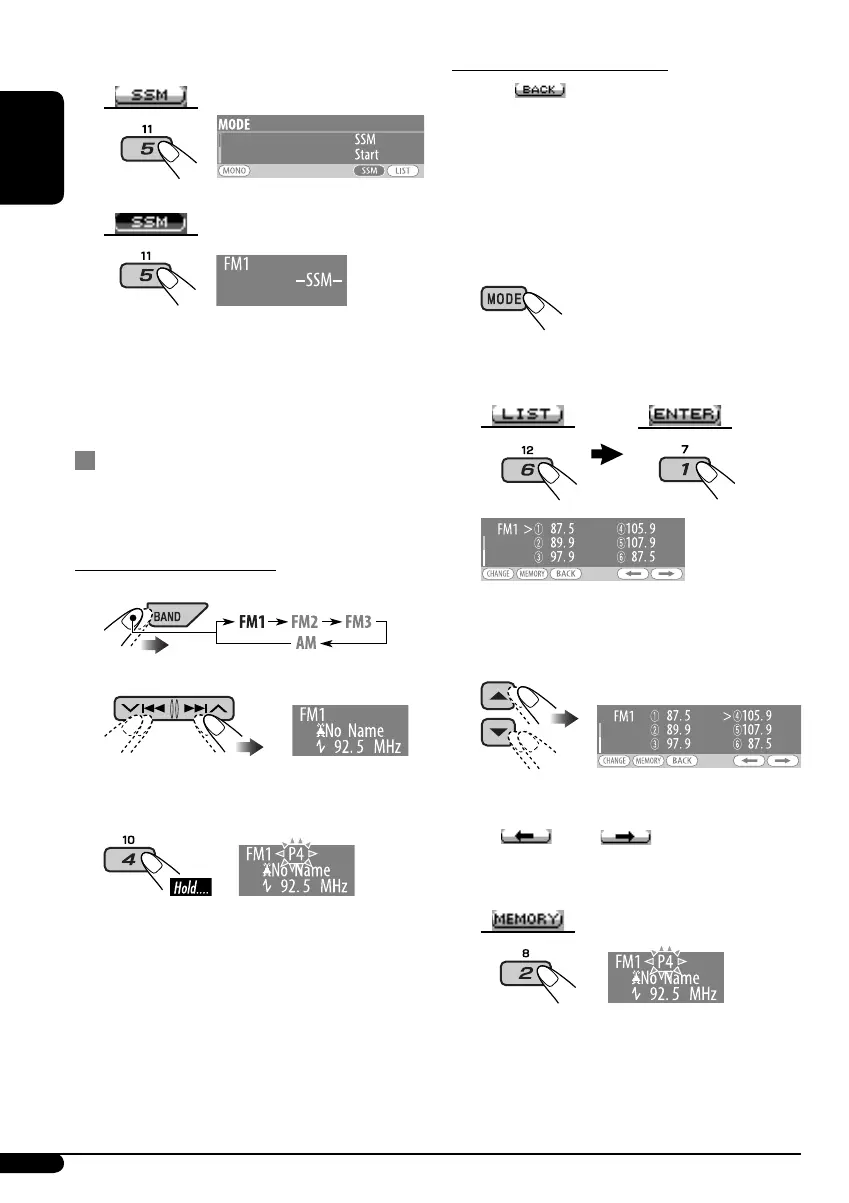
3 Select “SSM.”
4
Local FM stations with the strongest signals are
searched and stored automatically in the FM
band.
Manual presetting
Ex.: Storing FM station of 92.5 MHz into preset
number 4 of the FM1 band.
Using the number buttons
1
2
3
Using the Preset Station List
• When appears on the display, you can
move back to the previous display by pressing
number button 3.
1 Follow steps 1 and 2 on left column.
• By holding 5 / ∞, the Preset Station List
will appear (go to step 4 below).
2
3 Display the Preset Station List.
4 Select the preset number you want to
store into.
• You can move to the lists of the other FM
bands by pressing number button 5
(
) or 6 ( ) repeatedly.
5 Store the station.
EN08-15KD-AR870G820[J]1.indd 10EN08-15KD-AR870G820[J]1.indd 10 5/12/05 4:52:48 pm5/12/05 4:52:48 pm


 To Next Page
 Loading...