ENGLISH
7
Getting started
Basic operations
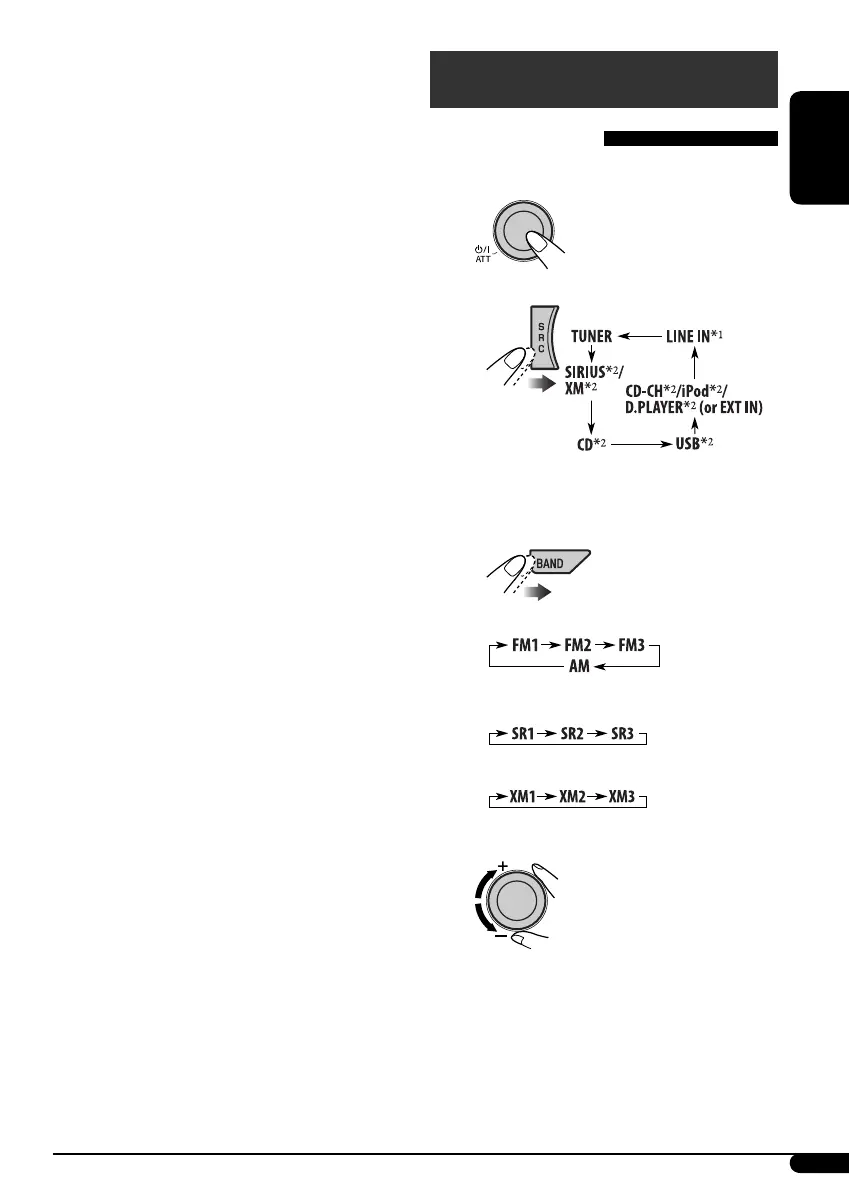
~ Turn on the power.
Ÿ
*
1
Only for KD-AR870.
*
2
You cannot select these sources if they
are not ready or not connected.
!
• For FM/AM tuner
• For SIRIUS tuner
• For XM tuner
⁄ Adjust the volume.
@ Adjust the sound as you want. (See
pages 16 – 18.)
• While listening to an Apple iPod® or a
JVC D. player:
– Pauses/stops or resumes playback with
D ∞.
– Enters the main menu with 5 U. (Now
5 U/D ∞/2 R/F 3 work as the menu
selecting buttons.)*
3 VOL – / VOL + buttons
• Adjusts the volume level.
4 SOUND button
• Selects the sound mode (i-EQ: intelligent
equalizer).
5 SOURCE button
• Selects the source.
6 2 R (reverse) / F (forward) 3 buttons
• Searches for stations if pressed briefly.
• Fast-forwards or reverses the track if
pressed and held.
• Changes the tracks if pressed briefly.
• While listening to the satellite radio:
– Changes the channels if pressed briefly.
– Changes the channels rapidly if pressed
and held.
• While listening to an iPod or a D. player
(in menu selecting mode):
– Selects an item if pressed briefly. (Then,
press D ∞ to confirm the selection.)
– Skips 10 items at a time if pressed and
held.
* 5 U: Returns to the previous menu.
D ∞: Confirms the selection.
Continued on next page...
EN02-07KD-AR870G820[J]1.indd 7EN02-07KD-AR870G820[J]1.indd 7 5/12/05 4:52:31 pm5/12/05 4:52:31 pm


 To Next Page
 Loading...