EasyManua.ls Logo

JVC KD-AV31 - Page 13

JVC KD-AV31
24 pages
Print Icon
To Next Page IconTo Next Page
To Previous Page IconTo Previous Page
Loading...
Sound/Display/Other Settings
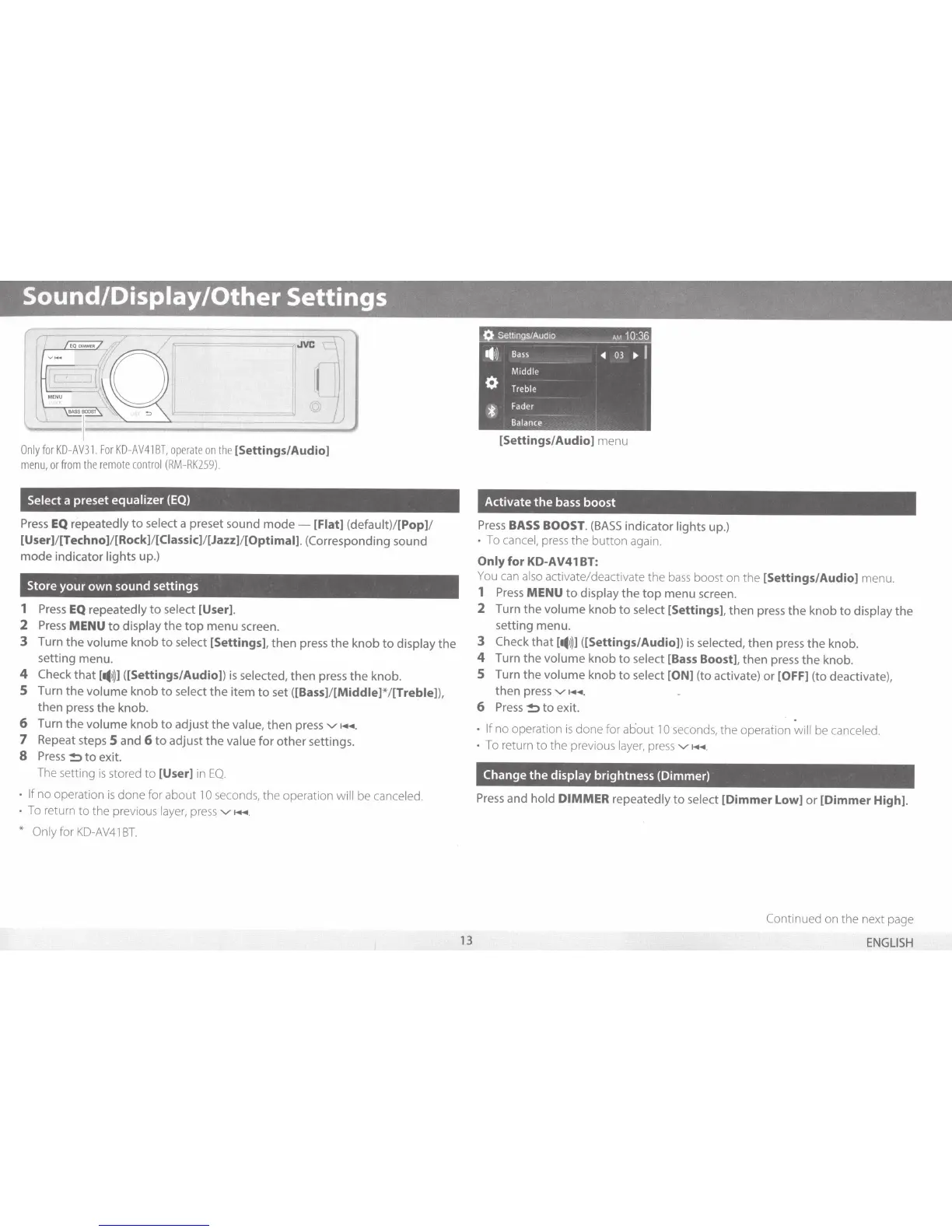
On
ly
for
KD-AV31.
For
KD
-
AV41
BT,
operate
on
the
[Settings/Audio]
menu,
or
from
the
remote
control
(RM
-
RK259).
Select a preset
equalizer
(EQ)
Press
EQ
repeatedly
to
select a preset sound
mode
-
[Flat]
(default)/[Pop)/
[User)/[Techno)/[Rock)/[Ciassic)/[Jazz)/[Optimal].
(Corresponding sound
mode
indicator lights
up
.)
Store
your
own
sound
settings
1
Press
EQ
repeatedly
to
select
[User].
2
Press
MENU
to
display
the
top
menu screen.
3
Turn
the
volume
knob
to
select
[Settings],
then press
the
knob
to
display
the
setting menu.
4
Check
that
[
..
1))]
([Settings/Audio])
is
selected,
then
press
the
knob.
5
Turn
the
volume
knob
to
select
the
item
to
set
([Bass)/[Middle)*/[Treble]),
then
press
the
knob.
6
Turn
the
volume
knob
to
adjust
the
value,
then
press
v-
~+~~
.
7
Repeat steps
5
and
6
to
adjust
the
value
for
other
settings.
8
Press
~to
exit.
The setting
is
stored
to
[User]
in
EQ.
If
no operation
is
done for about
10
seconds, the operation
will
be
cancel
ed.
To return
to
the previous
layer,
press
v-
~+~~
.
*
Only for
KD-AV41
BT.
13
Q
Settings/AudiO
AM
10:36
..
1))
Bass
-4
03
• I
Middle
0
Treble
*
Fader
Balance
[Settings/Audio]
menu
Activate
the
bass
boost
Press
BASS
BOOST.
(BASS
indicator lights up.)
To
cancel,
press
the button again.
Only
for
KD-AV41
BT:
You
can
also activate/deactivate the
bass
boost on the
[Settings/Audio]
menu.
1
Press
MENU
to
display
the
top
menu screen.
2
Turn
the
volume
knob
to
select
[Settings],
then
press
the
knob
to
display
the
setting menu.
3 Check
that
[
..
1))1
([Settings/Audio])
is
selected,
then
press
the
knob.
4
Turn
the
volume
knob
to
select
[Bass
Boost],
then
press
the
knob.
5
Turn
the
volume
knob
to
select
[ON]
(to activate)
or
[OFF]
(to deactivate),
then
press
v-
~+~~.
6
Press
~to
exit.
.
If
no operation
is
done for about
10
seconds, the operation
will
be
canceled.
To
return
to
the previous
layer,
press
v-
~+~.
Change
the
display
brightness
(Dimmer)
Press
and
hold
DIMMER
repeatedly
to
select
[Dimmer
Low] or
[Dimmer
High].
Continued on the next page
ENGLISH

Related product manuals