EasyManua.ls Logo

JVC KD-AV31 - Wiring Connections; Main Wiring Diagram; Fuse and Power Connections

JVC KD-AV31
24 pages
Print Icon
To Next Page IconTo Next Page
To Previous Page IconTo Previous Page
Loading...
Installation/Connection
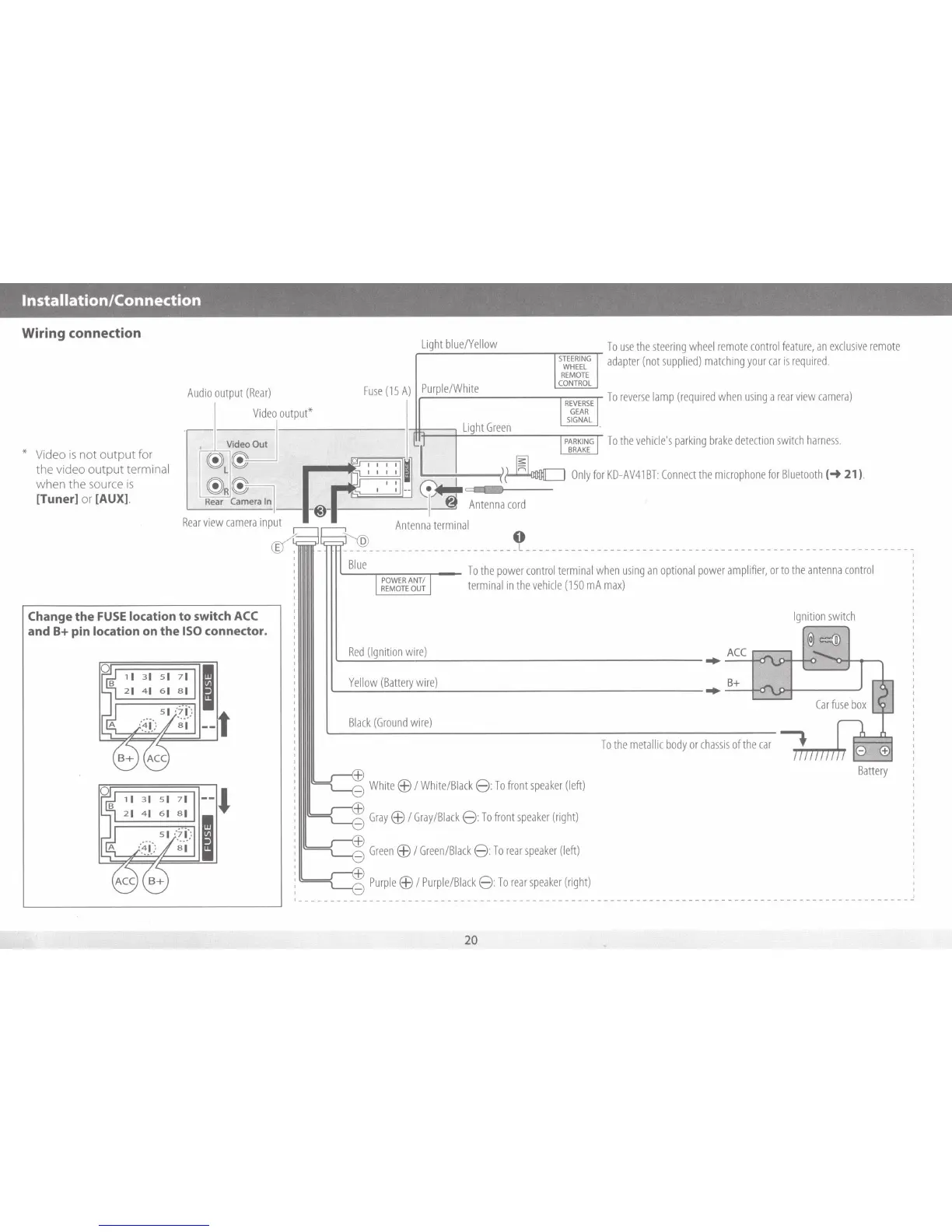
Wiring connection
* Video
is
not output for
the video output terminal
when the source
is
[Tuner]
or
[AUX].
Audio
output
(Rear)
Change
the
FUSE
location
to
switch
ACC
and
B+ pin
location
on
the
ISO
connector.
Ligh
t
bl
ue/Ye
ll
ow
STEER
I
NG
WH
EEL
REMOT
E
Fuse
(15
A)
Pu
rple/W
h
ite
CON
T
RO
L
I
REVER
SE
output*
GE
AR
SIGN
AL
Li
ght
Green
l
I
PARKING
I
BRAKE
To
use
the
steer
i
ng
wheel
remote
control
feature
,
an
exclusive
remote
adapter
(not
supp
l
ied)
matching
your
car
is
required
.
To
reverse
l
amp
(require
d
when
using
a
rear
view
camera)
To
the
vehicle's
parking
brake
detection
switch
harness
.
r
KD
-
AV41
BT:
Connect
the
microphone
for
Bluetooth
(_.
21
).
G)
I l
~~
'
~Onlyfu
--
....
___
8
_
~
~
Antenna
co
rd
'
I
Antenna
te
r
mmal
0
-
--
-
-
-----
-
---
--
--- ---
-----L-----------------------------------------------------------~
'-----.----..---
To
the
power
co
n
trol
termina
l
when
using
an
opt
i
onal
powe
r
ampl
i
fier,
or
to
the
antenna
control
termina
l
in
the
vehicle
(150
mA
max)
Ignition
switch
@=®
L-~
Y
~
e
~
llo
~
w
~
(~B
~
att~e
~r
y
~
w
~
i~re~)
-------------------~-B_
+
-+~
1....-....;:;.....1
Bl
ack
(Ground
wire)
Battery
White
EB
I
White/Black
8:
To
front
speaker
(left)
Gray
EB
I
Gray/B
l
ack
8:
To
front
speake
r
(right)
Gr
een
EB
I
Green/Black
8:
To
rear
speaker
(left)
Purple
EB
I
Purp
l
e/Black
8:
To
rear
speaker
(right)
~----------------------------------------------------------------------------------------------
20

Related product manuals