1-26 (No.MA254)
4.6 Service mode
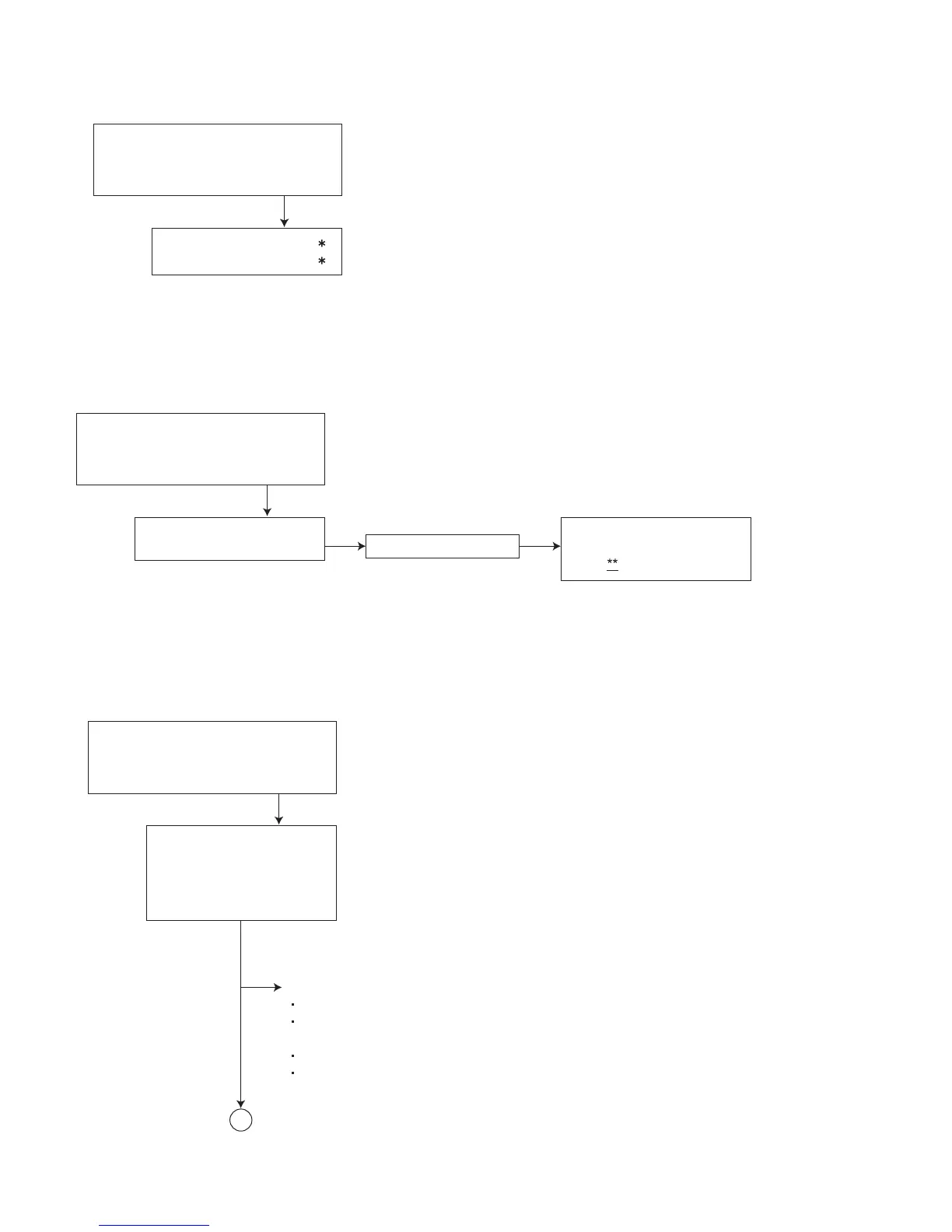
4.6.1 Service mode 1 (Indication of a service mode 1 is nothing.)
4.6.2 Service mode 2
4.6.3 Service mode 3
Keep this state more 2 seconds
while continuing pressing the
[STANDBY/ON ATTENUATOR] button
and [EJECT] button sequentially.
Screen indication
Exchanging it operate a menu of a service mode with the [UP] button and
[DOWN] button. Operate choice of a menu with a [ENT] button.
*1 : When an [ENT] button is pushed in NO EJECT indication,
it is set by an EJECT prohibition mode.
When an [ENT] button is pushed in EJECT OK indication, it is aet bu
a normal mode.
*2 : Forced EJECT movement
A screen becomes normal indication after an ENT button was pushed.
NO EJECT?
EMERGENCY EJECT?
1
2
Press the [ENT] button.
Keep this state more 2 seconds
while continuing pressing the
[MENU] button, [VOLUME-] button
and [ENT] button sequentially.
Screen indication
SERVICE MODE 2
INITIALIZE DVD
SERVICE MODE 2
INITIALIZE DVD
OK
Full initialization of EEPROM of a DVD unit
( It is included a permanent domain)
After clear completion, this indication is
continued till an effective key is input.
(OK **)
Keep this state more 2 seconds
while continuing pressing the
[MENU] button, [VOLUME+] button
and [ENT] button sequentially.
Screen indication
SERVICE MODE 3
INITIALIZE ALL
INITIALIZE
SERVICE MODE
RUNNING MODE
Exchanging it operate a menu of a service mode with the [UP] button
and [DOWN] button. Operate choice of a menu with a [ENT] button.
INITIALIZE ALL (Each EEPROM is initialized by a factory shipment state.)
Main micon EEPROM initialization (except a ROM correction domain)
Panel micon EEPROM initialization
(except factory adjustment data domain and ROM correction domain)
DVD unit EEPROM initialization (except a permanent domain)
After clear completion, a screen returns to normal indication after OK indication was
displayed for three seconds.
A


 To Next Page