ENGLISH
5
Before operating the unit — Cancel the display demonstration and set the clock
• See also page 23.
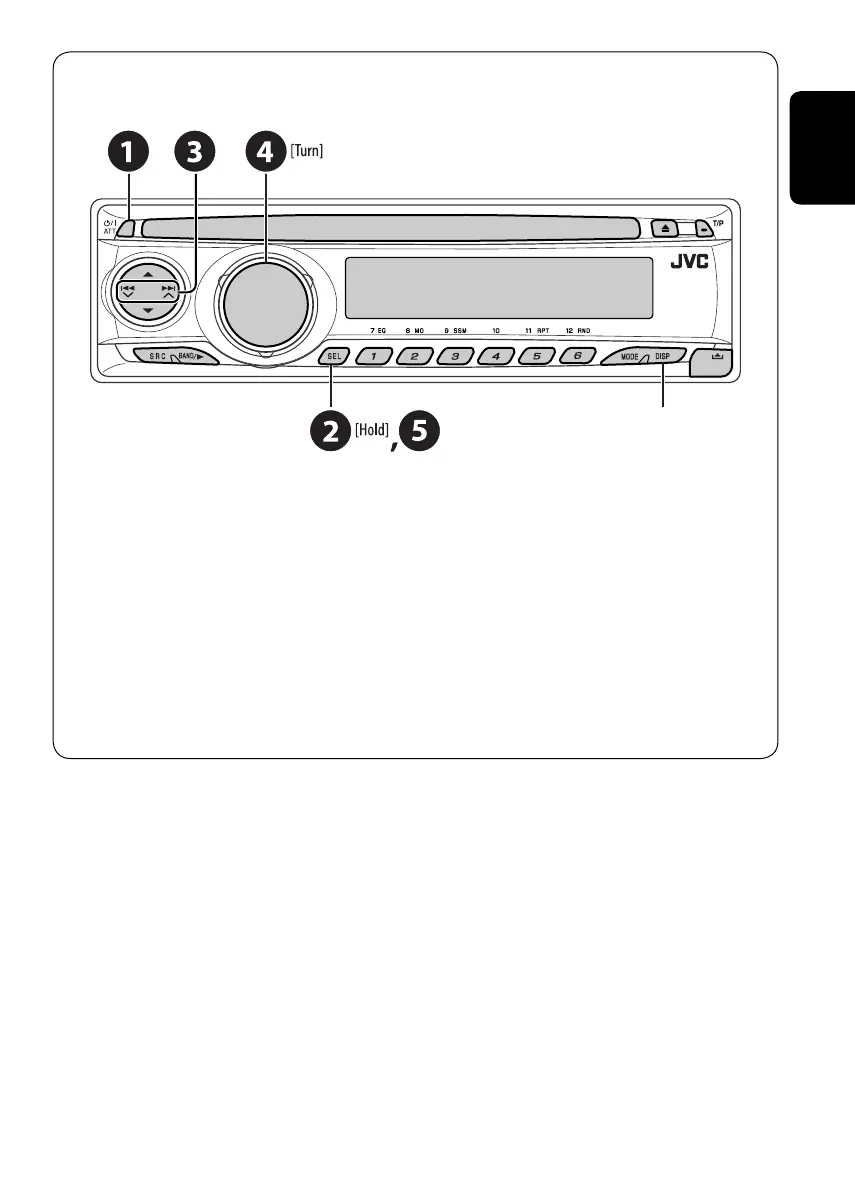
~ Turn on the power.
Ÿ Enter the PSM settings.
! ] ⁄ Cancel the display demonstrations
Select “DEMO,” then “DEMO OFF.”
Set the clock
Select “CLOCK H” (hour), then adjust the hour.
Select “CLOCK M” (minute), then adjust the minute.
Select “24H/12H,” then “24H” (hour) or “12H” (hour).
@ Finish the procedure.
When the power is turned off:
Check the current clock time
When the power is turned on:
Change the display information
EN02-05_KD-DV4202[E]3.indd 5EN02-05_KD-DV4202[E]3.indd 5 12/8/05 4:59:42 PM12/8/05 4:59:42 PM



 To Next Page