19OPERATIONS
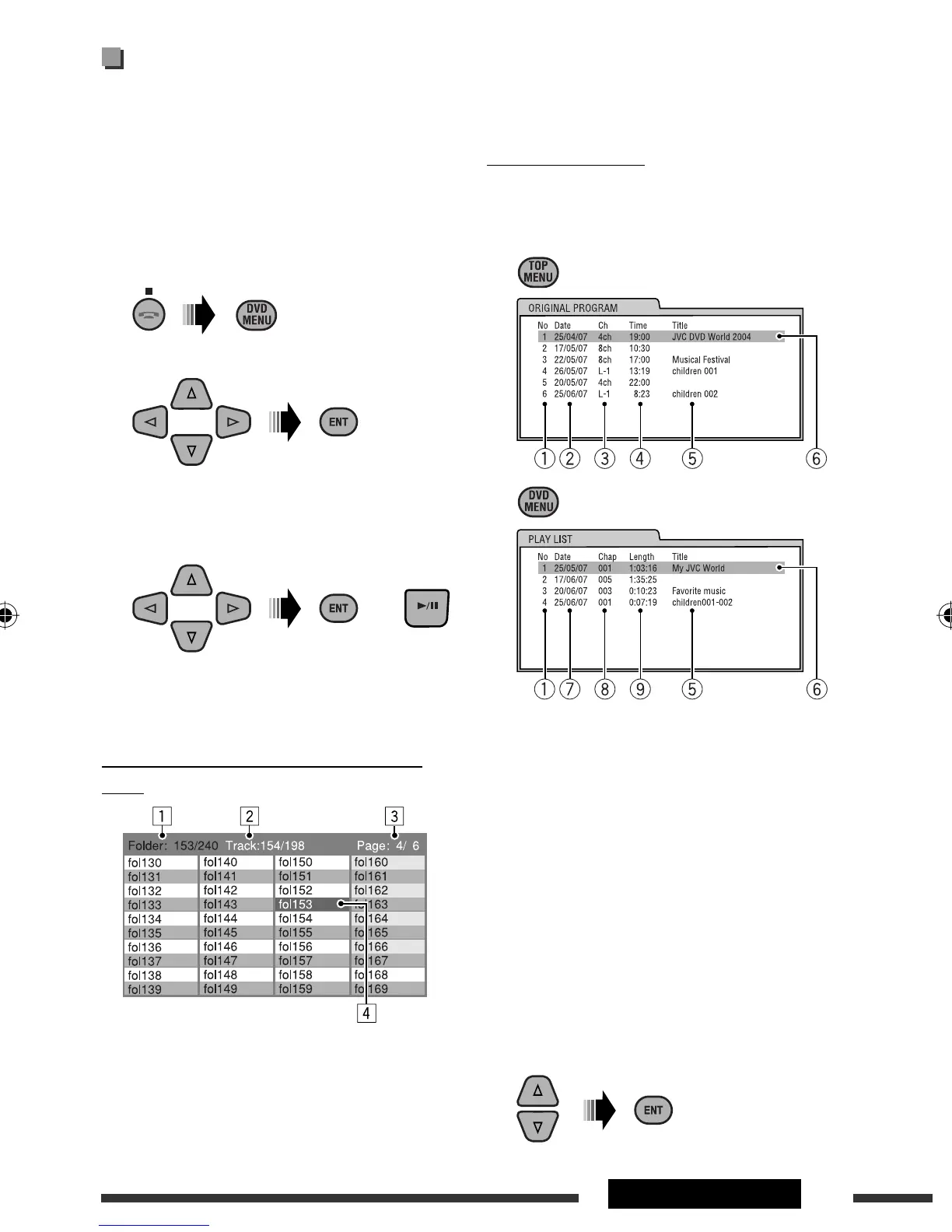
3 Current page/total number of the pages included
in the list
4 Current folder/track (highlighted bar)
List screen (DVD-VR)
You can use ORIGINAL PROGRAM or PLAY LIST screen
anytime while playing DVD-VR with its data recorded.
1 Select a list screen.
1 Program/playlist number
2 Recording date
3 Recording source (TV station, the input
terminal of the recording equipment, etc.)
4 Start time of recording
5 Title of the program/playlist *
6 Current selection (highlighted bar)
7 Creating date of playlist
8 Number of chapters
9 Playback time
* The title of the original program or playlist may
not be displayed depending on the recording
equipment.
2 Select an item from the list.
Operations using the list
screen
(DVD-VR/DivX/MPEG Video/MP3/WMA/WAV)
These operations are possible on the monitor using the
remote controller.
Before playing, you can display the folder list/track list
to confirm the contents and start playing a track.
1 Display the folder list while stop.
2 Select an item from the folder list.
• Track list of the selected folder appears.
• To go back to the folder list, press RETURN.
3 Select a track to start playing.
• MP3/WMA/WAV: Control screen appears (see
page 18).
List screen (DivX/MPEG Video/MP3/WMA/
WAV)
1 Current folder number/total folder number
2 Current track number/total number of tracks in the
current folder
Ex.: Folder list
or
EN16-23_DV4506_001A_f.indd 19EN16-23_DV4506_001A_f.indd 19 11/12/08 12:54:02 PM11/12/08 12:54:02 PM



 To Next Page