ENGLISH
23EXTERNAL DEVICES
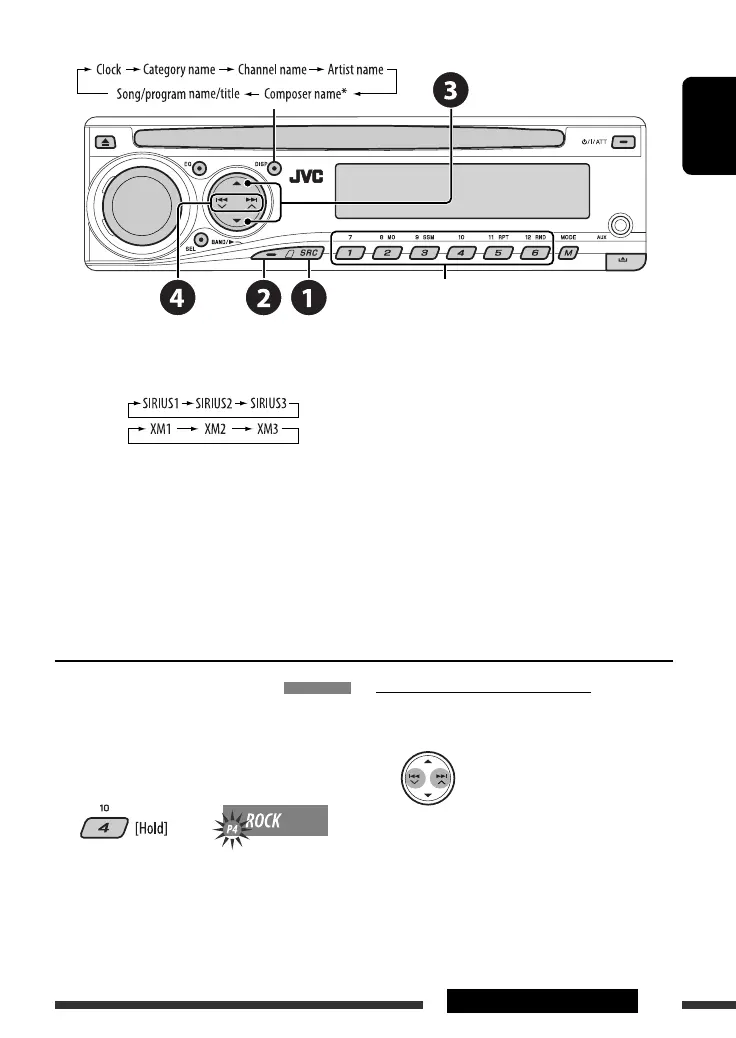
Change the display information
Select preset channel.
~ Select “SIRIUS” or “XM.”
Ÿ Select the bands.
SIRIUS:
XM:
! Select a category.
⁄ Select a channel to listen.
• Holding the button changes the channels rapidly.
• SIRIUS: If you select “ALL” in step !, you can tune in to all the channels of all categories.
• XM: If you do not select a channel within 15 seconds, category selected in step ! is canceled. You can select
all channels of all categories now (including non-categorised channels).
• While searching, invalid and unsubscribed channels are skipped.
Storing channels in memory
You can preset six channels for each band.
Ex.: Storing channels into preset number 4
1 Tune in to a channel you want.
2
* Only for SIRIUS Satellite radio
Checking the XM Satellite radio ID
While selecting “XM1,” “XM2,” or “XM3,” select
“Channel 0.”
The display alternately shows “RADIO ID” and the
8-digit (alphanumeric) ID number.
To cancel the ID number display, select any channel
other than “Channel 0.”
EN22-29_ADV5380[J]2.indd 23EN22-29_ADV5380[J]2.indd 23 11/11/06 9:15:57 AM11/11/06 9:15:57 AM


 To Next Page