9OPERATIONS
q 1 / ¡ buttons
• DVD-Video: Slow motion playback (during
pause).
• DVD-VR/VCD: Forward slow motion playback
(during pause).
• JPEG/MPEG Video/MP3/WMA/WAV/
USB
:
Reverse search/forward search.
w SOURCE button
• Selects the source.
e 3 (play) / 8 (pause) button
•
DISC/USB
: Starts/pauses playback.
r (end call) button
• Not applicable for this unit.
7 (stop) button
•
DISC/USB
: Stops playback.
t * RETURN button
•
VCD
: Returns to the PBC menu.
y * DVD MENU button
• DVD-Video: Shows the disc menu.
• DVD-VR: Shows the Playlist screen.
• VCD: Resumes PBC playback.
u * % / fi buttons
• DVD-Video: Makes selection/settings.
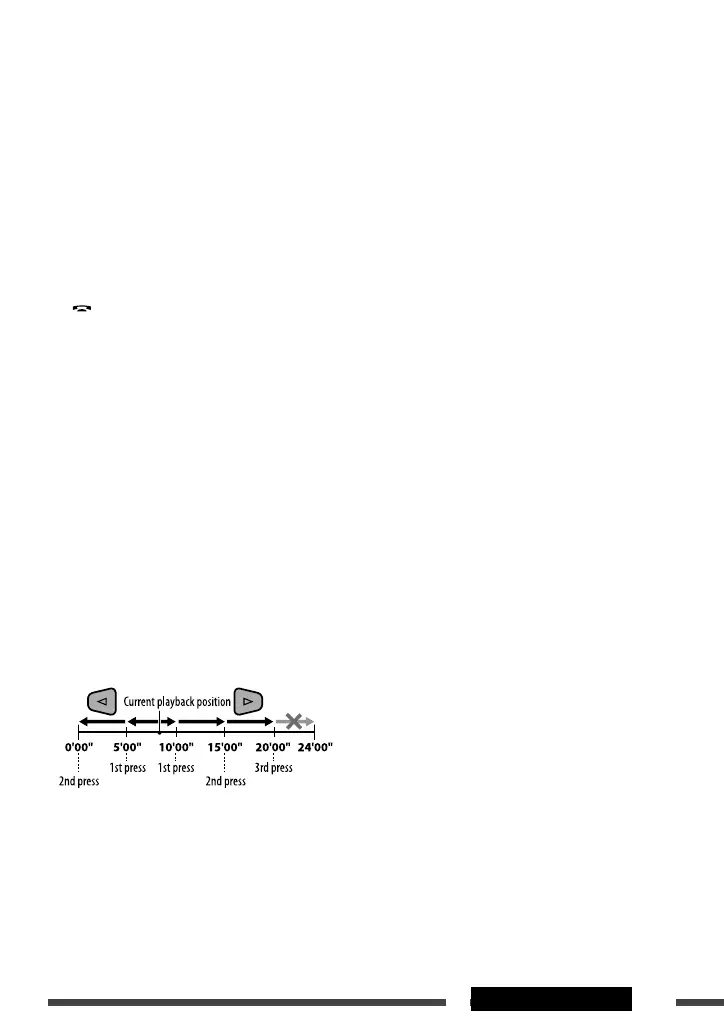
@ / # buttons
• DVD-Video: Makes selection/settings.
• JPEG/MPEG Video: Skips back or forward by
about five minutes.
ENT (enter) button
• Confirms selection.
i * DUAL button
• Not applicable for this unit.
o DIRECT button
•
DISC/USB
: Enters direct search mode for
chapter/title/program/playlist/folder/track
when pressed with SHIFT button (see page 16 for
details).
CLR (clear) button
•
DISC/USB
: Erases the misentry when pressed
with SHIFT button.
* Functions as number buttons/
*
(asterisk)/# (hatch)
when pressed with SHIFT button.
–
DISC/USB
: Enters chapter/title/program/playlist/
folder/track number after entering search mode by
pressing SHIFT and DIRECT (see page 16 for details).
EN02-09_KD-DV5606_001A_f.indd 9EN02-09_KD-DV5606_001A_f.indd 9 1/8/10 12:40:45 PM1/8/10 12:40:45 PM



 To Next Page