CAUTION:
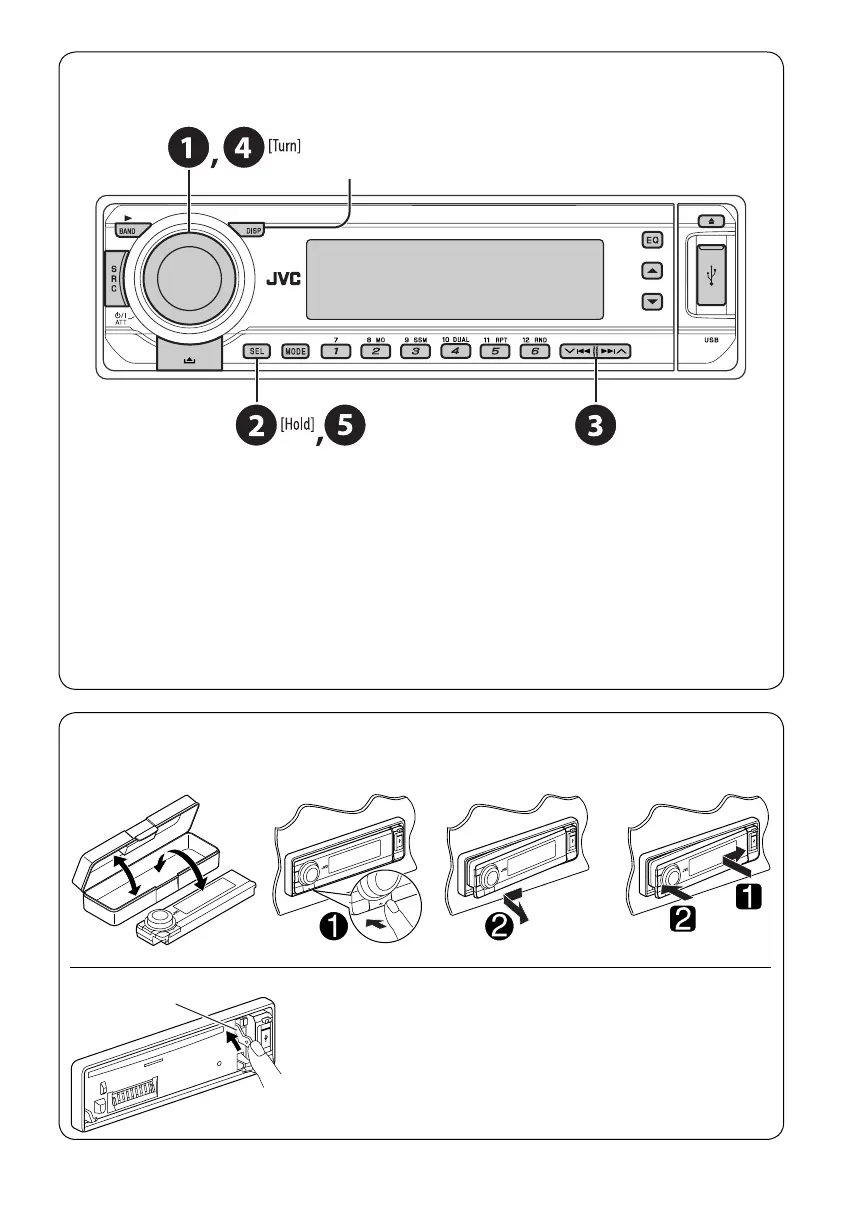
The lever comes out if you pressed the 0 button while the
panel is detached. If this happens, push the lever back into lock
position before attaching the panel.
Lever
5
Before operating the unit — Cancel the display demonstration and set the clock
• See also page 26.
~ Turn on the power.
Ÿ Enter the PSM settings.
! ] ⁄ Cancel the display demonstrations
Select “DEMO,” then “DEMO OFF.”
Set the clock
Select “CLOCK H” (hour), then adjust the hour.
Select “CLOCK M” (minute), then adjust the minute.
@ Finish the procedure.
How to detach/attach the control panel
Detaching... Attaching...
When the power is turned off: Check the current clock time
When the power is turned on: Change the display information
EN02-05_DV7206_005A_f.indd 5EN02-05_DV7206_005A_f.indd 5 1/17/06 10:53:14 AM1/17/06 10:53:14 AM


 To Next Page