67
ENGLISH
SEL
ATT
SEL
345621
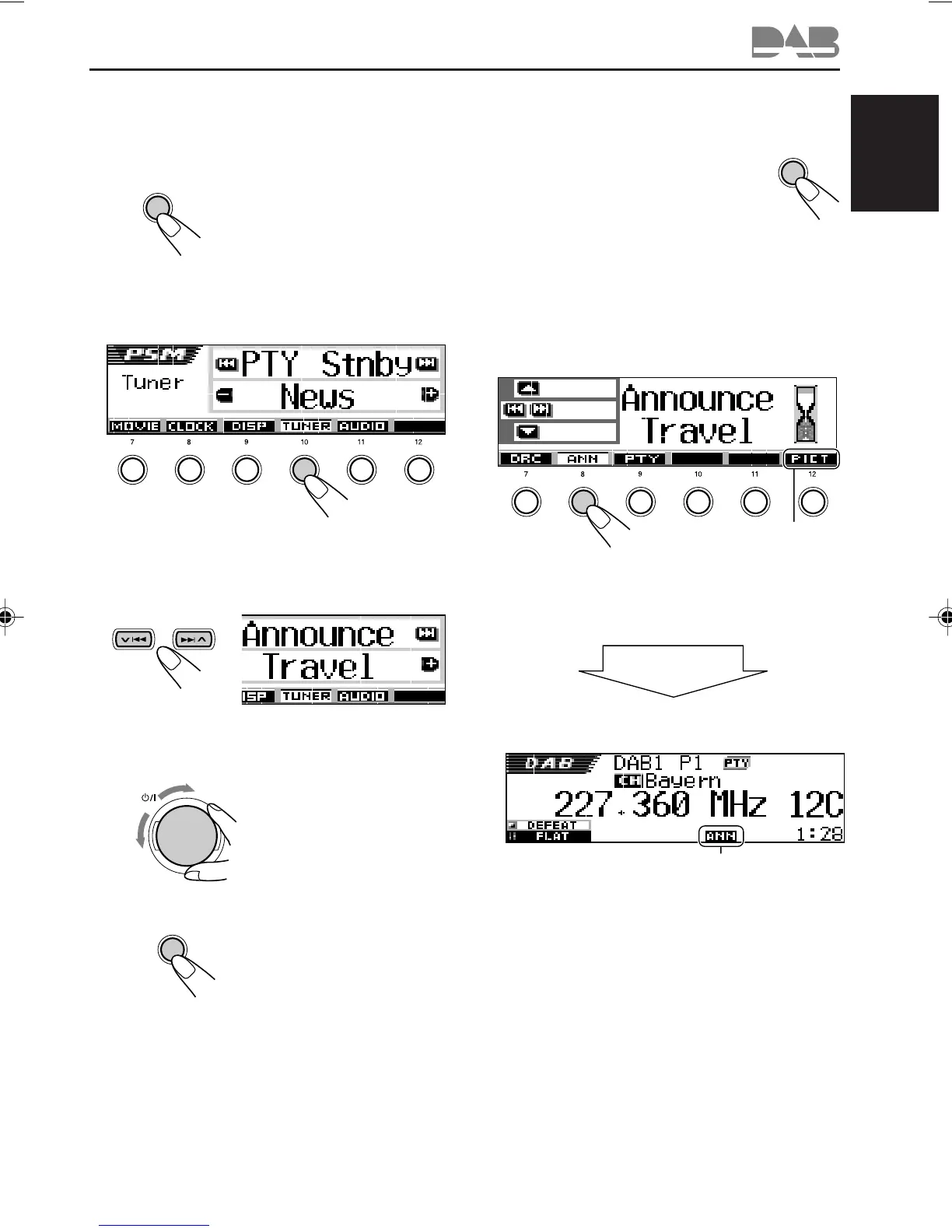
Ex.: When the currently selected
announcement type for Announcement
Standby Reception is “Travel”
To activate Announcement Standby
Reception
1 Press MODE (M) while listening to a
DAB service.
“Mode” appears on the display, and
the number buttons start flashing.
2 Press number button 2 repeatedly to activate
Announcement Standby Reception while
“Mode” is still on the display.
Each time you press the button,
Announcement Standby Reception turns on
and off alternately.
M
MODE
ANN indicator appears
(either lights up or flashes)
After about
5 seconds
The display returns to the source indication
screen.
345621
See page 40 for this
function.
1
Press and hold SEL (select) for more
than 2 seconds so that one of the
PSM items appears on the display.
(PSM: see pages 47 and 48.)
2
Press number button 4 to select
“TUNER”—Tuner category of the
PSM settings.
The “PTY Stnby” (standby) setting screen
appears on the display.
3
Select “Announce” (announcement).
4
Select one of the 9 announcement
types. (See page 68.)
Selected announcement
type appears on the
display and is stored into
memory.
5
Finish the setting.
CONTINUED ON THE NEXT PAGE
EN62-70SH9101[E_EX]f.p65 03.2.27, 23:2967



 To Next Page