10
KV-M65 (EN)
TQBX0223[J]
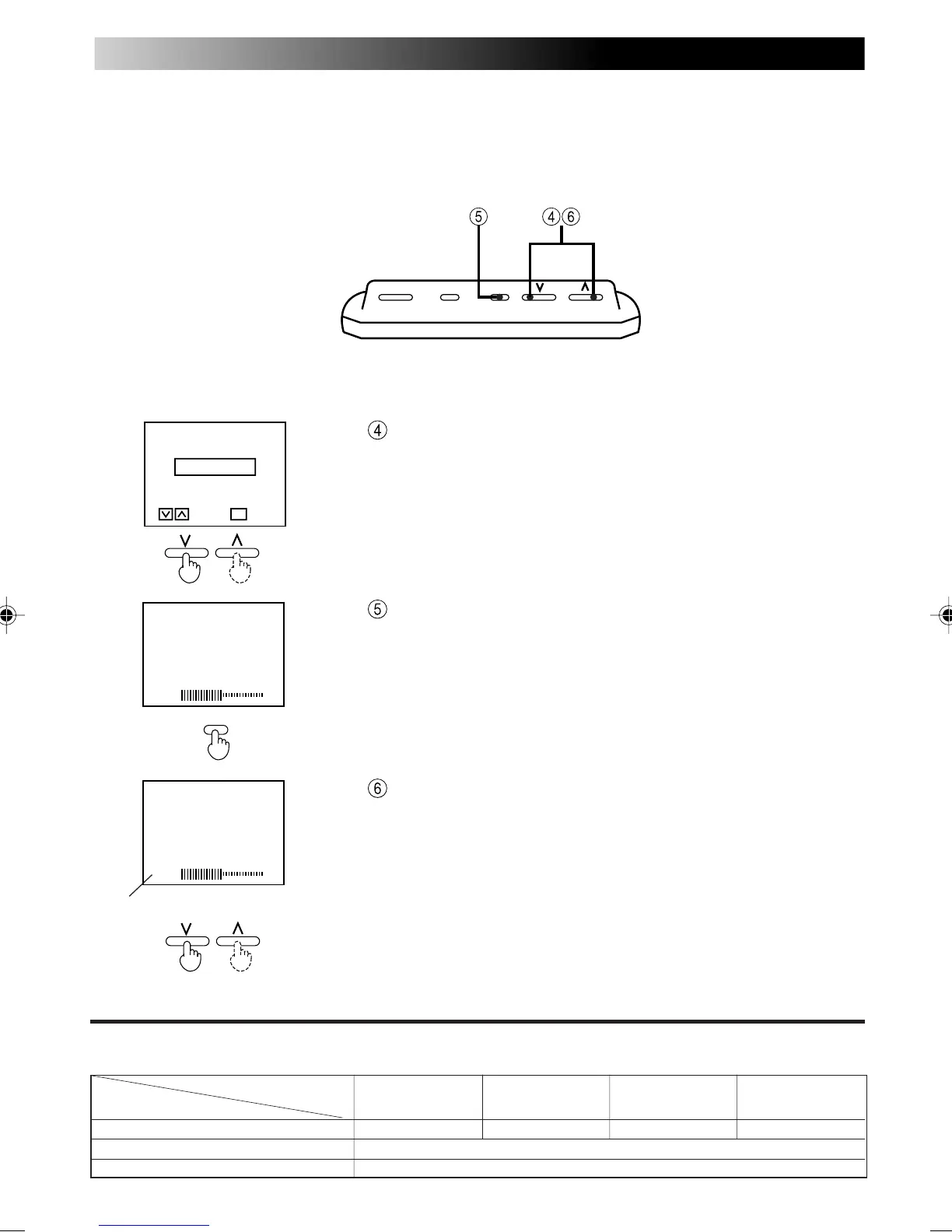
Select STANDARD.
After the SPEAKER MODE screen disappears (occurs af-
ter about 10 seconds), press the MENU button for less
than 2 seconds and show the speaker volume level dis-
play.
Adjust the speaker volume level.
Note
• Relationship between the Speaker mode setting and the built-in speaker volume
Built-in speaker volume
Speaker mode setting
Television RGB Video 1 Video 2
STANDARD Television sound – Video 1 sound Video 2 sound
NAVIGATION Not used at present. Please select either STANDARD or MUTE.
MUTE There is no sound output from the speakers
• Speaker output is monaural sound. (It is not heard as stereo sound.)
Sound level (0-60 levels)
[ SPEAKER
M
ODE ]
STANDARD
NAVIGATION
M
UTE
ENTERSELECT
M
ENU
VOLU
M
E
30
VOLU
M
E
30
MENU
POWER MODE MENUPOWER MODE MENU



 To Next Page