33
6 Using the Smart Features
Chapter
6
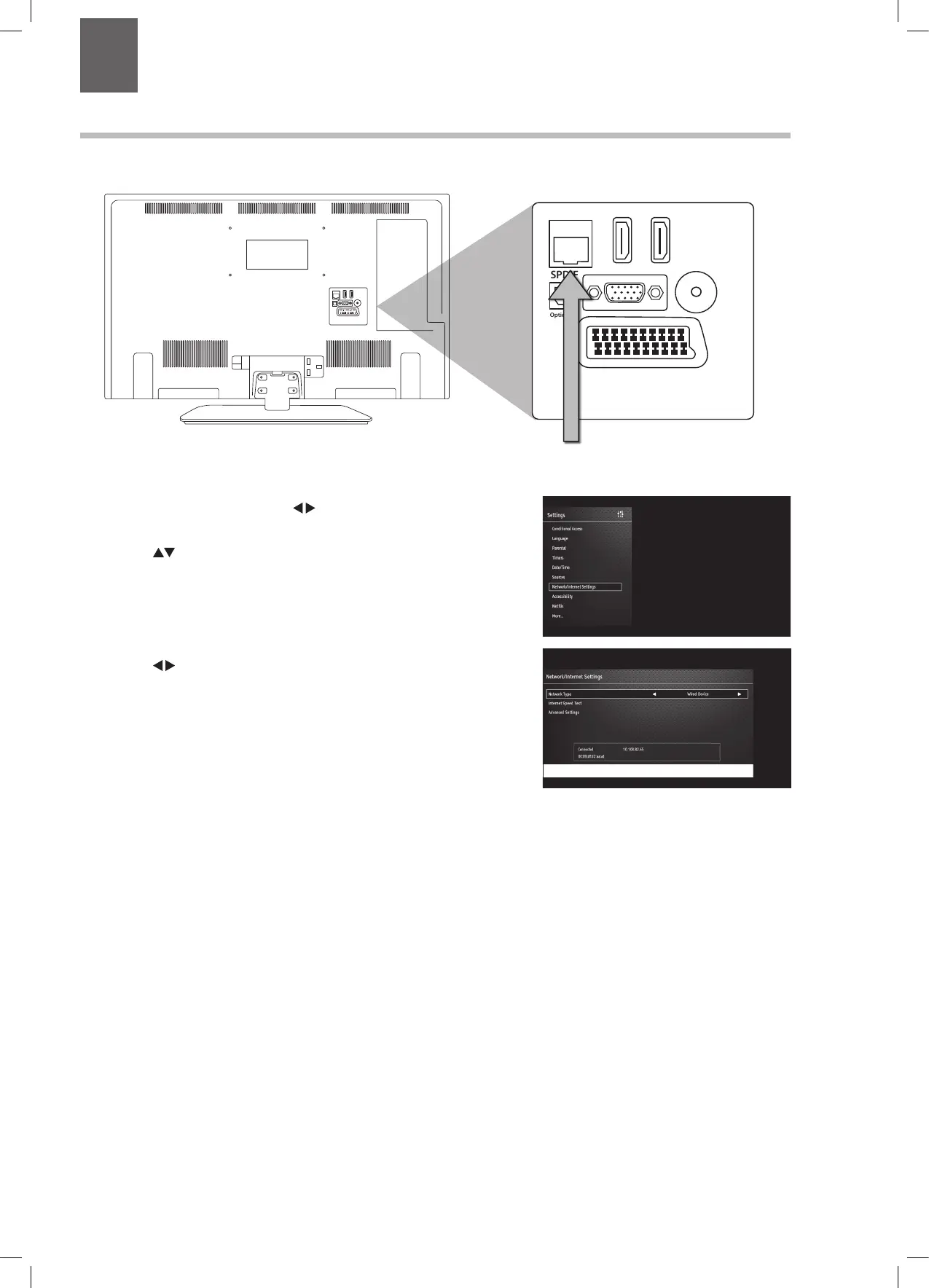
Connecting to the Internet (Wired)
For the fastest and most reliable connection we recommend connecting your TV to the internet using an ethernet cable.
1. Press the MENU button then press to select SETTINGS then
press OK.
2. Press the
buttons to select NETWORK/INTERNET SETTINGS
then press OK.
3. Press the
buttons to select wired. The word connected will
appear to show you are now connected to the internet.
SCART
SPDIF
Optic.OUT
VGA
ANT.
HDMI 1
(ARC)
HDMI 2
LAN
COMMON INTERFACE
USB
5Vdc
Max. 500mA
USB
5Vdc
Max. 500mA
SIDE AVYPbPr
MODE - / I
- +
SCART
SPDIF
Optic.OUT
VGA
ANT.
HDMI 1
(ARC)
HDMI 2
LAN
Connect your ethernet cable
to the LAN socket
LT-32C672_IB.indd 33 26/07/2017 08:13


 To Next Page