11
EN
INTRODUCTION CONNECTION
INITIAL SETTING
WATCHING TV OPTIONAL SETTING OPERATING DVD
SETTING DVD
TROUBLESHOOTING INFORMATION
Note:
• This unit accepts 480i / 480p / 720p / 1080i video signals.
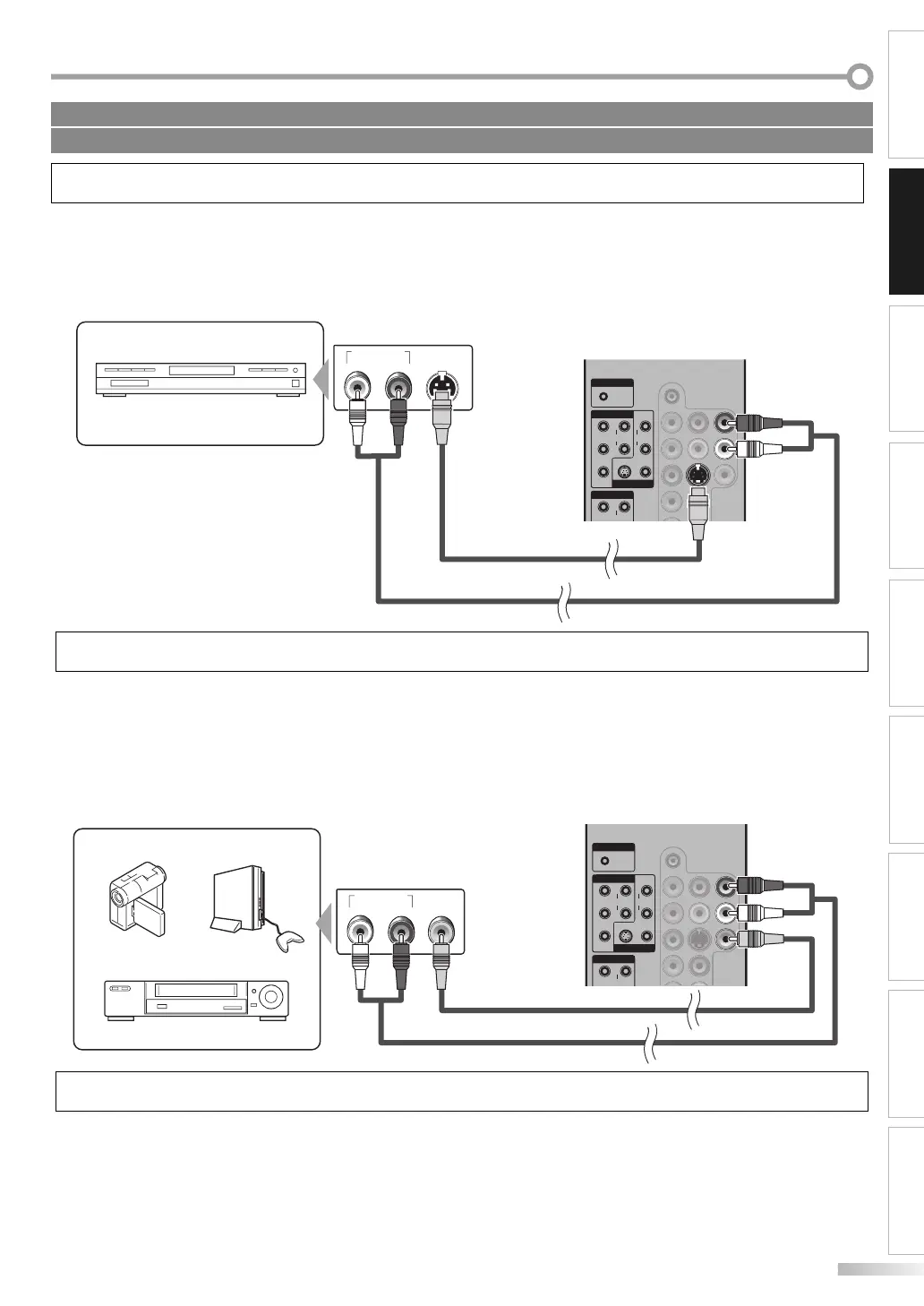
[S-video Cable Connection]
S-video connection offers good picture quality for video devices connected to the unit.
Use an S-video cable to connect the unit to external video devices equipped with S-video output jack.
If you connect to the unit’s VIDEO 1or VIDEO 2 S-video input jack, connect RCA audio cable to the audio L/R jack of
VIDEO 1 or VIDEO 2 accordingly.
AUDIO OUT
RL
S-VIDEO
OUT
COMPONENT 1
VIDEO 1
PC-IN
AUDIO
AUDIO
YR
Pb
Pr
L
AUDIO
S VIDEO VIDEO
R
L
COMPONENT 2
AUDIO
Y
R
Note:
• If you connect to the S-video jack and the video jack at the same time, the S-video connection will have priority.
[Video Connection]
Video connection offers standard picture quality for video devices connected to the unit.
If you connect to the unit’s VIDEO 1 or VIDEO 2 input jack, connect RCA audio cable to the audio L/R jack of VIDEO 1 or
VIDEO 2 accordingly.
When the audio jack of the video device is monaural, connect the RCA audio cable to the audio L input jack.
COMPONENT 1
VIDEO 1
PC-IN
AUDIO
AUDIO
YR
Pb
Pr
L
AUDIO
S VIDEO VIDEO
R
L
COMPONENT 2
AUDIO
Y
R
AUDIO OUT
RL
VIDEO
OUT
Note:
• If you connect to the S-video jack and the video jack at the same time, the S-video connection will have priority.
Cables not included.
Please purchase the necessary cables at your local store.
e.g.)
DVD recorder with the S-video
output jack
rear of this unit
S-video cable
RCA audio cable
e.g.)
camcorder video game
VCR
RCA video cable
RCA audio cable
rear of this unit


 To Next Page
 Loading...