English - 5 -
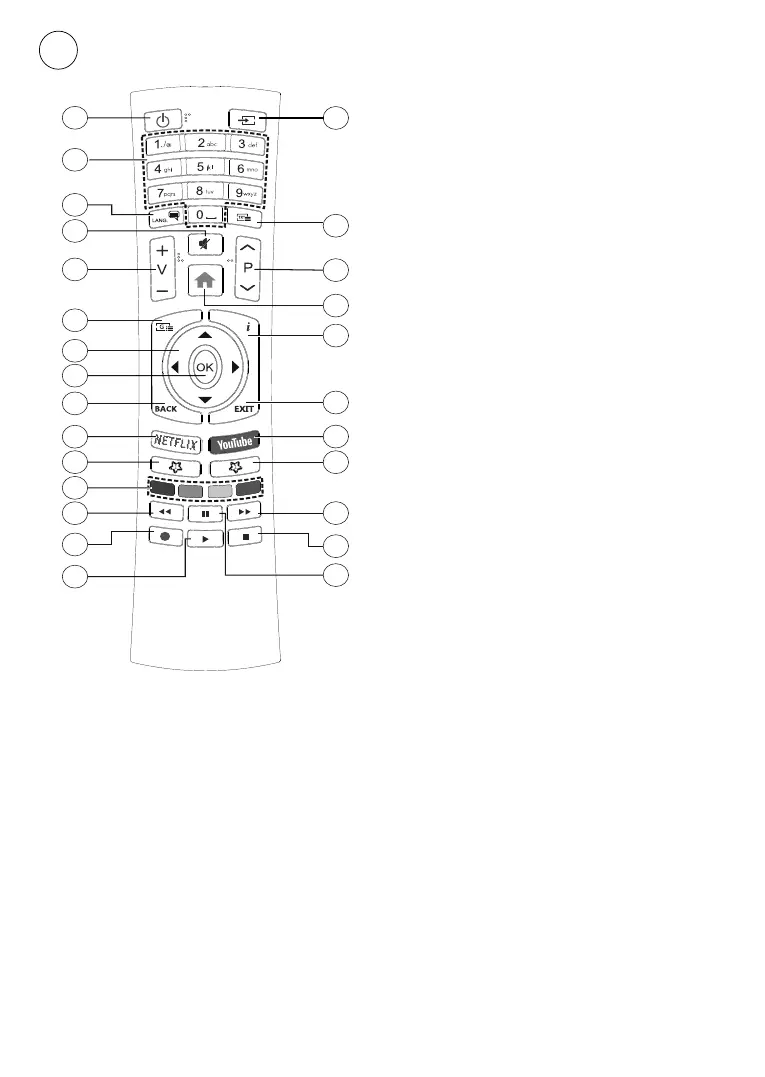
Remote control RC4390
5
4
1
3
6
7
9
11
13
14
15
5
26
25
24
23
19
18
17
16
8
2
21
22
10
20
12
1. Standby:
2. Numeric buttons:
TV mode, enters a number or a letter in the text
box on the screen
3. Language:
(analogue TV), displays and changes audio
language (digital TV, where available)
4. Mute:
5. Volume +/-
6. Menu:
mode, displays available setting options such as
sound and picture
7. Directional buttons:
options, moves the focus or cursor etc., sets
8. OK: Confirms selections, enters sub-menus,
9. Back/Return: Returns to previous menu screen,
goes one step back, closes open windows, closes
teletextTeletext mode)
10.
11. MyButton1:
menu on available sources
12. Coloured Buttons:
instructions for coloured button functions
13. Rewind: Moves frames backwards in media
such as movies
14. Record:
mode(**)
15. Play/Pause button (*)
16. Play/Pause button (*)
17. Stop:
18. Fast forward: Moves frames forward in media
such as movies
19. Guide: Displays the electronic programme guide
20. YouTube:
21. Exit:
switches to last
set source
22. Info: Displays information about on-screen
content
23. Home:
24. Programme +/-: Increases/Decreases channel
25. Text:
26. Source:
content sources,
switches to last set source
(*) Play - Starts to play selected media
Pause - Pauses the media being played, starts
timeshift recording in Live TV mode(**)
(**) If this feature is supported by your TV.



 To Next Page