19
POWER
TIMER
MODE
TV STB VCR DVD AUDIO
INPUT
123
456
789
0
TUNE
TV
RETURN
+
iPod MUTING
– CH + – VOL +
RM-C1485
TV
OK
M
E
N
U
B
A
C
K
V1 V2 V3 V4 V5
TV DVD/DVR DBB TUNER USB
TV
RETURN
+
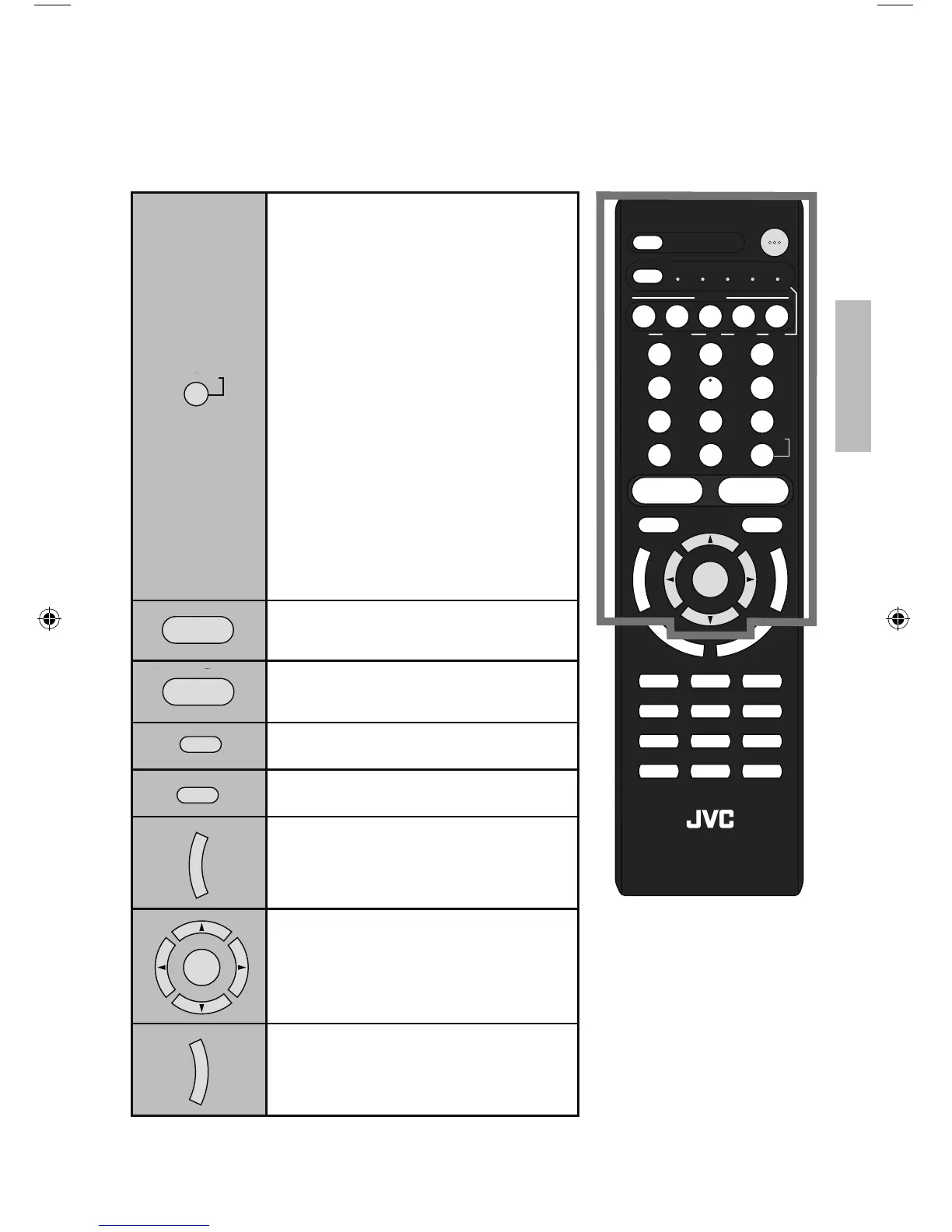
Has three functions.
Return – Returns to the channel viewed
just before the channel
currently onscreen.
Return+ – Lets you program a specific
channel to return to while
scanning through the
channels using the – CH +
button as you memorize the
channel.
TV – Returns to the TV mode as you are
watching a video, DVD, etc.
Note:
• Press TUNE and RETURN+ TV
buttons. This will memorize the
current channel to return to while you
scan through the other channels. To
cancel, press TUNE and RETURN+
TV buttons again.
– CH +
Move sequentially through the channels.
– VOL +
Raise or lower the volume.
iPod
Control your iPod connected to the TV.
See page 46.
MUTING
Turns the TV volume to 0. Press again
to restore the volume.
M
E
N
U
Used to access the TV’s onscreen
menus. See page 24.
OK
Used to navigate through the TV’s
onscreen menus.
B
A
C
K
Go back to a previous onscreen menu or
to correct a mistake.
Basics
LCT2518-001A-A.indd 19LCT2518-001A-A.indd 19 1/14/09 8:55:00 AM1/14/09 8:55:00 AM



 To Next Page