34
Password
MPAA
Can. Eng.
Can Fre.
TVPG
NR
G
PG
PG13
R
NC-17
X
OK
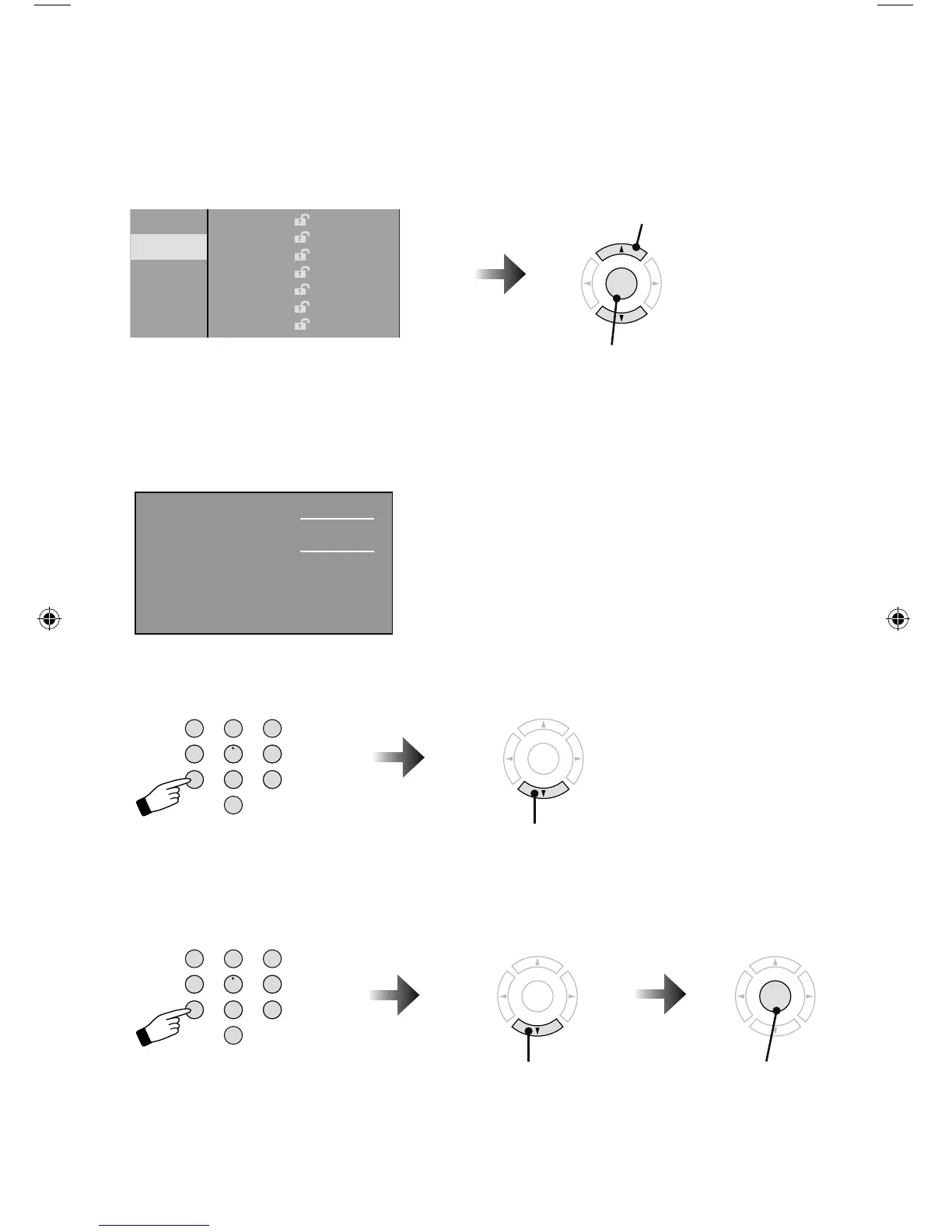
1 Select
2 Lock / Unlock
– When you lock or unlock channels –
You can lock or unlock ratings as shown below.
Note:
• If you lock a rating, any rating that is higher is automatically blocked.
Password
You can change the four digit password using
the number buttons on your remote.
* If you forget your password, unplug the TV
from the wall and then plug it back in. Your
password will reset to “0000”
1) Set a new password
OK
Next
Enter the four digit number
Enter the four digit number
2) Confi rm and set
OK
Set
OK
Next
123
456
789
0
TUNE
TV
RETURN
+
123
456
789
0
TUNE
TV
RETURN
+
Customizing your TV
New Password
Confirm Password
OK Clear
LCT2518-001A-A.indd 34LCT2518-001A-A.indd 34 1/14/09 8:55:13 AM1/14/09 8:55:13 AM



 To Next Page