MX-GT98V/MX-GT95V/MX-GT88V
MX-GT85V/MX-G78V/MX-G75V
1-15
Prior to performing the following procedures, remove
the front panel.
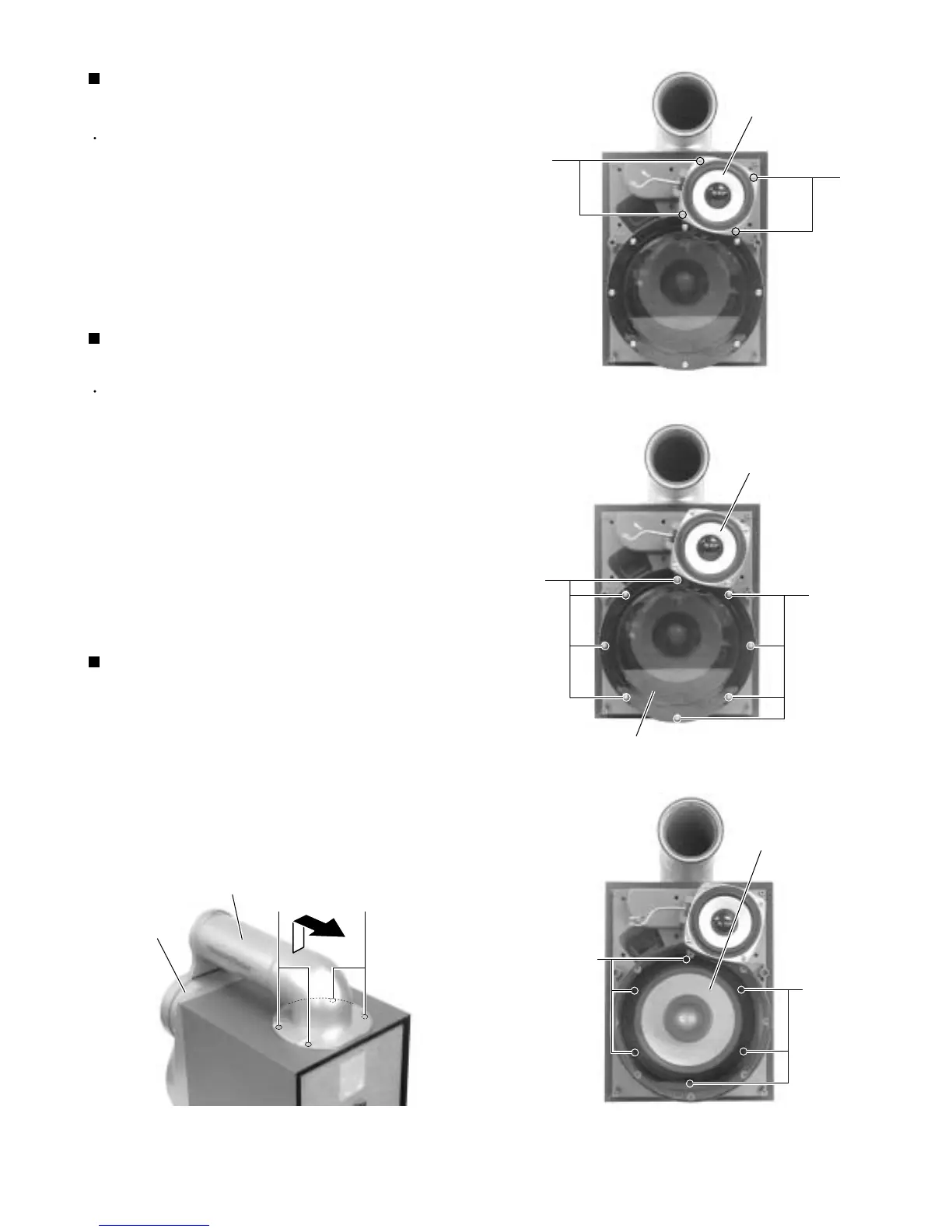
Remove the four screws E attaching the speaker
(squawker) on the front of the body.
Disconnect the wire from the two speaker terminals
of the speaker (squawker).
1.
2.
Removing the speaker (squawker)
(See Fig.5)
Prior to performing the following procedures, remove
the front panel.
Remove the eight screws D attaching the punch
panel on the front of the body.
Remove the six screws F attaching the speaker
(woofer) on the front of the body.
Remove the speaker (woofer) toward the front and
disconnect the wire from the two speaker terminals.
1.
2.
3.
Removing the speaker (woofer)
(See Fig.6 and 7)
Remove the four screws G attaching the duct on the
upper side of the body.
Move the duct upwards and pull out backward.
1.
2.
Removing the duct (See Fig.8)
Fig.5
Fig.6
Fig.7Fig.8
D
Speaker (squawker)
D
E
E
Speaker (woofer)
F
Front panel
G
Duct
G
Speaker (squawker)
Punch panel
F



 To Next Page