EasyManua.ls Logo

JVC MX-J30 - Page 47

JVC MX-J30
102 pages
Print Icon
To Next Page IconTo Next Page
To Previous Page IconTo Previous Page
Loading...
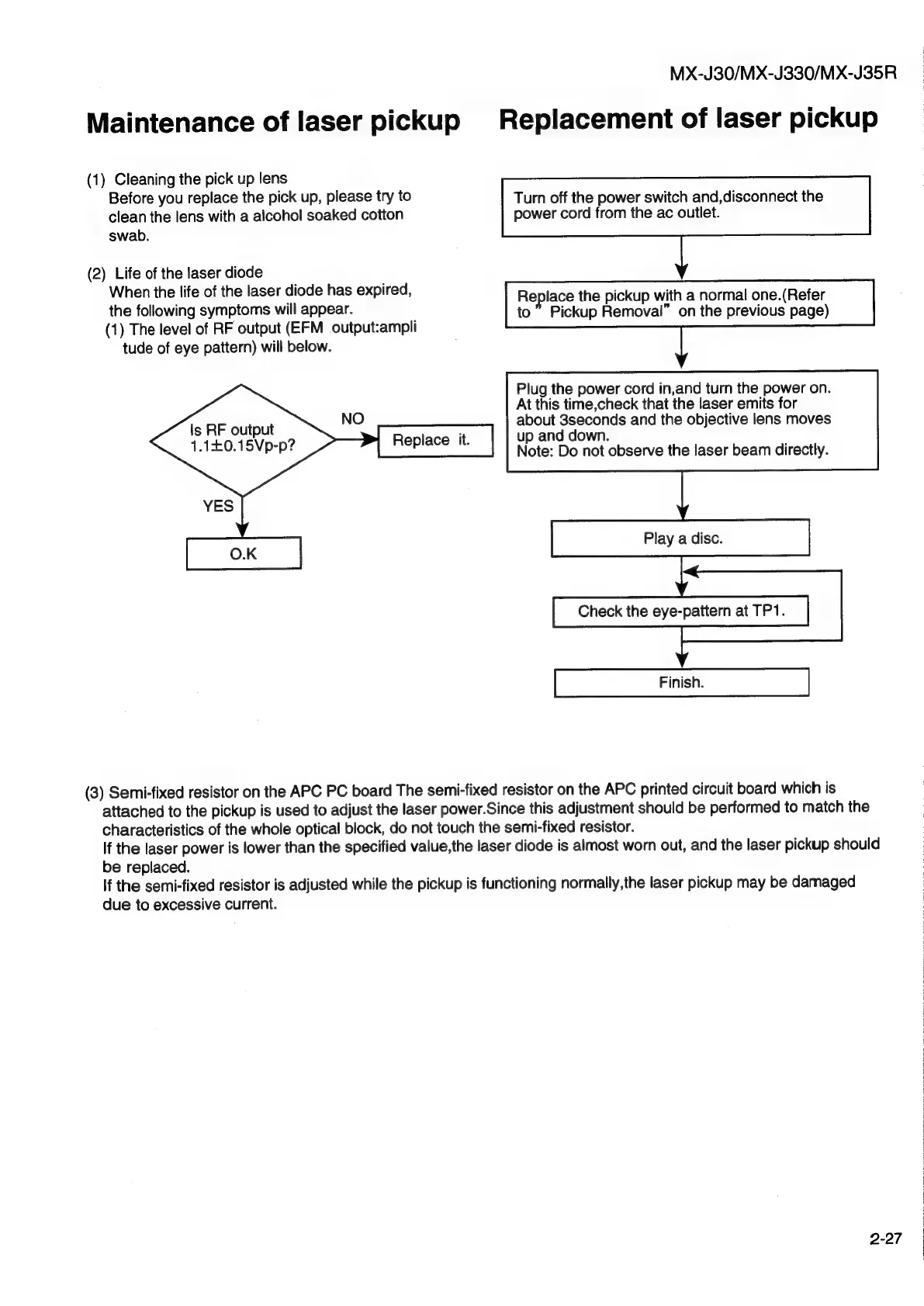
Maintenance
of
laser
pickup
(1)
Cleaning
the
pick
up
lens
Before
you
replace
the
pick
up,
please
try
to
clean
the
lens
with
a
alcohol
soaked
cotton
swab.
(2)
Life
of
the
laser
diode
When
the
life
of
the
laser
diode
has
expired,
the
following
symptoms
will
appear.
(1)
The
level
of
RF
output
(EFM
output:ampli
tude
of
eye
pattern)
will
below.
Is
RF
output
1.140.15Vp-p?
Replace
it.
MX-J30/MX-J330/MX-J35R
Replacement
of
laser
pickup
Turn
off
the
power
switch
and,disconnect
the
power
cord
from
the
ac
outlet.
Rep
lace
the
pickup
with
a
normal
one.(Refer
to
Pickup
Removal”
on
the
previous
page)
Plug
the
power
cord
in,and
turn
the
power
on.
At
this
time,check
that
the
laser
emits
for
about
3seconds
and
the
objective
lens
moves
up
and
down.
Note:
Do
not
observe
the
laser
beam
directly.
Play
a
disc.
Check
the
eye-pattern
at
TP1.
(3)
Semi-fixed
resistor
on
the
APC
PC
board
The
semi-fixed
resistor
on
the
APC
printed
circuit
board
which
is
attached
to
the
pickup
is
used
to
adjust
the
laser
power.Since
this
adjustment
should
be
performed
to
match
the
characteristics
of
the
whole
optical
block,
do
not
touch
the
semi-fixed
resistor.
If
the
laser
power
is
lower
than
the
specified
value,the
laser
diode
is
almost
worn
out,
and
the
laser
pickup
should
be
replaced.
If
the
semi-fixed
resistor
is
adjusted
while
the
pickup
is
functioning
normally,the
laser
pickup
may
be
damaged
due
to
excessive
current.
2-27

Other manuals for JVC MX-J30

Related product manuals