EasyManua.ls Logo

JVC MX-J30 - Page 52

JVC MX-J30
102 pages
Print Icon
To Next Page IconTo Next Page
To Previous Page IconTo Previous Page
Loading...
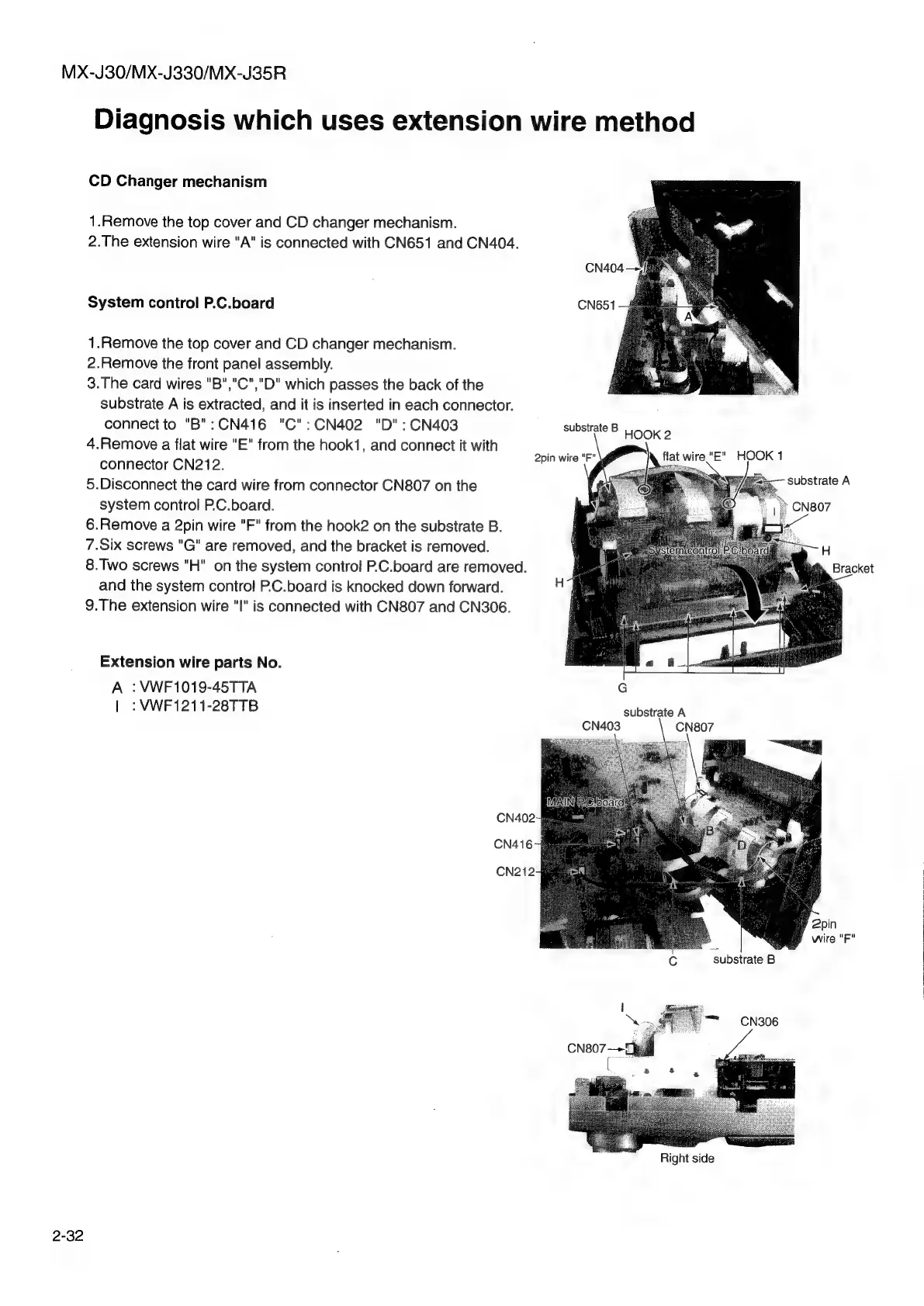
MX-J30/MX-J330/MX-J35R
Diagnosis
which
uses
extension
wire
method
CD
Changer
mechanism
1.Remove
the
top
cover
and
CD
changer
mechanism.
2.The
extension
wire
"A"
is
connected
with
CN651
and
CN404.
System
control
P.C.board
1.Remove
the
top
cover
and
CD
changer
mechanism.
2.Remove
the
front
panel
assembly.
3.The
card
wires
"B","C","D"
which
passes
the
back
of
the
substrate
A
is
extracted,
and
it
is
inserted
in
each
connector.
connect
to
"B":CN416
"C":CN402
"D":CN403
4.Remove
a
flat
wire
"E"
from
the
hook1,
and
connect
it
with
connector
CN212.
5.Disconnect
the
card
wire
from
connector
CN807
on
the
system
control
P.C.board.
6.Remove
a
2pin
wire
"F"
from
the
hook2
on
the
substrate
B.
7.Six
screws
"G"
are
removed,
and
the
bracket
is
removed.
8.Two
screws
"H"
on
the
system
control
P.C.board
are
removed.
and
the
system
control
P.C.board
is
knocked
down
forward.
9.The
extension
wire
"I"
is
connected
with
CN807
and
CN306.
Extension
wire
parts
No.
A
:
VWF1019-45TTA
|
:
VWF1211-28TTB
2-32
CN404—¥]
CN651
substrate
B
HOOK
2
2pin
wire
"F"
\@
substrate
A
Se
Bracket
substrate
A
CN807
y
2pin
}
wire
"F"
‘substrate
B
Right
side