33
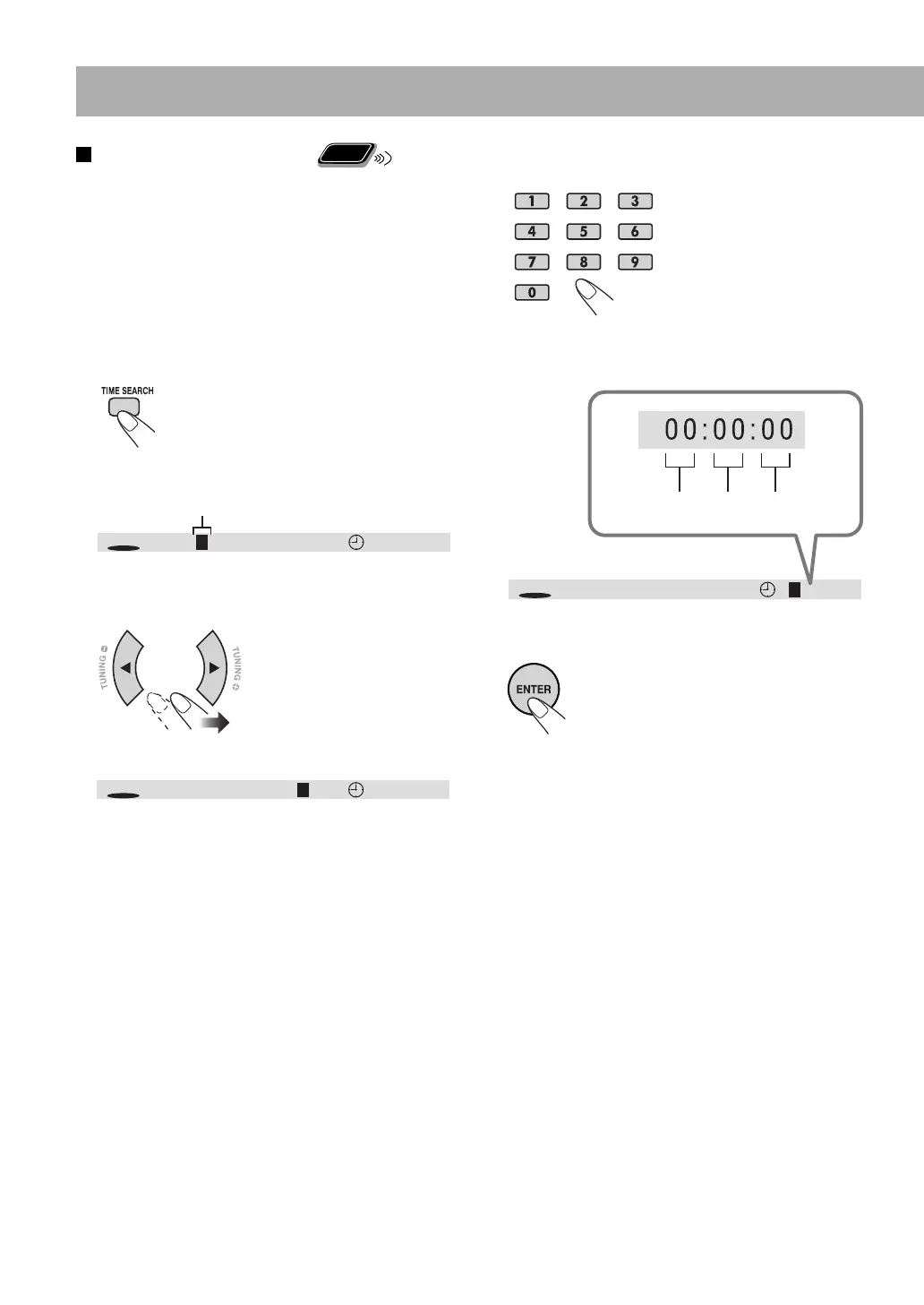
3 Enter the number.
When entering the elapsed playback time
You can specify the time in hours/minutes/seconds.
4 Confirm your entry.
The System starts playing from the
selected position.
To select the position to play
Remote
ONLY
Using the on-screen bar, you can select the title/chapter/
track to play. You can also select a particular point by
specifying the elapsed playback time from the beginning
using the on-screen bar.
• This function is not available during Program Play and
Random Play.
1 While playing, display the on-screen bar.
• You can also select the position to play before starting
playback.
Ex.: When a DVD Video is played
2 Move the highlight to the position you want to specify.
Highlighted
TT
DVD
CH 001/006 00:00:410 1/07
TT
DVD
CH 001 /006 01/070 0:00:41
TT
DVD
CH 001/00601/07 0 0:00:41
SecondsMinutesHours
EN_NX-T10[UG]_CS2.indb 33EN_NX-T10[UG]_CS2.indb 33 09.12.14 9:53:23 PM09.12.14 9:53:23 PM



 To Next Page
 Loading...