EasyManua.ls Logo

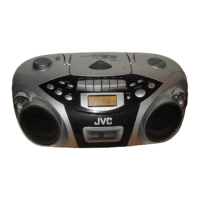
JVC RC-EX25S - User Manual

JVC RC-EX25S
79 pages
Print Icon
To Next Page IconTo Next Page
Loading...
INSTRUCTIONS
RC-EX25S
LVT1212-003A
[B]
CD PORTABLE SYSTEM
PUSH
PLAY/PAUSE
STOP
M
U
TIN
G
HB
S/
PRE
S
ET E
Q
P
R
O
G
R
A
M
/
C
L
O
C
K
S
E
T
A
d
d
"
/"
F
M
M
O
D
E
DISPLAY
TAP E
CD
BAND
RANDOM
TUNER
PRESET
CD REPEA
T
REMOTE
SENSOR
CD/
RANDOM
TAPE
FM MODE
+
INTRO STOP
HBS/
PRESET EQ
MUTING
STANDBY/ON DISPLAY
+
VOLUMEPRESET
CD REPEAT/
TUNER/
BAND
CD PLAY
/PAUSE
RM-SRCEX25A REMOTE CONTROL
00_FCV_RC-EX25S_B.p65 04.4.7, 4:50 PM1

Other manuals for JVC RC-EX25S

Questions and Answers

  • S
    Sharon BaxterJul 28, 2025
    What to do if my JVC CD Player disc is loaded but does not play?
    • S
      stephanie49Jul 28, 2025
      If your JVC CD Player disc is loaded but not playing, there might be several reasons: * The disc may be loaded upside down. Ensure the label side is facing up. * The disc could be dirty. Try cleaning it carefully. * The disc might be damaged or warped; in this case, replace it with a playable one. * The lens could be dirty, requiring cleaning. * Moisture condensation might be present. If so, turn the unit on and wait one or two hours before use.
  • W
    william04Aug 1, 2025
    Why is there no sound coming from my JVC CD Player speakers?
    • E
      Emily MorenoAug 2, 2025
      If you're experiencing no sound from the speakers of your JVC CD Player, check if headphones are connected. If they are, disconnect them to restore sound to the speakers.
  • N
    Nicole BaileyAug 6, 2025
    Why is the remote control not working for my JVC RC-EX25S?
    • K
      Kelsey AdamsAug 6, 2025
      If the remote control for your JVC CD Player isn't working, the batteries in the remote control unit may be run down. Replace them with new ones. Also, the remote sensor section may be exposed to bright light (direct sunlight, etc.). Try not to operate the unit under direct sunlight.
  • R
    Ryan HarperAug 10, 2025
    Why won't my JVC RC-EX25S turn on?
    • N
      natalie77Aug 10, 2025
      If your JVC CD Player's power cannot be turned on, the power cord may be unplugged. Connect the power cord.
  • S
    Stephanie HammondAug 14, 2025
    How to improve radio reception on my JVC CD Player?
    • C
      Christopher MaysAug 15, 2025
      If the radio reception on your JVC CD Player is poor with a lot of static, the antenna may not be properly adjusted. Adjust the antenna correctly.
  • C
    Christian DavidsonAug 19, 2025
    What to do if REC does not function on JVC RC-EX25S CD Player?
    • K
      Kelly MitchellAug 19, 2025
      If REC ¶ does not function on your JVC CD Player, the safety tabs of the cassette have been broken off. Also, make sure that a cassette is loaded.
  • M
    Michelle SullivanAug 23, 2025
    What to do if tape does not move when pressing PLAY 2 on JVC RC-EX25S CD Player?
    • A
      Adam DillonAug 23, 2025
      If, when you press PLAY 2 on your JVC CD Player, the tape does not move, the PAUSE 8 button may be pressed. Press PAUSE 8 again to release it.

Summary

Warnings, Cautions and Others

Laser Product Safety Warnings

Precautions regarding laser radiation and unit servicing.

Standby;ON Button Power Disconnection

Cautionary note about the STANDBY/ON button and mains disconnection.

General Electrical Safety Precautions

General precautions to reduce risks of electrical shocks and fire.

Safety Instructions

Safe Equipment Usage: Dos and Donts

Guidelines and warnings for the safe use of the equipment.

Safety Precautions

Preventing Shocks, Fires, and Damage

Precautions to prevent electric shocks, fires, and damage to the unit.

Power Supply

Battery Installation and Types

Guidance on installing and using batteries.

Battery Usage Safety Warnings

Crucial safety warnings for battery handling and disposal.

Turning the Unit On;Off

Powering the Unit On and Off

How to turn the unit on and off using the power button.

Setting the Clock

Clock Time Configuration Procedure

Step-by-step guide to setting the unit's clock.

Adjusting the Sound

Volume and Temporary Muting

Adjusting volume levels and temporary sound muting.

Basic CD Operation

CD Playback Control

Steps for starting, stopping, pausing, and resuming CD playback.

CD Playback Navigation

Track Skipping and Search

Functions for skipping tracks and searching within a disc.

Programmed CD Playback

Programming and Playback

Steps to program tracks and start programmed playback.

Radio Reception

Tuning Radio Stations

How to tune into AM and FM radio stations.

Presetting Radio Stations

Presetting Radio Stations

How to store and recall favorite radio stations.

Basic Cassette Operation

Tape Playback and Control

Playing, stopping, and fast-winding cassette tapes.

Recording

Standard Recording Process

Steps for recording from radio or CD onto tape.

Synchronized Recording and Erasing

Maintenance

Troubleshooting

Common Issues and Solutions

Diagnosing and resolving common unit problems.

JVC RC-EX25S Specifications

General IconGeneral
Playable CD FormatsCD, CD-R, CD-RW
Cassette DeckYes
CD PlayerYes
TypeCD Player
Radio TunerFM/AM
Output Power2 x 2.5 W
Speaker Configuration2
Power SourceBatteries

Related product manuals