8
Getting Started
Control Panel (continued)
B
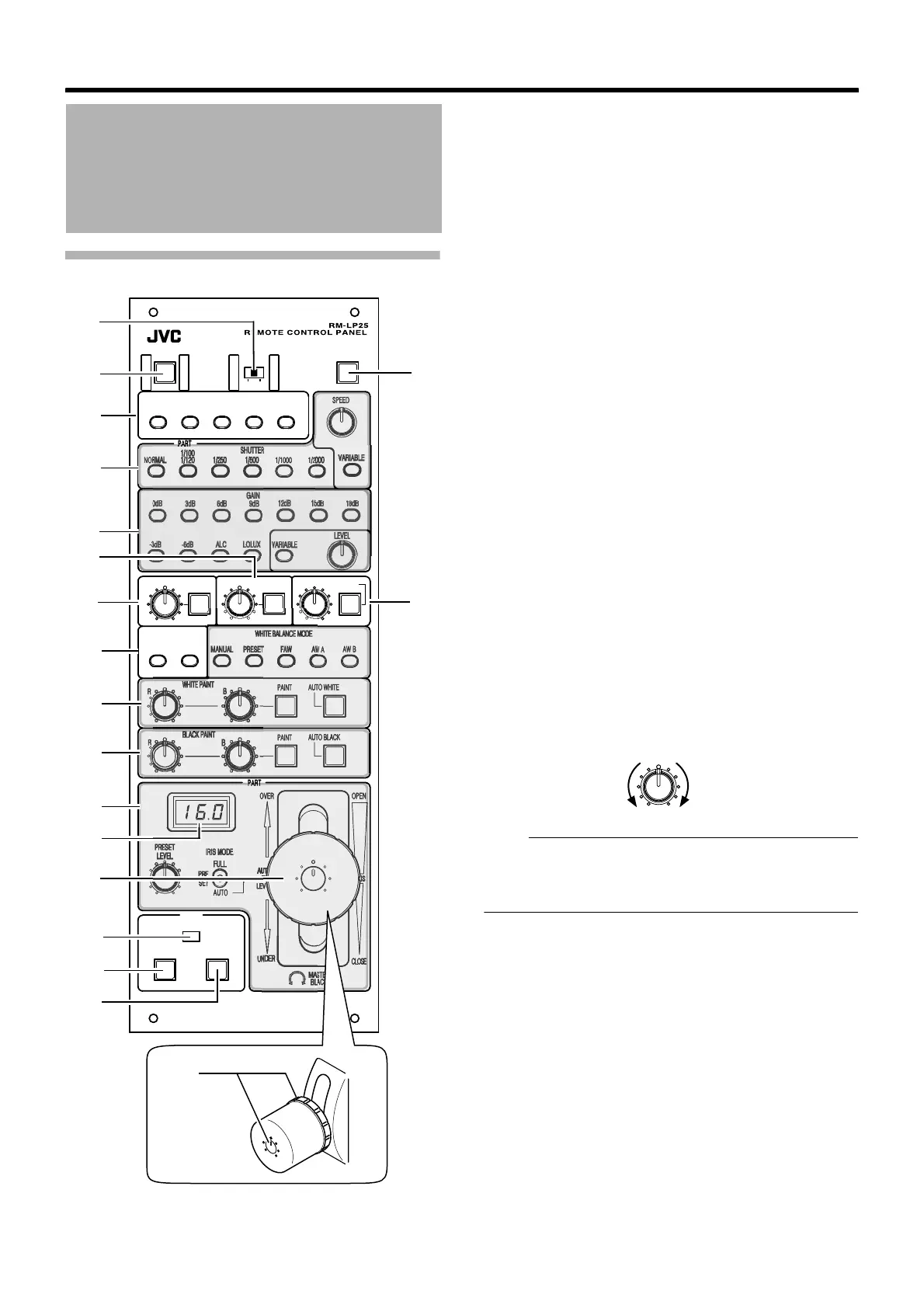
[OPERATE]Operate Button and Indicator Light
C
[SCENE FILE 1 to 5]Scene File Button and Indicator
Light(
A
19 page)
For storing the scene file data and loading/clearing the
preset scene file data.
D
[SHUTTER]Shutter Speed Control Unit(
A
15 page)
For specifying the shutter settings.
E
[GAIN]Gain Control Unit(
A
16 page)
For specifying the gain settings.
F
[DETAIL]/[LEVEL] Detail Control Unit
[DETAIL] Detail button and indicator light:
For turning ON/OFF the detail (contour) enhancement level
control.
[LEVEL] level adjustment knob:
For adjusting the detail level.
Note:
● The feature is not available on the camera if the light of
the corresponding button is not lit. Control using this unit
is disabled in this case.
G
[GAMMA]/[LEVEL] Gamma Control Unit
[GAMMA] Gamma button and indicator light:
For turning ON/OFF the gamma level control.
Names and Functions of Parts
(continued)
-3
L
E
V
E
L
L
E
V
E
L
G
A
M
M
A
D
E
T
A
I
L
K
N
E
E
P
O
I
N
T
A
U
T
O
K
N
E
E
B
L
A
C
K
C
O
M
P
R
E
S
S
S
T
R
E
T
C
H
R
R
PAINT
PAINT
AUTO WHITE
AUTO BLACK
AUTO
OVER OPEN
UN
CLOSE
STER
ACK
T
A
L
L
Y
C
A
L
L
P
R
E
V
I
E
W
1
O
P
E
R
A
T
E
B
A
R
S
L
O
C
K
P
A
R
T
O
F
F
F
U
L
L
S
C
E
N
E
F
I
L
E
2
3
5
4
SPEED
PART
R
NOR 1/1000 1/20
0
W A
AW B
PART
SET
F
U
L
L
B
E
G
C
H
O
R
S
A
P
Q
F
N
D
I
J
L
M
K
ON
(Orange light on)
:
Control of the camera using this
unit is enabled.
OFF (Light off)
:
Control of the camera using this
unit is disabled.
ON
(Orange light on)
:
Control of the detail level using
this unit is enabled.
Adjust by turning the [LEVEL]
knob.
OFF
(Green light on)
:
Control of the detail level using
this unit is disabled.
The detail level is set to the
camera's standard value.
ON
(Orange light on)
:
Control of the gamma level using
this unit is enabled.
Adjust by turning the [LEVEL]
knob.
OFF
(Green light on)
:
Control of the gamma level using
this unit is disabled.
The gamma level is set to the
camera's standard value.
LEVEL DETAIL
Softens the outline.
Sharpens the outline.


 To Next Page