TH-A5R
1-11
Prior to performing the following procedure, remove
the top cover, DVD mechanism assembly, DVD
loader board and DVD loading mechanism.
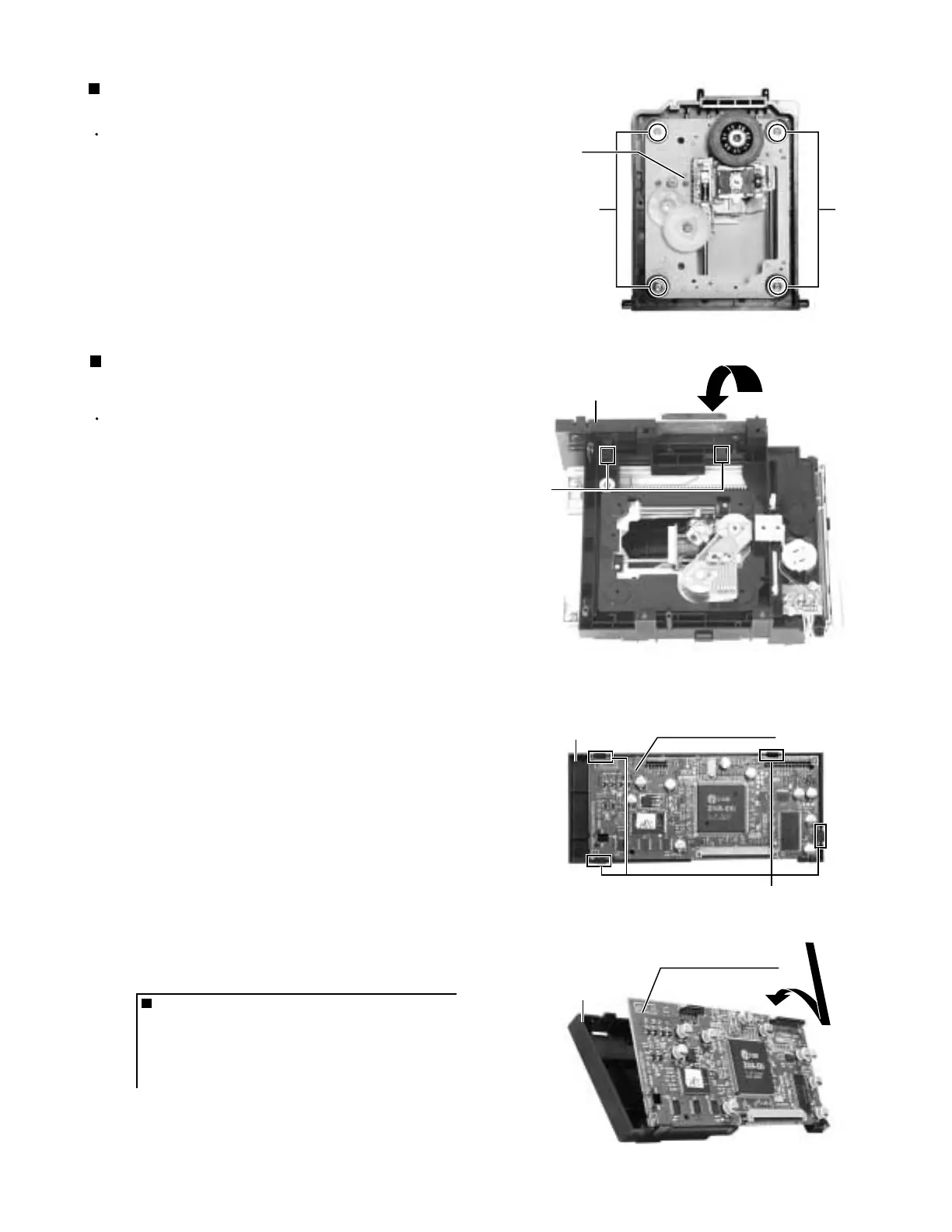
Remove the four screws D attaching the DVD
traverse mechanism to DVD loading mechanism.
1.
Removing the DVD traverse mechanism
(See Fig.5)
Removing the holder & DVD MPEG board
(See Fig.6 and 7)
Prior to performing the following procedure, remove
the top cover, DVD mechanism assembly and DVD
loader board.
Remove the two claws1, and remove the holder from
the DVD mechanism assembly as it is pushed down.
Notes: When removing only the DVD MPEG board, it is not
necessary to remove this holder.
Remove the four claws2 and remove the DVD
MPEG board from the holder.
1.
2.
ONE POINT
Insert in after uniting with a lower claws,
when inserting DVD MPEG board in holder.
When inserting DVD MPEG board in
holder. (see fig.8)
Fig.5
Fig.6
Fig.7
Fig.8
D
D
DVD loading mechanism
(top side)
DVD traverse
mechanism
Claw1
Claw2
DVD MPEG board
DVD mechanism assembly
(bottom side)
DVD MPEG board
Holder
Holder
Holder



 To Next Page
 Loading...