EasyManua.ls Logo

JVC TK-1280E - Page 13

JVC TK-1280E
82 pages
Print Icon
To Next Page IconTo Next Page
To Previous Page IconTo Previous Page
Loading...
@
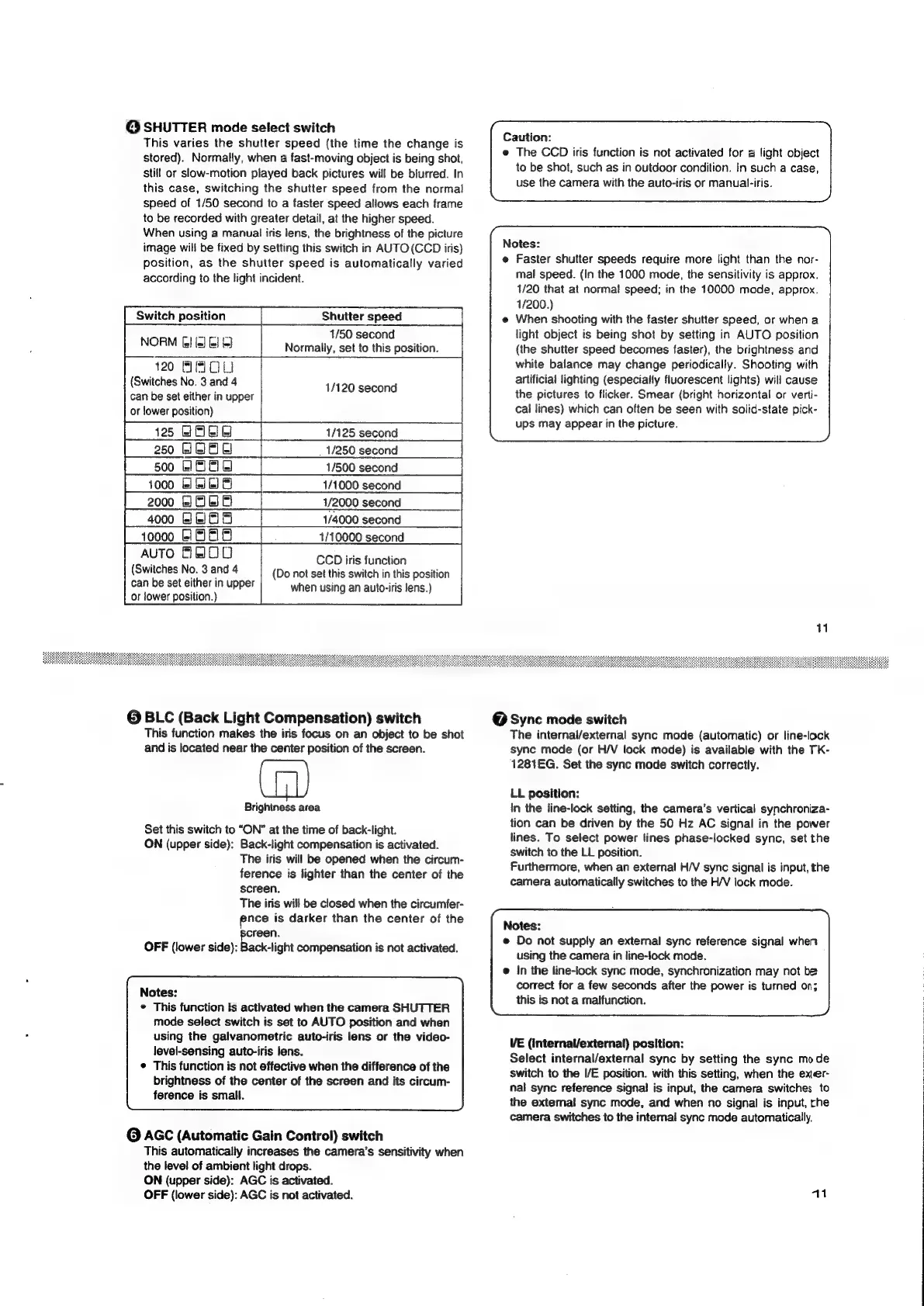
SHUTTER
mode
select
switch
This
varies
the
shutter
speed
(the
time
the
change
is
stored).
Normally,
when
a
fast-moving
object
is
being
shot,
still
or
slow-motion
played
back
pictures
will
be
blurred.
In
this
case,
switching
the
shutter
speed
from
the
normal
speed
of
1/50
second
to
a
faster
speed
allows
each
frame
to
be
recorded
with
greater
detail,
at
the
higher
speed.
When
using
a
manual
iris
lens,
the
brightness
of
the
picture
image
will
be
fixed
by
setting
this
switch
in
AUTO(CCD
iris)
position,
as
the
shutter
speed
is
automatically
varied
according
to
the
light
incident.
Switch
position
Shutter
speed
Reeser
1/50
second
NORM
[2]
[a]
2!
&]
Normally,
set
to
this
position.
120
ABOU
(Switches
No.
3
and
4
1/120
second
can
be
set
either
in
upper
or
lower
position)
125
BOE
1/125
second
1/250
second
1/500
second
1/1000
second
1/2000
second
1/4000
second
AUTO
FAOO
(Switches
No.
3
and
4
can
be
set
either
in
upper
or
lower
position.)
CCD
iris
function
(Do
not
set
this
switch
in
this
position
when
using
an
auto-iris
lens.)
@
BLC
(Back
Light
Compensation)
switch
This
function
makes
the
iris
focus
on an
object
to
be
shot
and
is
located
near
the
center
position
of
the
screen.
Brightness
area
Set
this
switch
to
“ON”
at
the
time
of
back-light.
ON
(upper
side):
Back-light
compensation
is
activated.
The
iris
will
be
opened
when
the
circum-
ference
is
lighter
than
the
center
of
the
screen.
The
iris
will
be
closed
when
the
circumfer-
ence
is
darker
than
the
center
of
the
creen.
OFF
(lower
side):
Back-light
compensation
is
not
activated.
Notes:
*
This
function
is
activated
when
the
camera
SHUTTER
mode
select
switch
is
set
to
AUTO
position
and
when
using
the
galvanometric
auto-iris
lens
or
the
video-
level-sensing
auto-iris
lens.
¢
This
function
is
not
effective
when
the
difference
of
the
brightness
of
the
center
of
the
screen
and
its
circum-
ference
is
small.
©
AGC
(Automatic
Gain
Control)
switch
This
automatically
increases
the
camera’s
sensitivity
when
the
level
of
ambient
light
drops.
ON
(upper
side):
AGC
is
activated.
OFF
(lower
side):
AGC
is
not
activated.
Caution:
e
The
CCD
iris
function
is
not
activated
for
a
light
object
to
be
shot,
such
as
in
outdoor
condition.
In
such
a
case,
use
the
camera
with
the
auto-iris
or
manual-iris.
Notes:
e@
Faster
shutter
speeds
require
more
light
than
the
nor-
mal
speed.
(in
the
1000
mode,
the
sensitivity
is
approx.
1/20
that
at
norma!
speed;
in
the
10000
mode,
approx.
1/200.)
e
When
shooting
with
the
faster
shutter
speed,
or
when
a
light
object
is
being
shot
by
setting
in
AUTO
position
(the
shutter
speed
becomes
faster),
the
brightness
and
white
balance
may
change
periodically.
Shooting
with
artificial
lighting
(especially
fluorescent
lights)
will
cause
the
pictures
to
flicker.
Smear
(bright
horizontal
or
verti-
cal
lines)
which
can
often
be
seen
with
solid-state
pick-
ups
may
appear
in
the
picture.
11
@
Sync
mode
switch
The
internai/external
sync
mode
(automatic)
or
line-lock
syne
mode
(or
H/V
lock
mode)
is
available
with
the
TK-
1281EG.
Set
the
sync
mode
switch
correctly.
LL
position:
In
the
line-lock
setting,
the
camera’s
vertical
synchroniza-
tion
can
be
driven
by
the
50
Hz
AC
signal
in
the
power
lines.
To
select
power
lines
phase-locked
sync,
set
the
switch
to
the
LL
position.
Furthermore,
when
an
external
H/V
sync
signal
is
input,
the
camera
automatically
switches
to
the
H/V
lock
mode.
Notes:
e
Do
not
supply
an
external
sync
reference
signal
when
using
the
camera
in
line-lock
mode.
e
In
the
line-lock
sync
mode,
synchronization
may
not
be
correct
for
a
few
seconds
after
the
power
is
turned
on;
this
is
not
a
malfunction.
VE
(internal/external)
position:
Select
internal/external
sync
by
setting
the
sync
mode
switch
to
the
I/E
position.
with
this
setting,
when
the
exter-
nal
sync
reference
signal
is
input,
the
camera
switches
to
the
external
sync
mode,
and
when
no
signal
is
input,
rhe
camera
switches
to
the
internal
sync
mode
automatically.
41

Related product manuals