EasyManua.ls Logo

JVC TK-1280E - Page 12

JVC TK-1280E
82 pages
Print Icon
To Next Page IconTo Next Page
To Previous Page IconTo Previous Page
Loading...
@
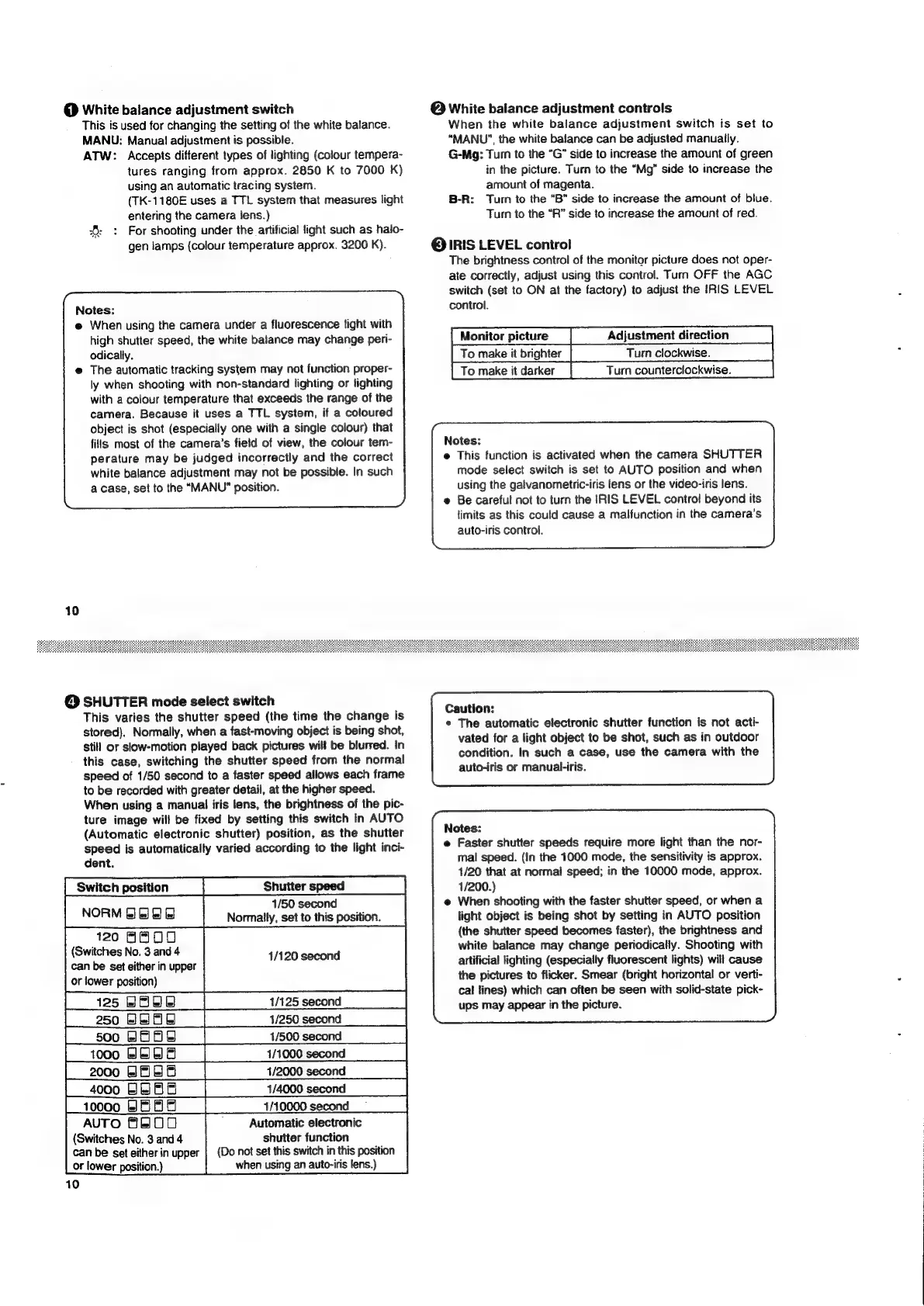
White
balance
adjustment
switch
This
is
used
for
changing
the
setting
of
the
white
balance.
MANU:
Manual!
adjustment
is
possible.
ATW:
Accepts
different
types
of
lighting
(colour
tempera-
tures
ranging
from
approx.
2850
K
to
7000
K)
using
an
automatic
tracing
system.
(TK-1180E
uses
a
TTL
system
that
measures
light
entering
the
camera
lens.)
6:
:
For
shooting
under
the
artificial
fight
such
as
halo-
gen
lamps
(colour
temperature
approx.
3200
K).
Notes:
@
When
using
the
camera
under
a
fluorescence
light
with
high
shutter
speed,
the
white
balance
may
change
peri-
odically.
The
automatic
tracking
system
may
not
function
proper-
ly
when
shooting
with
non-standard
lighting
or
lighting
with
a
colour
temperature
that
exceeds
the
range
of
the
camera.
Because
it
uses
a
TTL
system,
if
a
coloured
object
is
shot
(especially
one
with
a
single
colour)
that
fills
most
of
the
camera’s
field
of
view,
the
colour
tem-
perature
may
be
judged
incorrectly
and
the
correct
white
balance
adjustment
may
not
be
possible.
In
such
a
case,
set
to
the
“MANU”
position.
@
White
balance
adjustment
controls
When
the
white
balance
adjustment
switch
is
set
to
“MANU”,
the
white
balance
can
be
adjusted
manually.
G-Mg;:
Turn
to
the
“G”
side
to
increase
the
amount
of
green
in
the
picture.
Turn
to
the
“Mg”
side
to
increase
the
amount
of
magenta.
B-R:
Turn
to
the
“B”
side
to
increase
the
amount
of
blue.
Turn
to
the
“R”
side
to
increase
the
amount
of
red.
@
IRIS
LEVEL
control
The
brightness
control
of
the
monitor
picture
does
not
oper-
ate
correctly,
adjust
using
this
control.
Turn
OFF
the
AGC
switch
(set
to
ON
at
the
factory)
to
adjust
the
IRIS
LEVEL
control.
Monitor
picture
Adjustment
direction
To
make
it
brighter
To
make
it
darker
Turn
counterclockwise.
Notes:
e
This
function
is
activated
when
the
camera
SHUTTER
mode
select
switch
is
set
to
AUTO
position
and
when
using
the
galvanometric-iris
lens
or
the
video-iris
lens.
@
Be
careful
not
to
turn
the
IRIS
LEVEL
contro!
beyond
its
limits
as
this
could
cause
a
malfunction
in
the
camera's
auto-iris
control.
@
SHUTTER
mode
select
switch
This
varies
the
shutter
speed
(the
time
the
change
is
stored).
Normally,
when
a
fast-moving
object
is
being
shot,
still
or
slow-motion
played
back
pictures
will
be
blurred.
In
this
case,
switching
the
shutter
speed
from
the
normal
speed
of
1/50
second
to
a
faster
speed
allows
each
frame
to
be
recorded
with
greater
detail,
at
the
higher
speed.
When
using
a
manual
iris
lens,
the
brightness
of
the
pic-
ture
image
will
be
fixed
by
setting
this
switch
in
AUTO
(Automatic
electronic
shutter)
position,
as
the
shutter
speed
is
automatically
varied
according
to
the
light
inci-
dent.
Switch
position
Shutter
speed
NORM
GEEE
1/50
second
Normally,
set
to
this
position.
120
ABOU
(Switches
No.
3
and
4
1/120
second
can
be
set
either
in
upper
or
lower
position)
AUTO
FEOO
'
Automatic
electronic
(Switches
No.
3
and
4
shutter
function
can
be
set
either
in
upper
|
(Do
not
set
this
switch
in
this
position
or
lower
position.)
when
using
an
auto-iris
lens.)
10
Caution:
¢
The
automatic
electronic
shutter
function
is
not
acti-
vated
for
a
light
object
to
be
shot,
such
as
in
outdoor
condition.
In
such
a
case,
use
the
camera
with
the
auto-iris
or
manual-iris.
Notes:
e
Faster
shutter
speeds
require
more
light
than
the
nor-
mal
speed.
(In
the
1000
mode,
the
sensitivity
is
approx.
1/20
that
at
normal
speed;
in
the
10000
mode,
approx.
1/200.)
@
When
shooting
with
the
faster
shutter
speed,
or
when
a
light
object
is
being
shot
by
setting
in
AUTO
position
(the
shutter
speed
becomes
faster),
the
brightness
and
white
balance
may
change
periodically.
Shooting
with
artificial
lighting
(especially
fluorescent
lights)
will
cause
the
pictures
to
flicker.
Smear
(bright
horizontal
or
verti-
cal
lines)
which
can
often
be
seen
with
solid-state
pick-
ups
may
appear
in
the
picture.

Related product manuals