EasyManua.ls Logo

JVC TK-1280E - Page 11

JVC TK-1280E
82 pages
Print Icon
To Next Page IconTo Next Page
To Previous Page IconTo Previous Page
Loading...
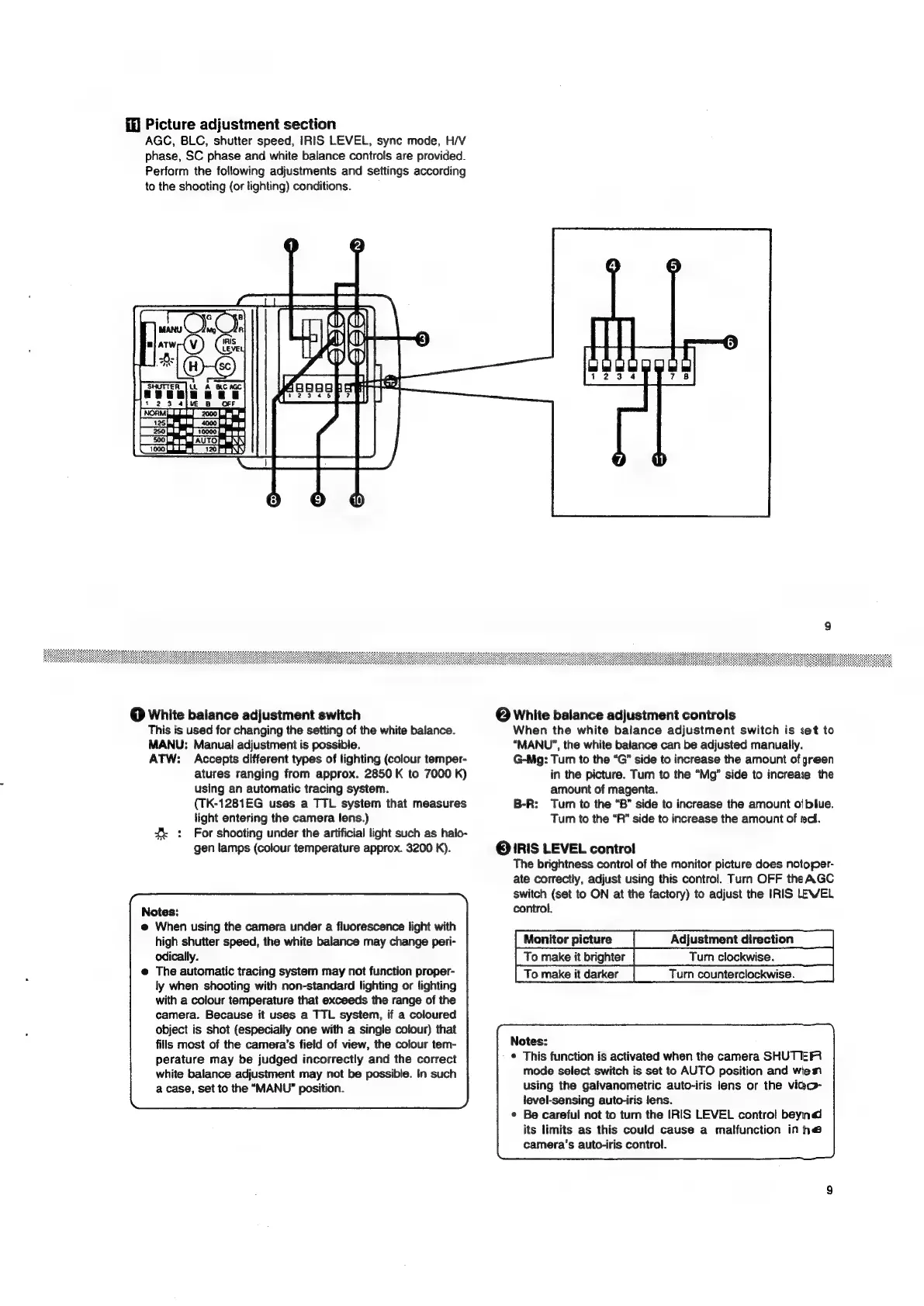
Picture
adjustment
section
AGC,
BLC,
shutter
speed,
IRIS
LEVEL,
sync
mode,
H/V
phase,
SC
phase
and
white
balance
controls
are
provided.
Perform
the
following
adjustments
and
settings
according
to
the
shooting
(or
lighting)
conditions.
|
00
es
AUTOR
(1000
let
L120
@Q
White
balance
adjustment
switch
This
is
used
for
changing
the
setting
of
the
white
balance.
MANU:
Manual
adjustment
is
possible.
ATW:
Accepts
different
types
of
lighting
(colour
temper-
atures
ranging
from
approx.
2850
K
to
7000
K)
using
an
automatic
tracing
system.
(TK-1281EG
uses
a
TTL
system
that
measures
light
entering
the
camera
lens.)
:
For
shooting
under
the
artificial
light
such
as
halo-
gen
lamps
(colour
temperature
approx.
3200
K).
Notes:
@
When
using
the
camera
under
a
fluorescence
light
with
high
shutter
speed,
the
white
balance
may
change
peri-
odically.
The
automatic
tracing
system
may
not
function
proper-
ly
when
shooting
with
non-standard
lighting
or
lighting
with
a
colour
temperature
that
exceeds
the
range
of
the
camera.
Because
it
uses
a
TTL
system,
if
a
coloured
object
is
shot
(especially
one
with
a
single
colour)
that
fills
most
of
the
camera’s
field
of
view,
the
colour
tem-
perature
may
be
judged
incorrectly
and
the
correct
white
baiance
adjustment
may
not
be
possible.
In
such
a
case,
set
to
the
“MANU”
position.
@
White
balance
adjustment
controls
When
the
white
balance
adjustment
switch
is
set
to
“MANU”,
the
white
balance
can
be
adjusted
manually.
G-Mg:
Tur
to
the
“G”
side
to
increase
the
amount
of
green
in
the
picture.
Tum
to
the
“Mg”
side
to
increase
the
amount
of
magenta.
B-R:
Turn
to
the
“B”
side
to
increase
the
amount
of
blue.
Turn
to
the
“R”
side
to
increase
the
amount
of
rc.
©
IRIS
LEVEL
contro!
The
brightness
control
of
the
monitor
picture
does
notoper-
ate
correctly,
adjust
using
this
control.
Turn
OFF
the
AGC
switch
(set
to
ON
at
the
factory)
to
adjust
the
IRIS
LEVEL
control.
Monitor
picture
Adjustment
direction
To
make
it
brighter
To
make
it
darker
Turn
counterclockwise.
Notes:
©
This
function
is
activated
when
the
camera
SHUTER
mode
select
switch
is
set
to
AUTO
position
and
wiem
using
the
galvanometric
auto-iris
lens
or
the
vido-
level-sensing
auto-iris
lens.
Be
careful
not
to
turn
the
IRIS
LEVEL
contro!
beynd
its
limits
as
this
could
cause
a
malfunction
in
he
camera's
auto-iris
control.

Related product manuals