EasyManua.ls Logo

JVC TK-1280E - Page 16

JVC TK-1280E
82 pages
Print Icon
To Next Page IconTo Next Page
To Previous Page IconTo Previous Page
Loading...
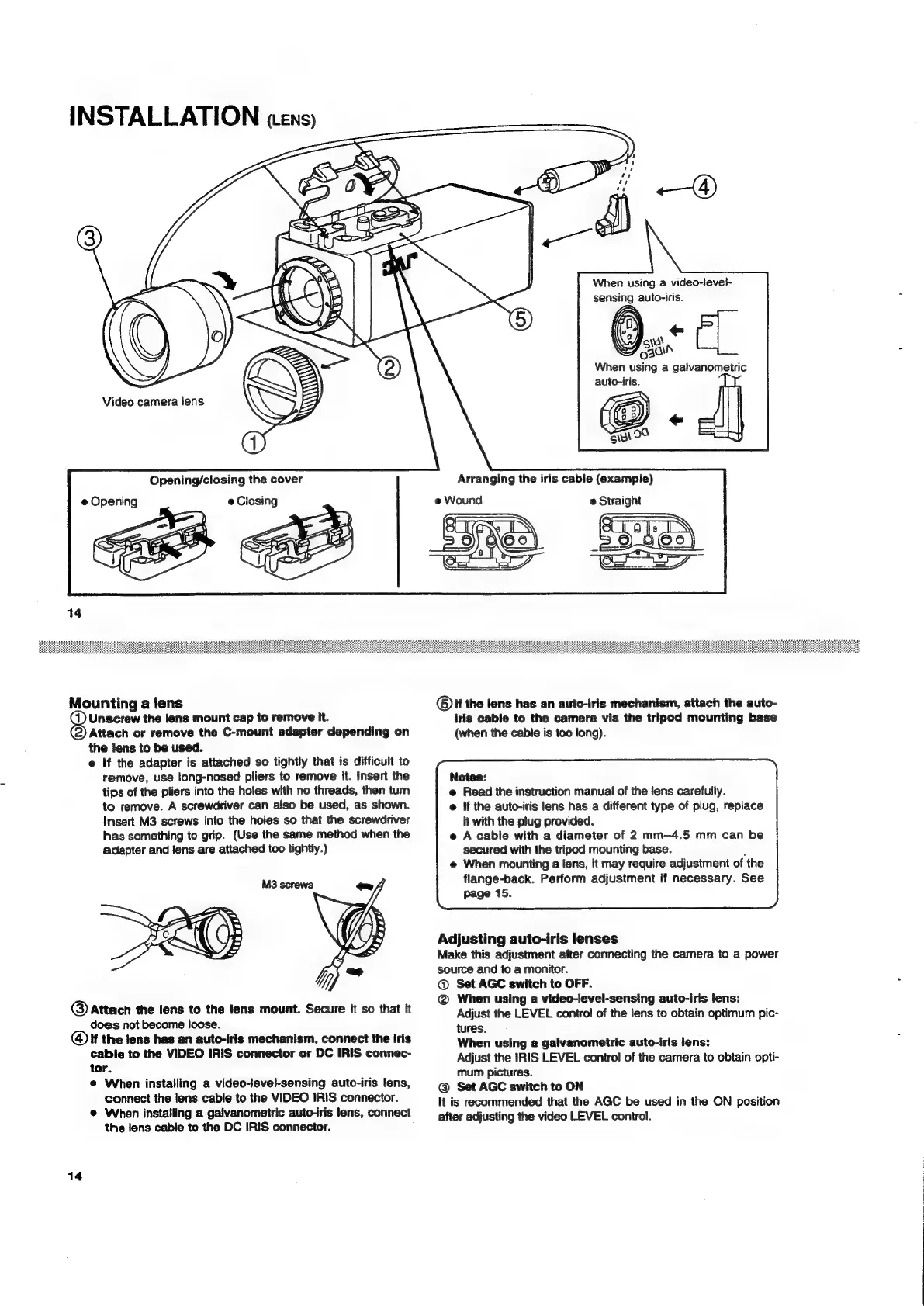
INSTALLATION
ens)
When
using
a
video-level-
sensing
auto-iris.
wall
When
using
a
galvanometric
auto-iris.
/GEN
ey
«
Siu
00
Arranging
the
iris
cable
(example)
eS
=
Opening/ciosing
the
cover
e@
Opening
e
Closing
@
Wound
e
Straight
Evel
CT
14
Mounting
a
fens
®t
the
lens
has
an
auto-iris
mechanism,
attach
the
auto-
Unscrew
the
lens
mount
cap
to
remove
it.
iris
cable
to
the
camera
via
the
tripod
mounting
base
Attach
or
remove
the
C-mount
adapter
depending
on
(when
the
cable
is
too
long).
the
lens
to
be
used.
e
If
the
adapter
is
attached
so
tightly
that
is
difficult
to
remove,
use
long-nosed
pliers
to
remove
it.
Insert
the
Notes:
tips
of
the
pliers
into
the
holes
with
no
threads,
then
turn
e
Read
the
instruction
manual
of
the
lens
carefully.
to
remove.
A
screwdriver
can
also
be
used,
as
shown.
@
If
the
auto-iris
lens
has
a
different
type
of
plug,
replace
Insert
M3
screws
into
the
holes
so
that
the
screwdriver
it
with
the
plug
provided.
has
something
to
grip.
(Use
the
same
method
when
the
©
A
cable
with
a
diameter
of
2
mm—4.5
mm
can
be
adapter
and
lens
are
attached
too
tightly.)
secured
with
the
tripod
mounting
base.
@
When
mounting
a
lens,
it
may
require
adjustment
of
the
flange-back.
Perform
adjustment
if
necessary.
See
page
15.
M3
screws
ee
Adjusting
auto-iris
lenses
Make
this
adjustment
after
connecting
the
camera
to
a
power
hj
ey
source
and
to
a
monitor.
Y
@
Set
AGC
switch
to
OFF.
.
@
When
using
a
video-level-sensing
auto-iris
lens:
@
Attach
the
lens
to
the
lens
mount.
Secure
it
so
that
it
Adjust
the
LEVEL
control
of
the
lens
to
obtain
optimum
pic-
does
not
become
loose.
tures.
@
If
the
lens
has
an
auto-iris
mechanism,
connect
the
iris
When
using
a
galvanometric
auto-iris
lens:
:
cable
to
the
VIDEO
IRIS
connector
or
DC
IRIS
connec-
Adjust
the
IRIS
LEVEL
control
of
the
camera
to
obtain
opti-
tor.
;
of
mum
pictures.
e
When
installing
a
video-level-sensing
auto-iris
lens,
@
Set
AGC
switch
to
ON
connect
the
lens
cable
to
the
VIDEO
IRIS
connector.
It
is
recommended
that
the
AGC
be
used
in
the
ON
position
@
When
installing
a
gaivanometric
auto-iris
lens,
connect
after
adjusting
the
video
LEVEL
control.
the
lens
cable
to
the
DC
IRIS
connector.
14

Related product manuals