EasyManua.ls Logo

JVC TK-1280E - Page 17

JVC TK-1280E
82 pages
Print Icon
To Next Page IconTo Next Page
To Previous Page IconTo Previous Page
Loading...
Mounting
a
lens
Unscrew
the
lens
mount
cap
to
remove
it.
Attach
or
remove
the
C-mount
adapter
depending
on
the
lens
to
be
used.
e
Hi
the
adapter
is
attached
so
tightly
that
is
difficult
to
remove,
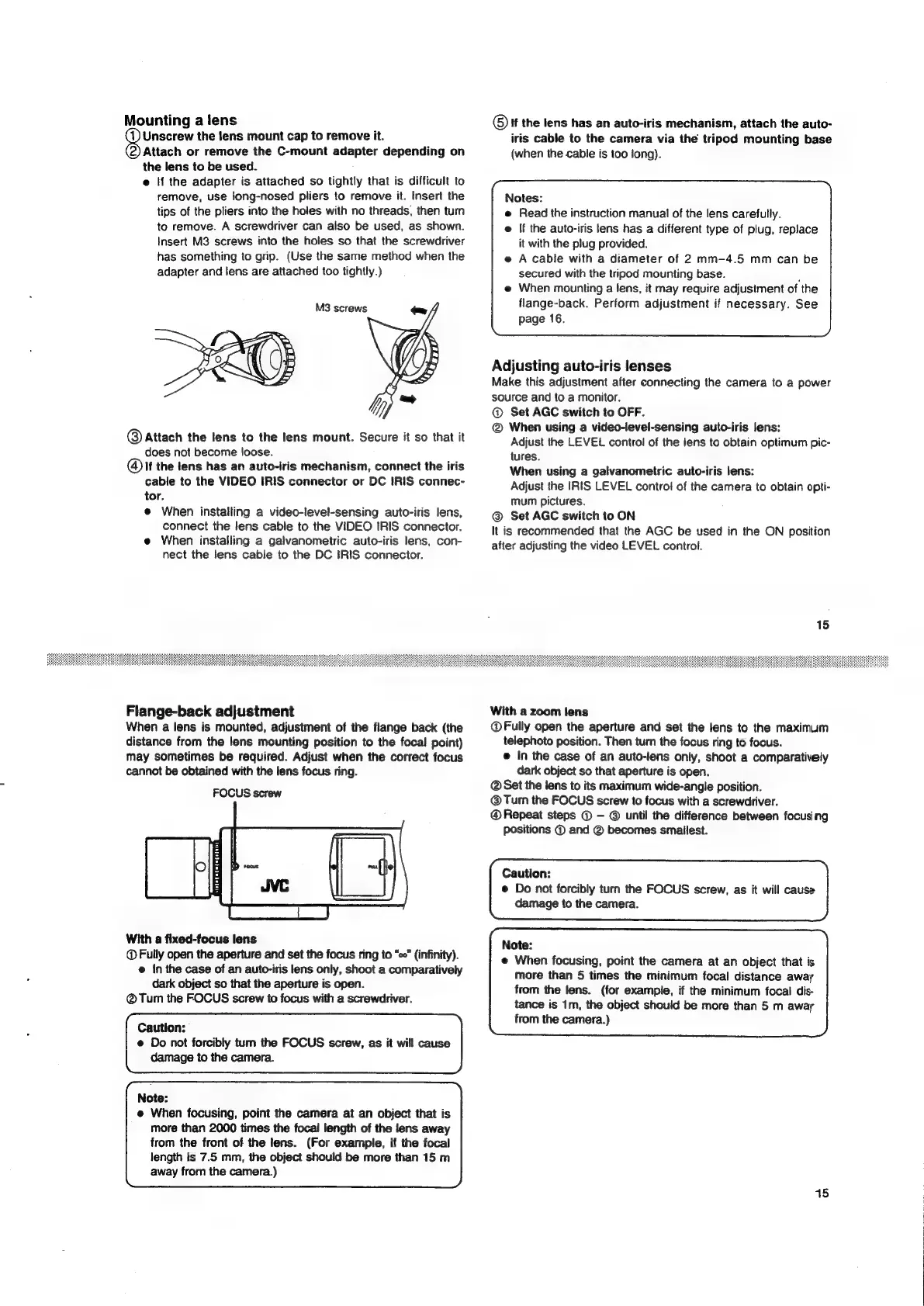
use
long-nosed
pliers
to
remove
it.
Insert
the
tips
of
the
pliers
into
the
holes
with
no
threads,
then
turn
to
remove.
A
screwdriver
can
also
be
used,
as
shown.
Insert
M3
screws
into
the
holes
so
that
the
screwdriver
has
something
to
grip.
(Use
the
same
method
when
the
adapter
and
lens
are
attached
too
tightly.)
M3
screws
7~
aap
©
Attach
the
lens
to
the
lens
mount.
Secure
it
so
that
it
does
not
become
loose.
lf
the
lens
has
an
auto-iris
mechanism,
connect
the
iris
cable
to
the
VIDEO
IRIS
connector
or
DC
IRIS
connec-
tor.
e
When
installing
a
video-level-sensing
auto-iris
lens,
connect
the
lens
cable
to
the
VIDEO
IRIS
connector.
e
When
installing
a
galvanometric
auto-iris
lens,
con-
nect
the
lens
cable
to
the
DC
IRIS
connector.
Flange-back
adjustment
When
a
lens
is
mounted,
adjustment
of
the
flange
back
(the
distance
from
the
lens
mounting
position
to
the
focal
point)
may
sometimes
be
required.
Adjust
when
the
correct
focus
cannot
be
obtained
with
the
lens
focus
ring.
FOCUS
screw
With
a
fixed-focus
lens
@
Fully
open
the
aperture
and
set
the
focus
ring
to
“so”
(infinity).
@
in
the
case
of
an
auto-iris
lens
only,
shoot
a
comparatively
dark
object
so
that
the
aperture
is
open.
@®Tum
the
FOCUS
screw
to
focus
with
a
screwdriver.
Caution:
e
Do
not
forcibly
tum
the
FOCUS
screw,
as
it
will
cause
damage
to
the
camera.
Note:
e@
When
focusing,
point
the
camera
at
an
object
that
is
more
than
2000
times
the
focal
length
of
the
lens
away
from
the
front
of
the
lens.
(For
example,
if
the
focal
length
is
7.5
mm,
the
object
should
be
more
than
15
m
away
from
the
camera.)
©)
If
the
lens
has
an
auto-iris
mechanism,
attach
the
auto-
iris
cable
to
the
camera
via
the
tripod
mounting
base
(when
the
cable
is
too
long).
Notes:
e
Read
the
instruction
manual
of
the
lens
carefully.
e
If
the
auto-iris
tens
has
a
different
type
of
plug,
replace
it
with
the
plug
provided.
e
A
cable
with
a
diameter
of
2
mm-4.5
mm
can
be
secured
with
the
tripod
mounting
base.
:
e
When
mounting
a
lens,
it
may
require
adjustment
of
the
flange-back.
Perform
adjustment
if
necessary.
See
page
16.
Adjusting
auto-iris
lenses
Make
this
adjustment
after
connecting
the
camera
to
a
power
source
and
to
a
monitor.
@
Set
AGC
switch
to
OFF.
®
When
using
a
video-level-sensing
auto-iris
lens:
Adjust
the
LEVEL
control
of
the
lens
to
obtain
optimum
pic-
tures.
When
using
a
galvanometric
auto-iris
lens:
Adjust
the
IRIS
LEVEL
contro!
of
the
camera
to
obtain
opti-
mum
pictures.
Set
AGC
switch
to
ON
It
is
recommended
that
the
AGC
be
used
in
the
ON
position
after
adjusting
the
video
LEVEL
control.
15
With
a
zoom
lens
@
Fully
open
the
aperture
and
set
the
lens
to
the
maximum
telephoto
position.
Then
turn
the
focus
ring
to
focus.
@
In
the
case
of
an
auto-lens
only,
shoot
a
comparatively
dark
object
so
that
aperture
is
open.
@
Set
the
lens
to
its
maximum
wide-angle
position.
@Tum
the
FOCUS
screw
to
focus
with
a
screwdriver.
@
Repeat
steps
©
©
until
the
difference
between
focusing
positions
©
and
@
becomes
smallest.
Caution:
®
Do
not
forcibly
turn
the
FOCUS
screw,
as
it
will
cause
damage
to
the
camera.
Note:
e
When
focusing,
point
the
camera
at
an
object
that
is
more
than
5
times
the
minimum
focal
distance
away
from
the
lens.
(for
example,
if
the
minimum
focal
dis-
tance
is
1m,
the
object
should
be
more
than
5
m
away
from
the
camera.)
15

Related product manuals