EasyManua.ls Logo

JVC TK-1280E - Page 18

JVC TK-1280E
82 pages
Print Icon
To Next Page IconTo Next Page
To Previous Page IconTo Previous Page
Loading...
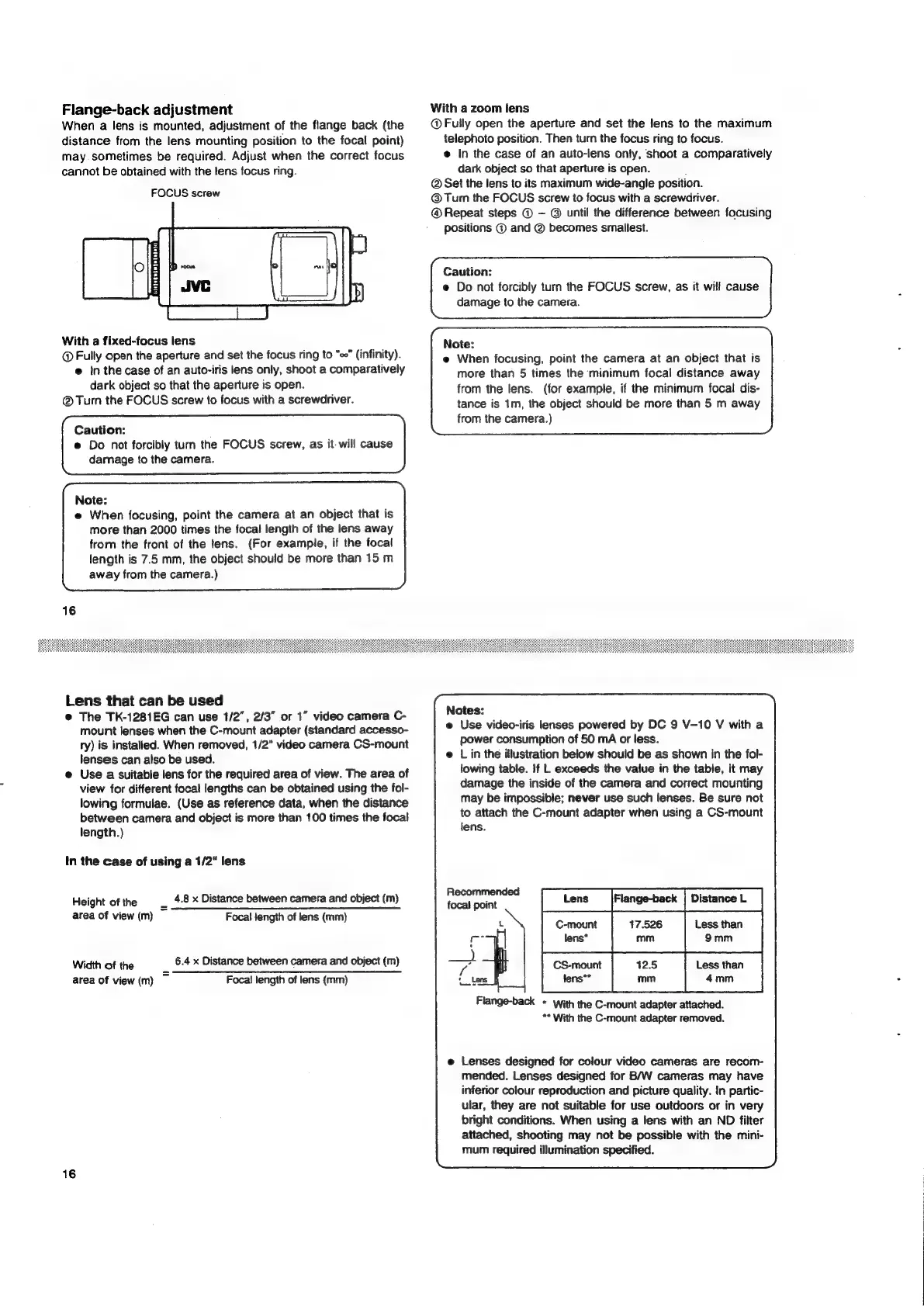
Flange-back
adjustment
When
a
lens
is
mounted,
adjustment
of
the
flange
back
(the
distance
from
the
lens
mounting
position
to
the
focal
point)
may.
sometimes
be
required.
Adjust
when
the
correct
focus
cannot
be
obtained
with
the
lens
focus
ring.
FOCUS
screw
uiedegabeteteiato
With
a
fixed-focus
lens
@
Fully
open
the
aperture
and
set
the
focus
ring
to
“co”
(infinity).
e
In
the
case
of
an
auto-iris
lens
only,
shoot
a
comparatively
dark
object
so
that
the
aperture
is
open.
Turn
the
FOCUS
screw
to
focus
with
a
screwdriver.
Caution:
e
Do
not
forcibly
turn
the
FOCUS
screw,
as
it-
will
cause
damage
to
the
camera.
Note:
e@
When
focusing,
point
the
camera
at
an
object
that
is
more
than
2000
times
the
focal
length
of
the
lens
away
from
the
front
of
the
fens.
(For
example,
if
the
focal
length
is
7.5
mm,
the
object
should
be
more
than
15
m
away
from
the
camera.)
Lens
that
can
be
used
@
The
TK-1281EG
can
use
1/2”,
2/3”
or
1”
video
camera
C-
mount
lenses
when
the
C-mount
adapter
(standard
accesso-
ry)
is
installed.
When
removed,
1/2"
video
camera
CS-mount
lenses
can
also
be
used.
@
Use
a
suitable
lens
for
the
required
area
of
view.
The
area
of
view
for
different
focal
lengths
can
be
obtained
using
the
fol-
lowing
formulae.
(Use
as
reference
data,
when
the
distance
between
camera
and
object
is
more
than
100
times
the
focal
length.)
In
the
case
of
using
a
1/2"
lens
Height
of
the
_
4.8
x
Distance
between
camera
and
object
(m)
area
of
view
(m)
Focal
fength
of
lens
(mm)
Width
of
the
i“
6.4
x
Distance
between
camera
and
object
(m)
area
of
view
(m)
Focal
length
of
lens
(mm)
16
With
a
zoom
lens
@
Fully
open
the
aperture
and
set
the
lens
to
the
maximum
telephoto
position.
Then
turn
the
focus
ring
to
focus.
@
In
the
case
of
an
auto-lens
only,
shoot
a
comparatively
dark
object
so
that
aperture
is
open.
@
Set
the
lens
to
its
maximum
wide-angle
position.
@Turn
the
FOCUS
screw
to
focus
with
a
screwdriver.
@
Repeat
steps
@
©
until
the
difference
between
focusing
positions
©
and
@
becomes
smallest.
Caution:
©
Do
not
forcibly
turn
the
FOCUS
screw,
as
it
will
cause
damage
to
the
camera.
Note:
e
When
focusing,
point
the
camera
at
an
object
that
is
more
than
5
times
the
minimum
focal
distance
away
from
the
lens.
(for
example,
if
the
minimum
focal
dis-
tance
is
1m,
the
object
should
be
more
than
5
m
away
from
the
camera.)
Notes:
e
Use
video-iris
lenses
powered
by
DC
9
V-10
V
with
a
power
consumption
of
50
mA
or
less.
@
Lin
the
illustration
below
should
be
as
shown
in
the
fol-
lowing
table.
If
L
exceeds
the
value
in
the
table,
it
may
damage
the
inside
of
the
camera
and
correct
mounting
may
be
impossible;
never
use
such
lenses.
Be
sure
not
to
attach
the
C-mount
adapter
when
using
a
CS-mount
lens.
Recommended
fearon
[tame
Rengetec
L
C-mount
17.526
Less
than
(ee
lens*
mm
9mm
f
CS-mount
Less
than
«Lens
fens**
4mm
Flange-back
+
with
the
C-mount
adapter
attached.
**
With
the
C-mount
adapter
removed.
e
Lenses
designed
for
colour
video
cameras
are
recom-
mended.
Lenses
designed
for
B/W
cameras
may
have
inferior
colour
reproduction
and
picture
quality.
In
partic-
ular,
they
are
not
suitable
for
use
outdoors
or
in
very
bright
conditions.
When
using
a
lens
with
an
ND
filter
attached,
shooting
may
not
be
possible
with
the
mini-
mum
required
illumination
specified.

Related product manuals